
Auto dialer app
Auto Dialer App by Field Team Tracking
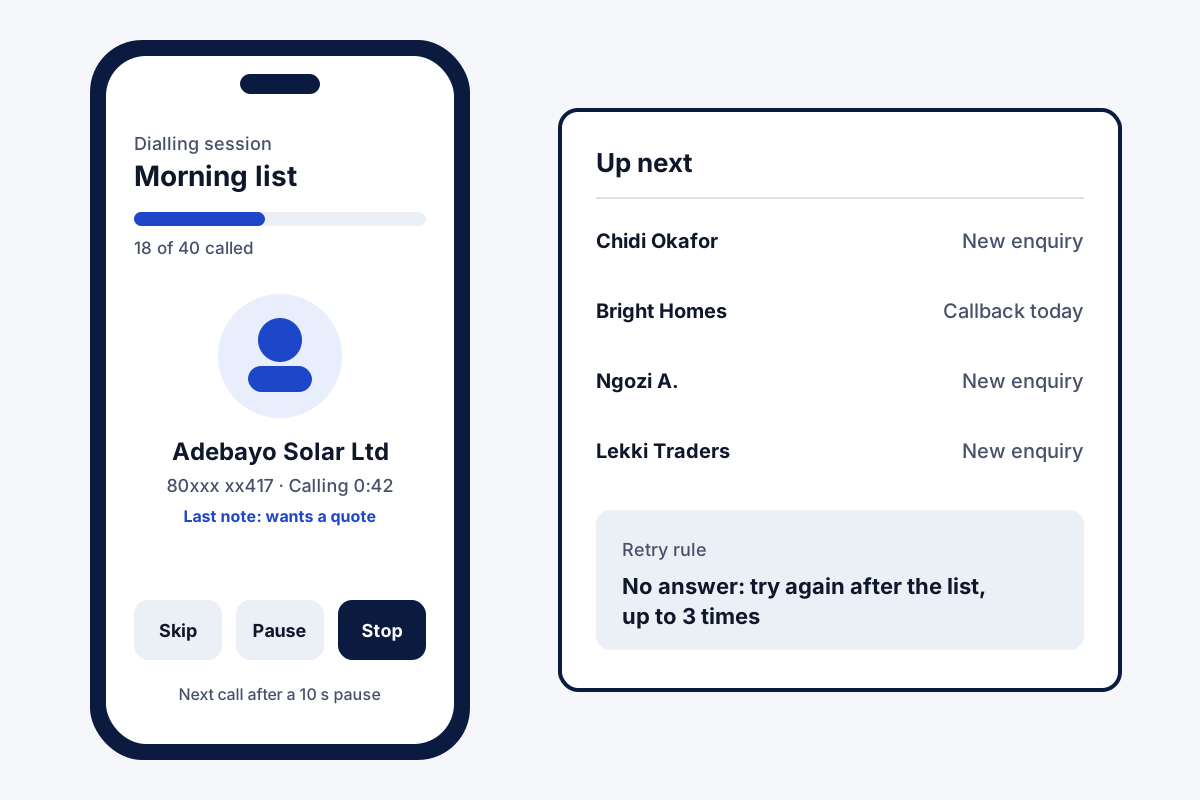
An auto dialer app moves a rep from one call straight to the next lead. Nobody keys in digits between conversations. Field Team Tracking works through the queue on the rep's handset SIM and shows a result form after each call.
- Lists from leads, uploads, call history or today's callbacks
- Unanswered numbers tried again, up to 3 times
- A wait between calls; owners may freeze its length
What is an auto dialer app?
An auto dialer app is phone software that calls numbers from a list one after another. No new call begins until the current one is over.
In Field Team Tracking every number belongs to a lead, and each conversation's result is filed on that customer.
- The handset's SIM places the calls; no call centre line needed.
- Unattended list dialling needs an Android phone.
- Reps on the road can clear their callbacks in one session.
Auto dialer app: what a dialling session looks like
An auto dialer app saves the minutes a rep loses between calls: finding the number, typing it, waiting. In Field Team Tracking, the rep opens a list and taps Start. The handset rings lead one on its SIM. Hanging up brings a small form for the result and a callback date. After the gap, lead two rings. A progress bar tracks the list, and three buttons skip a lead, pause the run or end it. Numbers that ring out rejoin the queue for as many as 3 more attempts, timed the way you choose. A call the network drops before any ringing gets dialled again, two times at most. The session can draw on filtered leads, an uploaded sheet, the call history or the callbacks due today. List dialling of this kind runs on Android phones.
Auto dialer app benefits
No typing between calls
Save the result, and the next lead rings once the gap has passed.
Result on every lead
Status, note and callback date land on the customer record.
Callbacks in one run
Today's due follow-ups become a single dialling session.
Controlled pace
Owners can freeze the wait between calls and demand a minimum call length.
WhatsApp dialling
Ring a list through WhatsApp when SIM calls are not wanted.
Lists per rep
Each rep dials the leads assigned to them, nobody else's.
Auto dialer app for field reps: calls between visits
Field reps rarely sit at a desk all day. A common pattern: phone the day’s warm leads before leaving, then visit the ones who agreed to meet. With the dialer and sales team visit tracking in one place, the morning calls and the afternoon stops appear on the same lead. Owners who want the location side can read how staff location is tracked on duty. Desk-based callers have their own setup on the CRM for telecalling teams and telecaller app pages. Returning missed calls is covered on the missed call and call log page. Retry rules have their own auto redial app page, and dialling from saved filters is on the CRM with dialer page.
WhatsApp calls instead of SIM calls
Some customers answer WhatsApp more readily than a strange number. A session can ring through WhatsApp or WhatsApp Business. Before the run, the list is stored in contacts; anyone without WhatsApp can be phoned normally or passed over. A daily cap, 20 calls at the start, keeps the volume sensible.
Auto dialer app terms
| Term | What it means | In Field Team Tracking |
|---|---|---|
| Auto dialer | Software that rings numbers from a list without manual typing | Yes, single calls from the handset |
| Power dialer | Starts a fresh call whenever the agent finishes one | Closest match to how sessions work |
| Predictive dialer | Fires many lines together and routes whoever answers to an idle agent | No |
| Auto redial | Calls an unanswered number again | Yes, 1 to 3 more tries |
| Ring limit | How long a call rings before it counts as unanswered | Yes, you set it |
| Robocall | A call that plays a recorded message | No |
Auto dialer app setup
A step-by-step first trial day is laid out on the telecalling software page. Owners setting rules for a whole team should see the auto dialer software page, and anyone sharing one huge list between several callers the bulk calling app page. Getting a spreadsheet into the dialer is walked through on the auto dialer from Excel page.
- Install the app on each rep’s Android phone and allow it to place calls.
- Upload a lead list from Excel or CSV, or filter existing leads.
- Decide how long to wait between calls, how long each one rings, and when to retry.
- Tap Start on the list and save a result after each call.
Auto dialer app price
One dialling seat is ₹1,908 for a year, so about ₹159 a month, or ₹249 a month when billed every quarter. Teams abroad budget 29 US dollars annually per seat, or 12 per quarter. Tax is added at checkout. Run a real calling session during the 3 trial days before you choose.
Auto dialer app limits
- Many lines at once. Each handset runs a single call; predictive multi-line dialling belongs to call centre software.
- Recorded messages. No voice broadcast or robocalls; a person talks on every call.
- iPhone lists. Unattended list dialling needs Android; iPhone users tap each call.
- Do-not-call checks. The app does not scrub your list against national registers; do that before you upload.
Auto dialer app example: a solar installer in Lagos
Invented business, shown only to make the numbers concrete. A solar installer in Lagos gets 60 enquiries a week from its website. Two reps used to dial them by hand from a notebook, and about a third were never called.
Now each Monday’s enquiries become a list. The reps run a session at 9 am, set a 10-second pause, and let silent numbers come back after the list. By noon all 60 have a result: 18 site visits booked, 25 not interested, 17 to try on Wednesday. The afternoon goes to the 18 visits.
Auto dialer app FAQ
Which auto dialer app fits a small team that also visits customers?
For a team that also visits customers, Field Team Tracking is a sensible pick. The dialer, the lead notes and the field route share one account. Large call centres with many seats usually need a cloud dialer instead.
What is Field Team Tracking?
Field Team Tracking is an auto dialer app and field team tracker in one, so a rep can phone a list in the morning and visit customers in the afternoon on the same app.
How much does an auto dialer app cost with Field Team Tracking?
One dialer seat on Field Team Tracking costs ₹1,908 for a whole year in advance, close to ₹159 monthly, or ₹249 for each month on a quarterly bill. Abroad: 29 US dollars yearly or 12 dollars quarterly. Taxes are separate; three days of trial come first.
Which app should I use for automated calling?
It depends on the calls. If a person speaks on every call, choose a dialer that uses your SIM and keeps the result, such as Field Team Tracking. For recorded voice messages, look at a broadcast service instead.
Are auto dialers illegal?
Dialling a list for a live person-to-person call is legal in many countries, but recorded robocalls and calls to people on do-not-call registers are often restricted. This is general guidance, not legal advice; check the telemarketing rules where your customers live.
Does the auto dialer play recorded messages?
No. Every call is a normal call that your rep speaks on. Field Team Tracking does not send recorded voice messages or robocalls.
Does the auto dialer work on iPhone?
Hands-off queue dialling is an Android feature; Apple's system blocks apps from firing calls back to back. On iPhone, a rep presses call on each lead and the outcome is still stored.
Can I run the list over WhatsApp calls?
Yes. Switch the session to WhatsApp, or to WhatsApp Business; a daily ceiling, 20 out of the box, keeps the count reasonable and can be raised or lowered.
What if nobody picks up?
Your rule decides: up to 3 more attempts, placed right away, after your chosen delay, or when the last lead has been tried. You also choose how many rings count as no answer.
Can I call my follow-ups for today in one go?
Yes. Point a session at the callbacks due today, and the dialer works through them one by one.
Can the owner stop reps from rushing through calls?
Yes. Freezing the wait stops reps from cutting it short. A minimum call length must also pass before a lead counts as done.
Where do the numbers for a session come from?
From your filtered leads, an Excel or CSV upload, the call history, the leads assigned to a rep, or the follow-ups due today.
See your team's whole day on one map
3-day trial with every feature. ₹159 per user per month on the yearly plan (₹1,908 a year), or ₹249 per user per month for 3 months; outside India $29 per user per year or $12 for 3 months. Prices are per user, exclusive of taxes.