
Customer management app
Customer Management App by Field Team Tracking
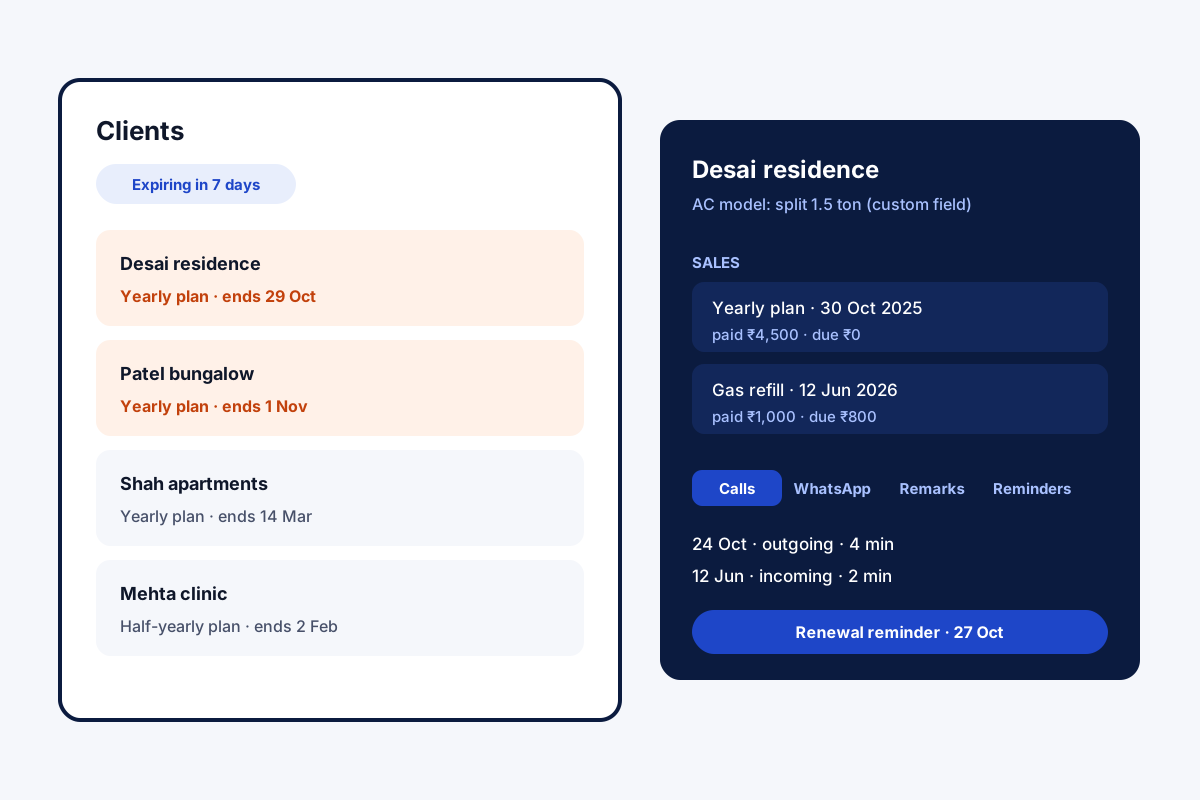
A customer management app keeps a business's existing customers in order, covering identity, purchases, open balances and the next contact date. Field Team Tracking keeps paying clients in their own tab, apart from leads, with every purchase and conversation attached.
- Clients separate from leads
- Products, packages and renewal dates per client
- Calls, chats and notes on one record
What is a customer management app?
It is a phone or web app for looking after existing customers: their details, purchase history, open balances and the next follow-up.
In Field Team Tracking one tap promotes a buyer from lead to client; from then on the record follows every sale and renewal.
- Repeat purchases are kept as separate sales.
- Expiring clients have their own filters.
- Custom client fields for your own details.
Customer management app for the customers you already have
Most apps chase new leads; a customer management app looks after the people who already pay. In Field Team Tracking, buyers move out of the lead list into a clients tab of their own. Each client record holds every sale separately, listing catalogue items or a package alongside cash received and the balance still open. Packages can be monthly, yearly or a custom length, and a renewal runs on from the current end date. An expiring view picks out plans ending today and over the next seven days, and a reminder sounds before each date. Your own fields store details such as a model number or tax ID. The record also gathers calls, chats, remarks and reminders under tabs, and a paid client added with a new number gets a lead made for them automatically.
Customer management app benefits
Clients tab
Paying customers kept apart from leads.
Catalogue
Products and packages on each sale.
Dues on record
Paid and due for every purchase.
Renewals
Expiry filters and reminders.
Full history
Calls, chats, remarks and reminders in tabs.
Own fields
Store any detail you track.
Customer management app versus lead management
Leads are people who might buy; customers already have. Keeping the two apart stops renewals getting lost among cold enquiries. The road from enquiry to sale is covered on the lead management app page, recording sales and revenue on the sales management app page, and chasing balances on the payment reminder app for business page. Teams that repair or maintain what customers bought can see site visits and job photos on the service technician tracking app page, and a visit history per customer on the customer visit tracker page.
Customer management app record
| Part | What it holds |
|---|---|
| Details | Name, numbers and your custom client fields |
| Sales | Each purchase with products or package, paid and due |
| Renewal | End date, expiry filters and reminder |
| History | Calls, WhatsApp chats, remarks and reminders |
Customer management app setup
- List what you sell, products and packages, in the catalogue.
- Turn your next buyer into a paid client and record the sale.
- Add custom fields for the details you track.
- Check the expiring filter each Monday.
Customer management app limits
- Invoices. No invoice or receipt creation.
- Email. No email campaigns to customers.
- Portal. Customers do not log in to see their account.
- iPhone calls. Calls are added to records automatically on Android only.
Customer management app example: an AC service company in Ahmedabad
An invented company, with sample numbers. An air conditioner service company in Ahmedabad sells yearly maintenance plans to about 900 homes. Renewal dates lived in a diary, and many plans lapsed unnoticed.
Each home is now a client with its plan as a package and the AC model in a custom field. Every Monday the team opens the expiring filter and calls those homes, and renewals no longer slip past the end date.
Customer management app FAQ
Which customer management app keeps clients apart from leads?
Field Team Tracking does: paying clients sit in their own tab, while leads stay in the lead list until they buy.
What is Field Team Tracking?
Field Team Tracking keeps clients, leads, calls and WhatsApp chats in one Android app, with attendance for staff.
What is the cost of the customer management app on Field Team Tracking?
Clients come with the normal seat. India: ₹1,908 billed yearly. Elsewhere: USD 12 each quarter. Tax applies.
What is the best app for keeping track of customers?
For a business that phones and messages customers, one where purchases, dues and conversations sit on the same record.
Which CRM is best for beginners?
A simple one that matches how you already work. Phone-based teams start fastest with an app that logs calls by itself.
How does a lead become a customer?
Tap to convert the lead, enter what was sold, and it moves to the clients tab.
Can one customer buy several things?
Yes. Each purchase is stored separately, so a returning customer can show many sales and packages.
How do I know whose plan is ending?
Open the expiring view for today or the coming seven days; a reminder also sounds ahead of each end date.
Can I add my own client details?
Yes. Custom client fields hold anything you track, such as a GST number or a machine model.
What if I add a paid client whose number is not in my leads?
The app creates the lead automatically, so the client and lead records stay together.
Can I see all past conversations?
Yes. Calls, WhatsApp chats, remarks and reminders are in tabs on the record.
See your team's whole day on one map
3-day trial with every feature. ₹159 per user per month on the yearly plan (₹1,908 a year), or ₹249 per user per month for 3 months; outside India $29 per user per year or $12 for 3 months. Prices are per user, exclusive of taxes.