
Facebook lead ads CRM integration
Facebook Lead Ads CRM Integration by Field Team Tracking
A Facebook lead ads CRM integration moves the details people submit on a Facebook or Instagram lead form straight into a CRM, so sales can call them quickly. Field Team Tracking takes those leads through a Google Sheet or a custom webhook, then hands each one to the next salesperson.
- Leads arrive by Google Sheet or custom webhook
- Shared out to salespeople in turns
- Optional AI first call before a person dials
What is a Facebook lead ads CRM integration?
It is a connection that sends each lead from a Facebook lead form into a CRM automatically, instead of someone downloading a file from Ads Manager.
Field Team Tracking has no one-click Facebook connector; leads come in through a sheet or an automation tool's webhook.
- Speed matters: call new form leads fast.
- Routing and AI first call run in the web CRM.
- Calls and notes then build on the lead.
Facebook lead ads CRM integration: the route a lead takes
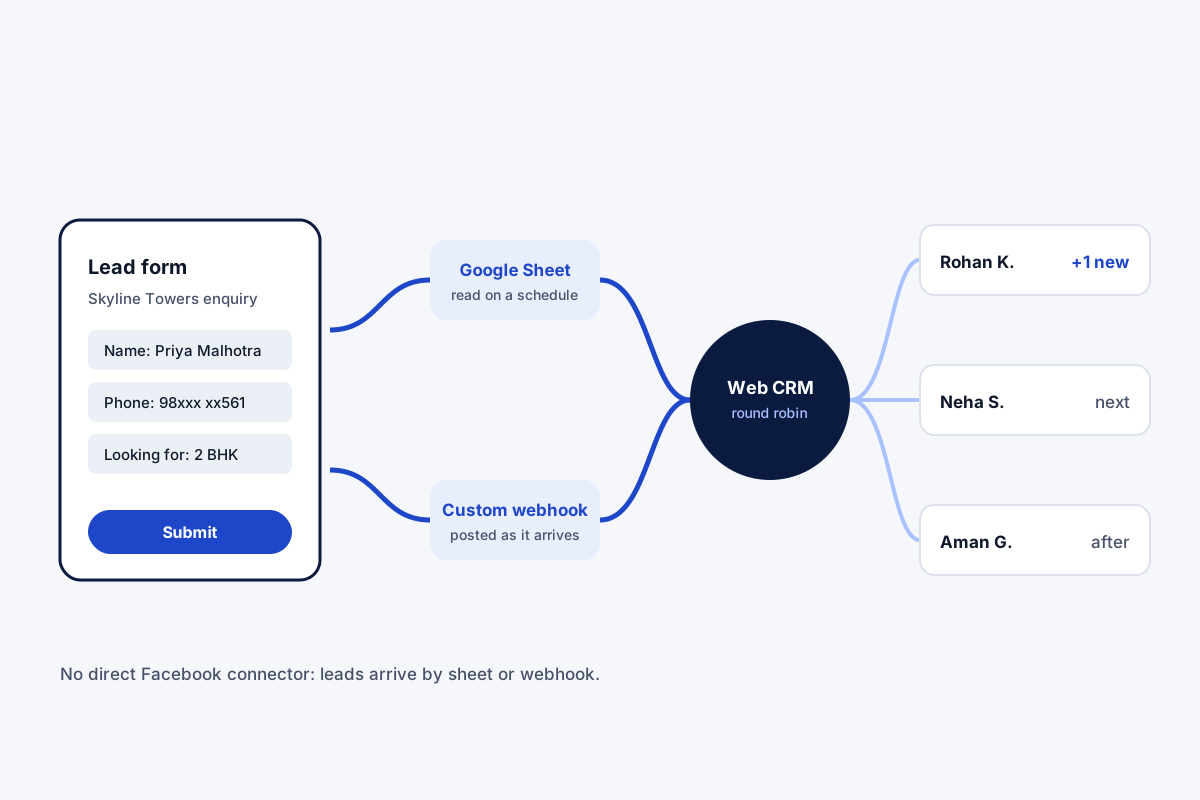
A Facebook lead ads CRM integration is a race against time. A person fills a lead form on Facebook or Instagram, and the first salesperson to call usually wins. Field Team Tracking does not plug into Facebook directly; instead, a lead can arrive by one of two routes. On the first, form leads land in a Google Sheet, and the app checks that sheet on a schedule for new rows. On the second, an automation tool posts each lead to the app’s custom webhook the moment it arrives. Either way, the form’s fields map to lead fields, including any custom ones, with the right country for the phone number. The web CRM then deals new leads to salespeople in turns. With the AI first call on, a synthetic voice rings each lead before a person does and passes on the call result.
Facebook lead ads CRM integration benefits
Sheet route
New rows pulled in on a schedule.
Webhook route
Each lead posted in as it arrives.
Fair hand-out
New leads dealt to salespeople in turns.
Call fast
Leads land in each person's queue.
Field mapping
Form answers into your own fields.
Junk shows up
Never-connected numbers go to lost leads.
Facebook lead ads CRM integration: after the lead arrives
Getting the lead in is half the job; working it is the rest. Each salesperson sees new form leads in their pending queue, calls them, and saves the result on the lead. Routing between salespeople is explained on the lead management software page, the lead list and filters on the lead management app page, and calling a fresh batch back to back on the auto dialer app page.
Facebook lead ads CRM integration routes compared
| Route | How leads arrive | Speed | Extra tool needed |
|---|---|---|---|
| Google Sheet | Form leads written to a sheet the app reads | On the app's schedule | A way to fill the sheet |
| Custom webhook | An automation tool posts each lead | As the tool sends it | An automation tool |
Facebook lead ads CRM integration setup
- Choose the route: a Google Sheet, or an automation tool with a webhook.
- In the web CRM, register the sheet or webhook as a source and match the form fields.
- Turn on round robin, and the AI first call if wanted.
- Submit a test lead on your form and watch it reach a salesperson.
Facebook lead ads CRM integration limits
- No native connector. Leads come through a sheet or webhook, not a direct Facebook link.
- Third-party tools. An automation tool, if used, has its own setup and fees.
- Sheet timing. Sheet rows arrive on a schedule, not instantly.
- Ad side. No ad management or conversion reporting back to Facebook.
Facebook lead ads CRM integration example: a real estate developer in Noida
An invented developer, with sample figures. A housing developer in Noida runs Facebook lead ads for a new tower. The sales team downloaded leads once a day, by which time many buyers had spoken to other projects.
The forms now post each lead to the webhook, and round robin hands it to one of six salespeople within moments. The AI first call rings the lead first, and the salesperson sees its result. Callbacks on the same day went from a few to almost every lead.
Facebook lead ads CRM integration FAQ
Which Facebook lead ads CRM integration suits a calling team?
Field Team Tracking suits it: form leads arrive by sheet or webhook, are dealt to salespeople in turns, and get called from their phones.
What is Field Team Tracking?
Field Team Tracking is a lead CRM and dialer that accepts Facebook lead ads through a live sheet or custom webhook.
What does the Facebook lead ads route cost on Field Team Tracking?
The app is billed per user, ₹1,908 a year in India or USD 12 a quarter abroad, plus tax. Any automation tool you use bills separately.
What are the ways to get Facebook form leads into a CRM?
Either send form leads to a Google Sheet that the CRM reads, or use an automation tool to post each lead to the CRM's webhook.
Does Field Team Tracking connect to Facebook directly?
No. There is no direct Facebook connector; the sheet or webhook route carries the leads in.
Which CRM integrates with Facebook?
Several CRMs list native Meta connectors. Others, like this one, accept the leads through a sheet or a webhook.
How fast do the leads arrive?
Webhook leads arrive when the automation tool posts them; sheet rows are checked on a schedule.
Can every new lead go to the next salesperson?
Yes. The web CRM deals leads from webhook and sheet sources to salespeople in rotation.
What is the AI first call?
A web CRM option: a synthetic voice rings each new lead first, then passes it to the next salesperson with the result.
What about fake or junk leads?
Calling quickly shows which leads are real; numbers that never connect gather in the lost leads list.
Can I map form fields to my own fields?
Yes. Each form question links to a standard or custom field, and a country choice formats the numbers.
See your team's whole day on one map
3-day trial with every feature. ₹159 per user per month on the yearly plan (₹1,908 a year), or ₹249 per user per month for 3 months; outside India $29 per user per year or $12 for 3 months. Prices are per user, exclusive of taxes.