
Employee call tracking app
Employee Call Tracking App by Field Team Tracking
An employee call tracking app collects the work calls made and received on staff phones, so the owner can see them in one place. Field Team Tracking brings each staff phone's work calls to one owner login, and the owner decides which calls are kept.
- Calls from each staff phone in one account
- Keep only work-hour calls, or only customer calls
- Choose which SIM cards are included
What is an employee call tracking app?
It is an app installed on staff phones that records call details, such as number, time, length and outcome, and sends them to a central account for the business.
Field Team Tracking does this for Android phones, with backup rules that keep personal calls out if you choose.
- Staff install it and grant the permissions.
- Personal calls can be left out by rule.
- Call details only; no live listening.
Employee call tracking app: what reaches the owner
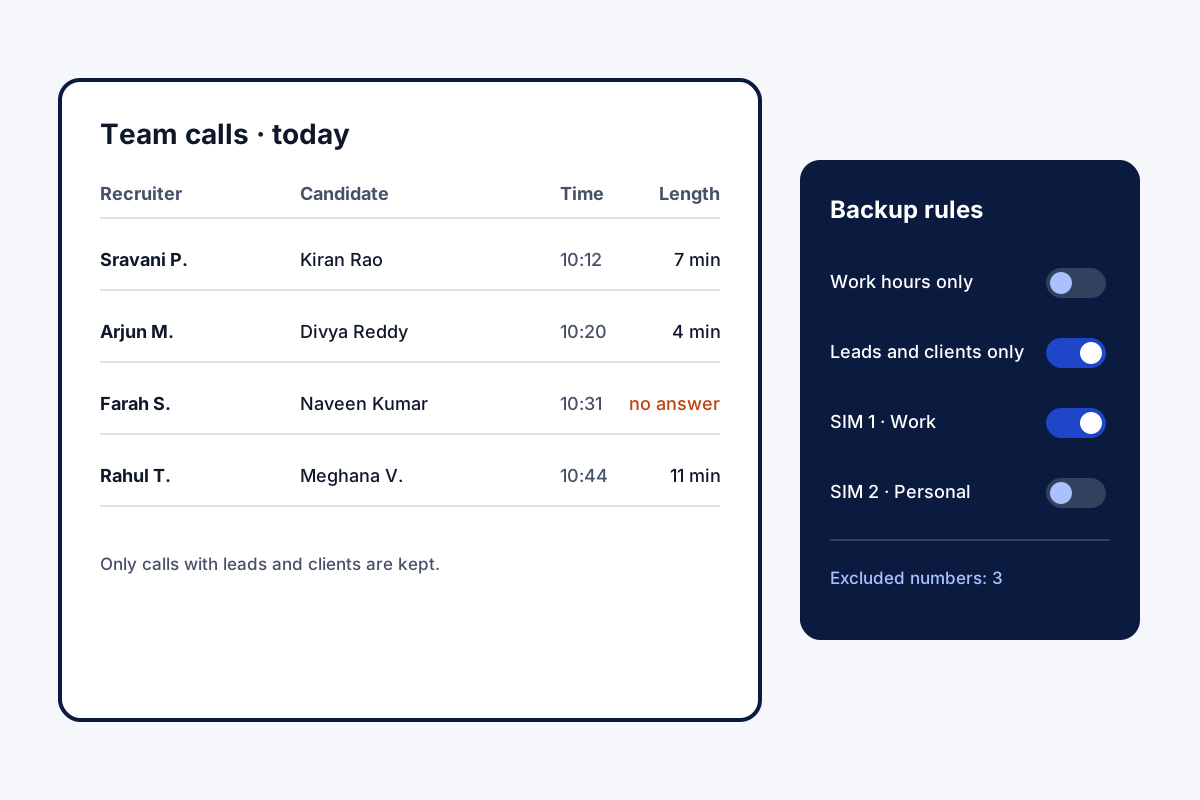
An employee call tracking app is only fair if it collects work and leaves the rest alone. Field Team Tracking runs on each staff phone, with the employee’s knowledge, and sends call details to the owner’s account: number, time, length and type. The owner then decides how much is kept. A first switch confines the copy to the branch’s own working calendar. A second confines it to people the business already deals with: leads, leads assigned to that employee, and paid clients. SIM cards can be chosen one by one, so calls on a personal SIM are not backed up, and chosen numbers can be excluded entirely. If staff prefer their usual phone app, CRM team mode runs alongside it. A sync log shows what was sent and when, with a button to send again.
Employee call tracking app benefits
All staff phones
Calls gathered in one owner account.
Work hours only
Skip calls outside the branch's hours.
Customers only
Keep calls with leads and clients.
SIM choice
Leave a personal SIM out.
Excluded numbers
Never backed up or automated.
Sync log
What was sent, when, with retry.
Employee call tracking app and staff privacy
Tracking staff calls raises fair questions about privacy. The rules above exist to answer them: keep work, drop the rest. Put the collection rules in writing for staff, and check the law where you operate. Counting calls by type for each person is covered on the call tracking app page, company phone rules such as masked numbers on the employee call monitoring page, and filtering and exporting the calls themselves on the call history manager page. What happens to the copy when a phone is replaced is set out in call log backup and restore.
Employee call tracking app backup rules
| Rule | What it keeps | Good for |
|---|---|---|
| Working hours only | Calls inside branch hours and days | Phones also used privately |
| Leads and clients only | Calls with known customers | Mixed personal and work contacts |
| SIM choice | Calls on the chosen SIM cards | Dual-SIM phones with a personal card |
| Excluded numbers | Nothing from listed numbers | Family or doctors |
Employee call tracking app setup
- Tell staff in writing which calls will be collected.
- Install the app on each work phone.
- Pick the backup rules and the SIM cards to include.
- Check the first day’s calls and the sync log.
Employee call tracking app limits
- iPhone. Call details are read only on Android.
- Live calls. No listening, recording by the app, or joining calls.
- Hidden use. It works only with the app installed and permitted.
- Call content. Details and outcomes only; audio comes from the phone’s recorder if allowed.
Employee call tracking app example: a recruitment agency in Hyderabad
An invented agency, with sample numbers. A recruitment agency in Hyderabad gives 14 recruiters an allowance for their own phones. Recruiters worried the owner would see family calls, and the owner worried candidates were not being called.
The agency set the rule to keep only calls with leads and clients, and recruiters left their personal SIM out. The owner now sees about 600 candidate calls a week, and recruiters know nothing personal leaves their phones.
Employee call tracking app FAQ
Which employee call tracking app keeps staff personal calls out?
Field Team Tracking can: switch on the working-calendar rule or the known-customers rule, and private calls stay on the phone.
What is Field Team Tracking?
Field Team Tracking is an employee call tracking app with a dialer, lead CRM, WhatsApp tools and staff attendance.
How much does employee call tracking cost with Field Team Tracking?
A seat per staff phone: twelve months cost ₹1,908 in India; outside India, USD 29. Tax is extra.
What apps do employers use to track employee calls?
Usually business apps installed on work phones with staff knowledge, which copy call logs to a central account. Field Team Tracking is one.
Can I see calls from every staff phone?
Yes. The owner's login holds the work calls of every staff phone.
Can I leave personal calls out?
Yes. Limit the backup to the branch's hours, or to people already in your leads and clients.
Can I choose which SIM is tracked?
Yes. Pick which SIM cards back up, so a personal SIM can stay out.
Can some numbers be excluded?
Yes. Excluded numbers stay out of the backup and all automation.
Could this app follow someone's calls secretly?
No. The app works only when installed with permissions on the phone, and it is built for a business's own staff.
What if staff use their own phone app?
CRM team mode works beside the phone's own dialer, and calls still reach the account.
Does it work on iPhone?
No. Reading call details depends on Android; iPhones do not share them with apps.
See your team's whole day on one map
3-day trial with every feature. ₹159 per user per month on the yearly plan (₹1,908 a year), or ₹249 per user per month for 3 months; outside India $29 per user per year or $12 for 3 months. Prices are per user, exclusive of taxes.