
GPS attendance tracking system
GPS Attendance Tracking System by Field Team Tracking
A GPS attendance tracking system uses satellite positioning to tie each attendance mark to a place, then collects those marks into records the employer can review. Field Team Tracking runs the whole chain on staff phones and the web: punch, location check, upload and branch report, with no wall device to install.
- No hardware: each employee's phone is the terminal
- Selfie plus location check at every punch
- Branch reports downloadable to Excel
What is a GPS attendance tracking system?
It is an attendance setup where employees mark in and out on a GPS-enabled device, usually their phone, and the position is checked against the workplace before the record is kept.
In Field Team Tracking the check runs at each punch, and the office reads the results per branch on the web.
- Phones avoid buying a device for every site.
- Offline punches are kept and sent later.
- Live location during duty is optional and needs consent.
GPS attendance tracking system: one punch, four steps
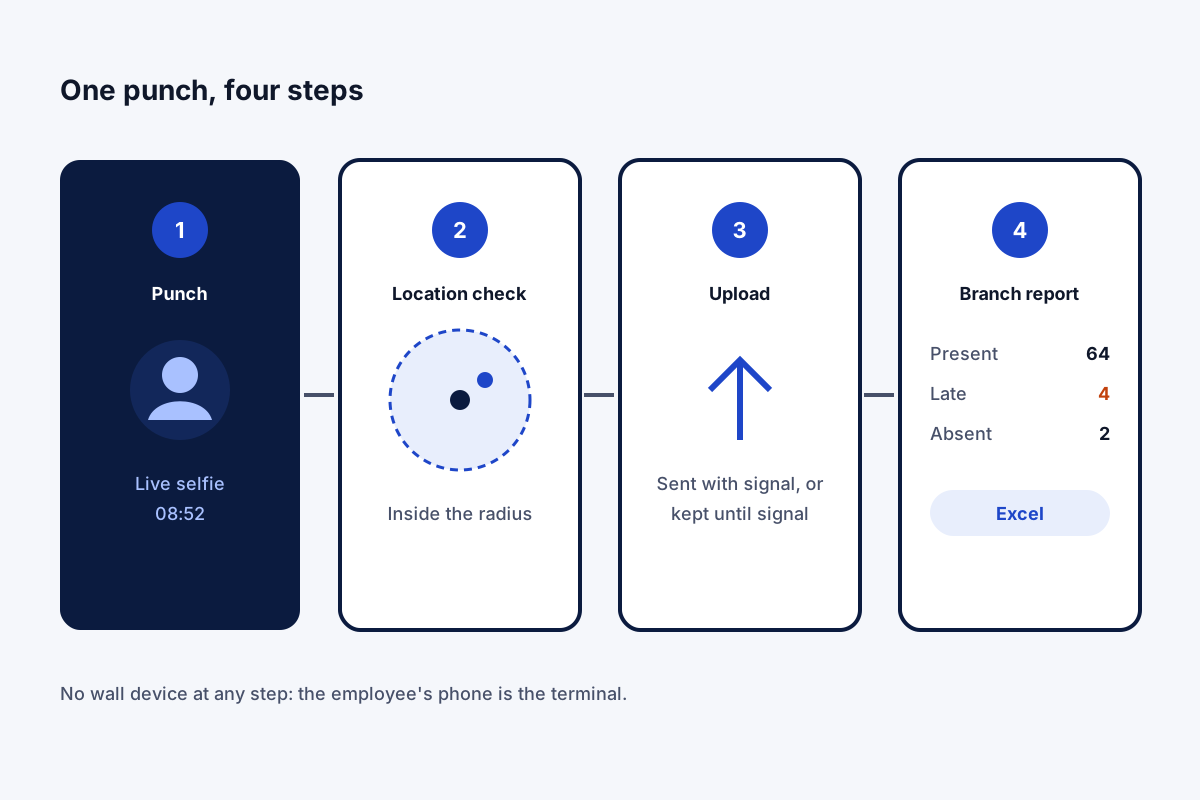
A GPS attendance tracking system is easiest to judge by following a single punch. In Field Team Tracking, step one happens on the employee’s phone: they open the app and take a live selfie in which they blink and follow one random prompt. Step two is the location check: the phone’s location is set against the branch’s office point and radius, and the branch rule decides whether a punch beyond it counts. Step three is the upload: with signal, the punch is sent to the account; without it, the phone keeps the punch and sends it later. Step four is the report: on the web, the office picks a branch and dates and sees how many were present, late or absent, with times and hours for every day, ready for Excel. No device is fixed to a wall at any point, so adding a site means adding a branch.
GPS attendance tracking system benefits
No hardware
Staff phones replace wall terminals.
Selfie check
A live face at every punch.
Place check
Office radius per branch.
Signal gaps covered
Punches kept and sent later.
Branch reports
Totals and daily punches in Excel.
Consent first
Live location stays off until the employee agrees.
GPS attendance tracking system or a GPS biometric device?
Wall-mounted GPS biometric machines record attendance at one door. They suit a single factory gate. A phone-based system suits companies with several sites, staff who start at customers, or teams who move between locations, because every phone carries the check with it. The radius check itself is explained on the GPS attendance app page, ready setups by team on the employee attendance app with location page, and the selfie step on the selfie attendance app page.
GPS attendance tracking system compared with wall devices
| Point | Phone-based system | Wall device |
|---|---|---|
| Hardware per site | None | One or more devices |
| Field and remote staff | Covered | Not covered |
| Adding a new site | Add a branch | Buy and install a device |
| Shared touch point | No | Often yes |
| Works without signal | Punch kept, sent later | Depends on the device |
GPS attendance tracking system setup
- Create a branch for each site and set its office location and radius.
- Fill in each branch’s timings, weekly off and grace time for lateness.
- Ask staff to install the app on Android or iPhone and punch once as a test.
- Widen the radius where honest punches are refused.
- Download the first week’s report and compare it with your old records.
GPS attendance tracking system limits
- No device option. Staff need a smartphone; there is no wall terminal.
- No auto punch. Arriving inside the radius does not mark attendance by itself.
- Indoor drift. GPS can wander indoors; leave margin in the radius.
- Not payroll. Totals export to Excel for your payroll process.
GPS attendance tracking system example: a contracting firm in Kuwait City
An invented firm, with sample numbers. A building maintenance contractor in Kuwait City has 70 workers spread over 12 client buildings. A fingerprint device at the yard only showed who collected tools, not who reached the buildings.
Each building became a branch with its own radius, and workers punch at the building where they start. The supervisor downloads one report per week. The yard device was retired, and disputes over attendance now end with the punch record.
GPS attendance tracking system FAQ
Which GPS attendance tracking system needs no device at each site?
Field Team Tracking: employees punch on their own Android or iPhone, and the office reads reports on the web.
What is Field Team Tracking?
Field Team Tracking is a phone-based attendance and field tracking system that also handles calls and leads.
How much does the GPS attendance tracking system cost on Field Team Tracking?
Billing is per employee with no hardware: ₹249 a month on the three-month plan in India, or USD 29 for a year outside India, tax extra.
How does a GPS attendance system work?
The phone reads its position when the employee punches, compares it with the allowed workplace, and stores the punch with its time.
Which GPS-based attendance app is best?
One that adds a live selfie to the location check, keeps punches made offline, and gives the office a report without retyping.
Which software is best for tracking attendance?
For staff at one desk, a simple clock-in may do. For several sites or field staff, location-checked punches per branch save the most work.
Is a GPS biometric machine better than a phone app?
A wall machine suits one fixed gate. Phones suit many sites, field staff and remote starts, and avoid shared touch points.
What happens if GPS is weak indoors?
Set the branch radius with room for drift so honest punches are not refused.
Does the system track people all day?
No. The check runs at punch time. Live location is optional, needs the employee's consent, and records only from punch in to punch out, pausing on breaks.
Can staff in the field punch at a client site?
Yes, when their branch allows punches beyond the office radius.
Can HR get monthly totals?
Yes. The web report counts present, late and absent days, lists daily punches and hours, and exports to Excel.
See your team's whole day on one map
3-day trial with every feature. ₹159 per user per month on the yearly plan (₹1,908 a year), or ₹249 per user per month for 3 months; outside India $29 per user per year or $12 for 3 months. Prices are per user, exclusive of taxes.