
Employee route tracking app
Employee Route Tracking App by Field Team Tracking
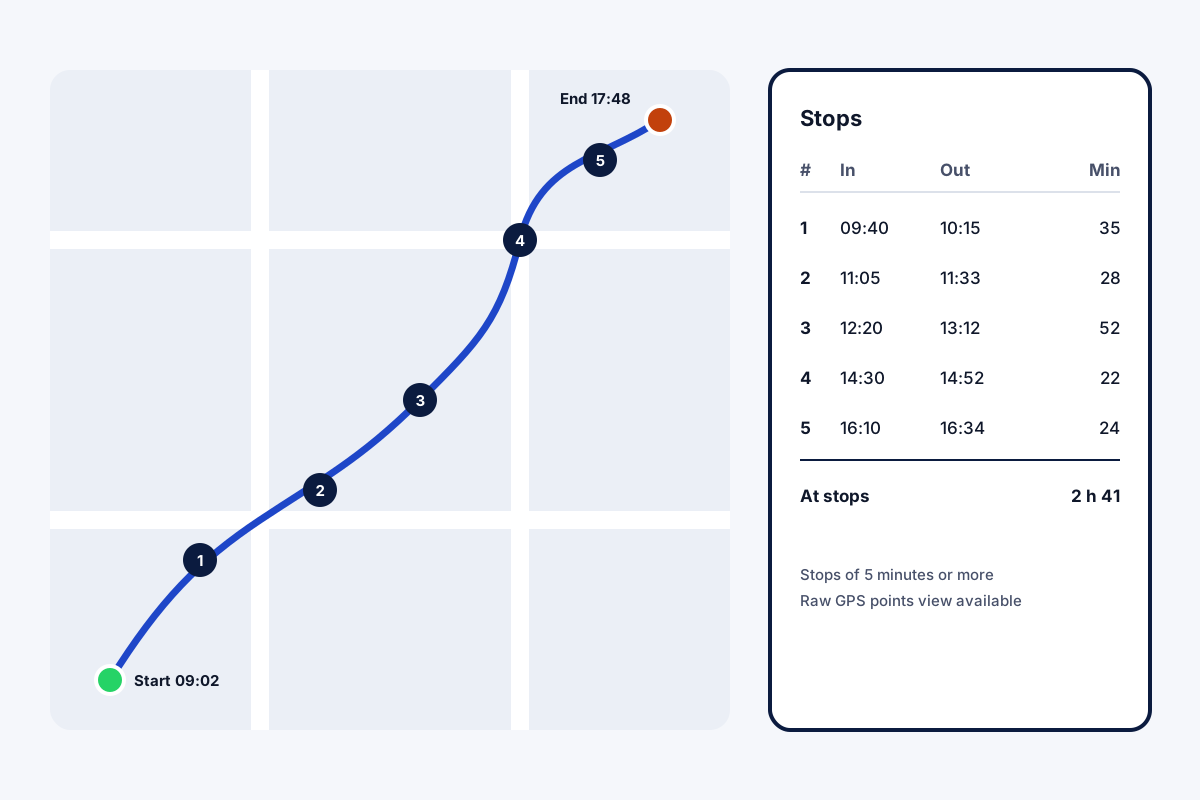
With an employee route tracking app, the office can replay the path a worker followed during the working day. Field Team Tracking builds that route from points taken every 15 seconds on duty, and marks each stop.
- Start and end of the day on the map
- Numbered stops with arrival, departure and minutes
- Raw GPS points behind any day's route
What is an employee route tracking app?
It records where an employee travels while working and lays that movement out as a route, usually with stops and distance, for any chosen day.
In Field Team Tracking the route covers duty time only, and starts once the employee has accepted the consent notice.
- A point every 15 seconds while on duty.
- Stops of 5 minutes or more marked.
- Fake GPS points kept out of the distance.
Employee route tracking app: one day as a route
An employee route tracking app is most useful the morning after, when someone asks where the day went. In Field Team Tracking, a reading is captured four times a minute during duty and uploaded in five-minute batches, with breaks left out. The web route view then draws the day on a map: where it started and ended, each stop of five minutes or more numbered with arrival, departure and minutes, and a summary of worked time, distance, idle time, breaks, time at the office and phone battery. Spoofed readings and impossible leaps get a warning and add nothing to the kilometres. Behind every route, a raw points view shows the underlying readings.
For how tracking starts fairly, see how to track employee location; for the wider location features, the employee location tracking app page; and for visits as records, the sales visit tracker app page. Distance for reimbursement is covered on the employee mileage tracking app page, and the live side of the recording in live location tracking for employees. The readings under the route are explained on the employee GPS tracking app page. Time spent at each customer site, for repair crews, is the focus of the service technician tracking app page. Hours and route side by side appear on the employee time and location tracking app page. Reopening earlier working days is covered on the employee location history app page.
Employee route tracking app FAQ
Which employee route tracking app shows each stop with times?
Field Team Tracking does: the web route view numbers every stop with arrival, departure and minutes spent.
What is Field Team Tracking?
Field Team Tracking is an employee route tracking app with attendance, calls and leads for field and sales teams.
How much is the employee route tracking app on Field Team Tracking?
Routes are included with every seat; a quarter is USD 12 outside India and ₹747 inside it, tax extra.
Is there an app that can track a route?
Many can. For work, choose one that records only during duty, asks for consent, and shows stops, distance and idle time.
Can employers use GPS to track employees?
Often, on work devices during working time with staff told. Laws differ, so check yours; this is general guidance.
Can I see the raw GPS points?
Yes. A raw points view sits behind any day's route.
See your team's whole day on one map
3-day trial with every feature. ₹159 per user per month on the yearly plan (₹1,908 a year), or ₹249 per user per month for 3 months; outside India $29 per user per year or $12 for 3 months. Prices are per user, exclusive of taxes.