
Sales team performance
How to Track Sales Team Performance by Field Team Tracking
Learning how to track sales team performance comes down to choosing a few numbers, collecting them without extra typing, and reviewing them on a fixed day. Field Team Tracking collects most of those numbers by itself, from calls, follow-ups, sales and field visits.
- Effort numbers: calls, connected calls, visits
- Result numbers: sales and revenue
- A weekly review with each person
How do you track sales team performance?
Choose a small set of activity and result metrics, record them automatically where possible, set each person against their own recent weeks, and coach on the gaps.
Field Team Tracking supplies call counts, follow-ups done, visits and revenue, so the review uses facts instead of memory.
- Track effort and results, not just one.
- Use numbers the phone records, not typed reports.
- Review weekly, at the same time.
How to track sales team performance in four steps
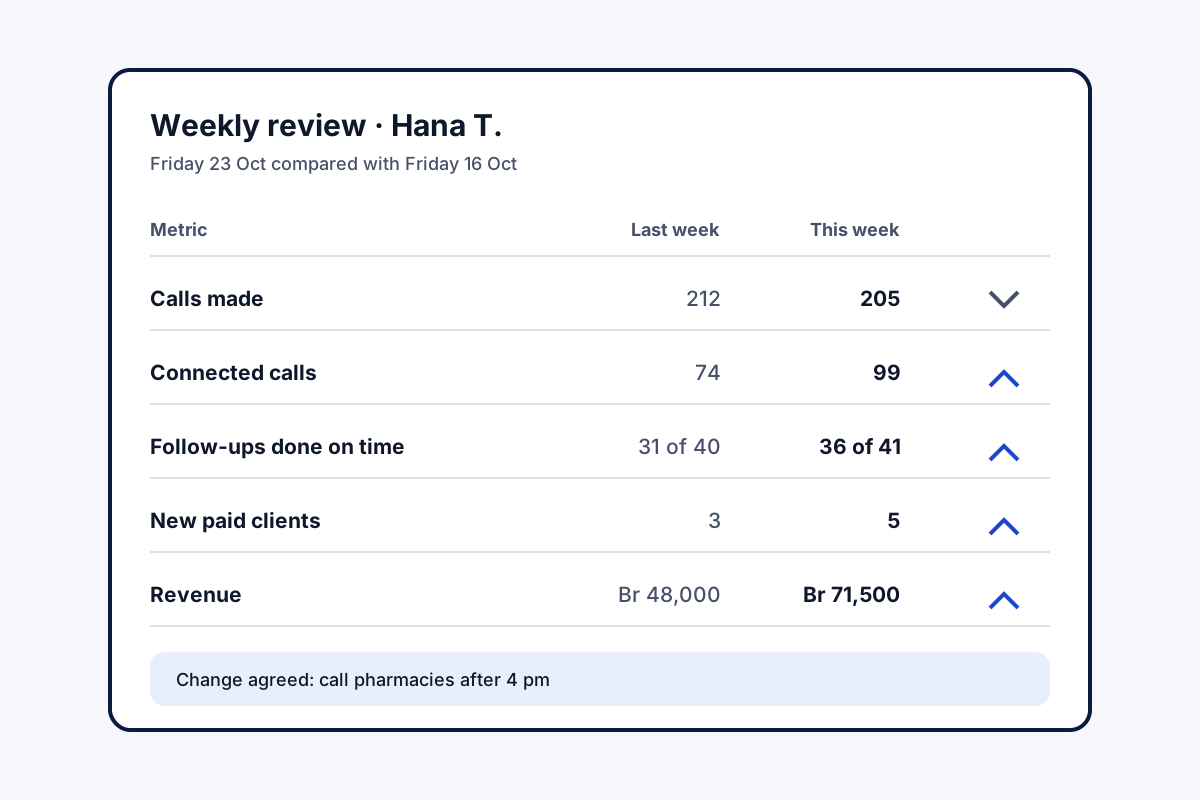
- Pick five numbers. Two for effort (calls made, connected calls), one for progress (follow-ups done on time) and two for results (new paid clients, revenue).
- Collect them without typing. Take call counts from each phone's analytics, follow-ups from the Reminders tab, and sales from the paid client records.
- Review on a fixed day. Every Friday, for example, open each salesperson's calls and sales for the week and set them beside that person's earlier weeks.
- Coach one gap at a time. Many calls but few connections points to calling times; many connections but few sales points to the pitch.
How to track sales team performance so the numbers stay honest
Knowing how to track sales team performance matters less than doing it every week, with numbers nobody can round up. The four steps above work because the data collects itself. In Field Team Tracking, each phone’s analytics count calls made and calls that connected. The Reminders tab separates follow-ups done from those gone overdue. Revenue cards total the sales for the week and month, and each sale sits on its client record. In the auto dialer, a call shorter than the minimum length you set does not mark the lead done, so a burst of two-second calls cannot fake progress. For staff on the road, the route adds stops and kilometres. Each phone can also send its day’s call counts as a notification at a chosen time, or share them on WhatsApp. What remains for the manager is the human part: the Friday conversation.
How to track sales team performance: metrics that matter
| Metric | What it shows | Where it comes from |
|---|---|---|
| Calls made | Effort | Call analytics on each phone |
| Connected calls | Real conversations | Call analytics |
| Follow-ups done on time | Discipline | Reminders tab: completed and overdue |
| New paid clients | Conversion | Paid clients list, by date added |
| Revenue | Result | Revenue cards for the week and month |
How to track sales team performance features
Calls counted
Totals and connected calls from the phone itself.
Honest progress
The auto dialer ignores too-short calls.
Follow-up discipline
Completed and overdue reminders listed.
Results
Paid clients and revenue by period.
Field effort
Stops and kilometres for reps on the road.
Daily report
Each phone sends its counts at a set time.
How to track sales team performance: common mistakes
Tracking only revenue hides the cause of a bad month; tracking only calls rewards busy work. Typed-in reports invite rounding up. Comparing people across very different territories breeds resentment. And reviewing once a quarter is too late to help anyone. The tools behind the numbers are on the sales team tracking app page for field reps, the call tracking app page for call counts, and the sales management page for sales and revenue. The day-level version of these numbers is described on the daily sales report app page, and the same thinking for non-sales roles in how to track employee work. The salesperson’s side of the day is on the app for sales executive page, a ready column layout in the sales team daily report format, and the manager’s controls on the sales team management app page. Between weekly reviews, a few morning signals are listed on the sales team monitoring app page.
How to track sales team performance: the Friday conversation
- Open the salesperson’s numbers for the week.
- Set them beside the same person’s last four weeks.
- Pick the one metric that dropped most.
- Agree one change for next week and save it as a remark.
How to track sales team performance: limits of the app
- Leaderboards. There is no side-by-side ranking screen.
- Targets. Quotas and commissions are kept outside the app.
- Call quality. Counts show effort, not how good the conversation was.
- iPhone calls. Call counts need Android phones.
How to track sales team performance example: a pharma distributor in Addis Ababa
An invented distributor, with sample numbers. A pharma distributor in Addis Ababa has five reps who phone and visit pharmacies. Monthly sales swung widely, and the manager could not say why.
The team now reviews five numbers every Friday. One rep made the most calls but connected on few; calling after 4 pm, when pharmacists were less busy, lifted her connected calls by a third. Another had strong conversations but many overdue follow-ups, which became his one change for the next week.
How to track sales team performance FAQ
Which app helps track sales team performance without extra typing?
Field Team Tracking fills in calls, connected calls, follow-ups and sales from the work itself, so the scorecard needs little manual entry.
What is Field Team Tracking?
Field Team Tracking is a calling, CRM and attendance app whose records feed the scorecard: calls, callbacks, sales and visits.
How much does performance tracking cost with Field Team Tracking?
Nothing beyond the normal seat, which is ₹1,908 per person for twelve months in India. Tax is added.
What should I measure to judge a sales team?
Use a short list: activity (calls, visits), conversations (connected calls), progress (follow-ups done, stage moves) and results (sales, revenue). Compare week to week.
What are good sales KPIs to start with?
Connected calls per day, follow-ups completed on time, new paid clients, revenue, and leads lost without a second try.
What does the 30-60-90 rule mean for a new salesperson?
It usually refers to a 30-60-90 day plan: learn in the first 30 days, start selling by 60, and work on full targets by 90.
How often should I review performance?
Weekly works for most small teams: often enough to fix problems, rare enough to show a trend.
Should I compare salespeople with each other?
Sparingly. Territories and lead quality differ, so set each person against their own earlier weeks first.
Can a daily report come to me automatically?
Each phone can produce its own daily call report, as a notification at a set time or shared on WhatsApp, with counts and unreturned missed calls.
How do I stop staff marking leads done without calling?
In the auto dialer, set the shortest call that counts. A briefer call does not mark the lead done.
Can I track field visits as part of performance?
Yes. For staff on the road, the route shows stops and kilometres for the hours they are on duty.
See your team's whole day on one map
3-day trial with every feature. ₹159 per user per month on the yearly plan (₹1,908 a year), or ₹249 per user per month for 3 months; outside India $29 per user per year or $12 for 3 months. Prices are per user, exclusive of taxes.