
Field force management software
Field Force Management Software by Field Team Tracking
Field force management software is the office side of running mobile staff: a web console where managers read attendance, routes and customer work sent from employees' phones. Field Team Tracking joins a phone app for Android and iPhone to an office web console, so what is typed or recorded outside reaches managers without forms.
- Route view per employee and day on the web
- Attendance and kilometres for any branch, in Excel
- Leads from sheets, APIs and webhooks, shared in turns
What is field force management software?
It is software that collects attendance, location and work records from field employees' phones and presents them to the office as routes, reports and customer histories.
In Field Team Tracking the phone app does the recording and the web console does the reading, filtering and exporting.
- Phones record; the web console reports.
- Branch rules are set once and apply to every punch.
- Exports go to Excel for payroll or allowance sheets.
Field force management software: phone in the field, console in the office
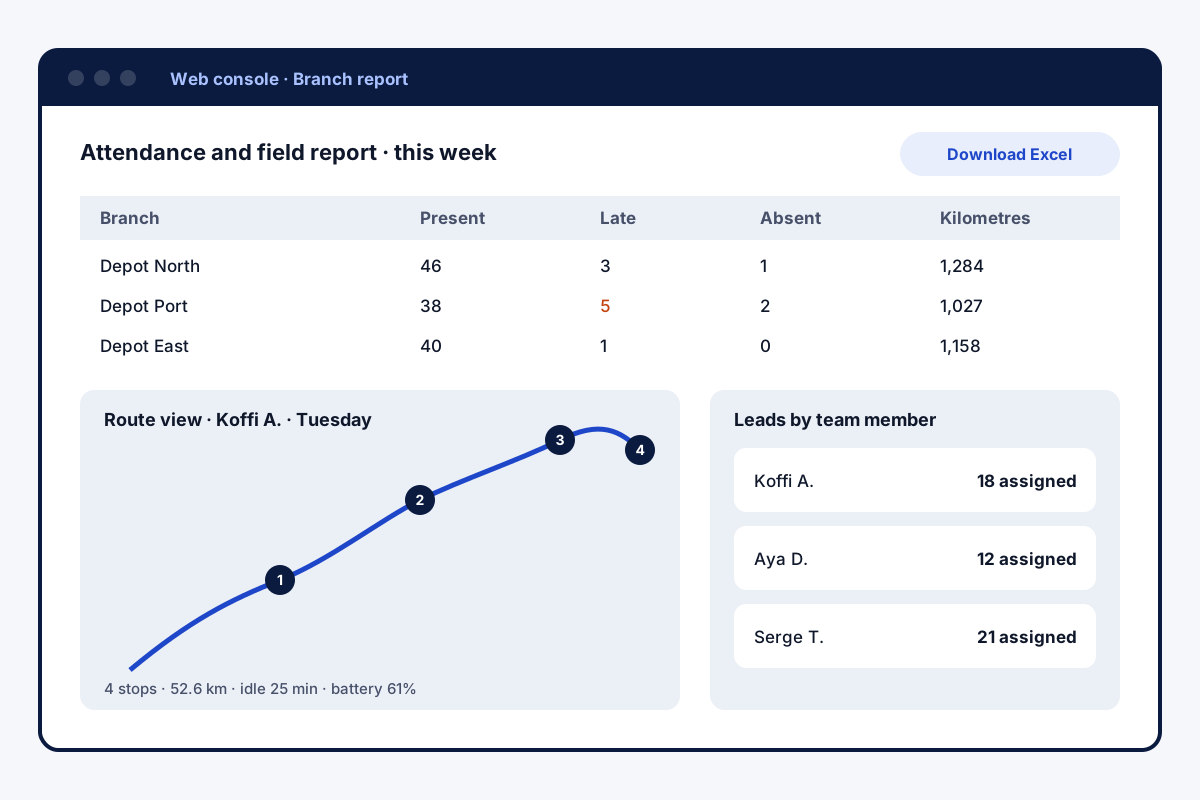
Field force management software has two halves, and both have to work for the system to be trusted. In Field Team Tracking, the half in the field is an app on each employee’s Android or iPhone: a selfie punch checked against the branch’s rules, location recorded only on duty, and calls, remarks and leads saved against customers. The half in the office is a web console. There, a manager replays any employee’s day on a map: numbered stops showing when each began and ended, plus idle time and battery level. A branch-wide report for the dates you choose counts who was present, late or absent, adds the kilometres, and downloads to Excel. Lead lists are imported, filtered and handed out in the same account, and every status change, including those made on the web, stays in the lead’s history.
Field force management software benefits
Day replay
Each employee's route with timed stops.
Branch report
Attendance and kilometres, exported to Excel.
Rules once
Hours, late cut-off and radius per branch.
Lead hand-out
Assign and move leads between staff.
Connected sources
Sheets, APIs and webhooks feed leads in.
Duty-only data
Location only after consent, only at work.
Field force management software: questions to ask before buying
Ask each vendor where recording starts and stops, what happens to fake GPS readings, whether punches work without signal, and whether reports export without manual work. Ask who owns the customer history when an employee leaves. The phone side is described on the field force management app page, day replays on the employee route tracking app page, and the attendance rules on the staff attendance app page.
Field force management software: console screens
| Screen | What it shows | Export |
|---|---|---|
| Route view | Map, numbered stops, minutes, distance, idle time, battery | View only |
| Raw GPS points | Every reading behind a route | View only |
| Attendance and field report | Present, late, absent, punches, hours, breaks, kilometres | Excel |
| Leads | Filters, assignment, status history | CSV |
| Lead sources | Webhook and live sheet sources shared in turns | No export |
Field force management software setup
- Create branches and set each one’s hours, days off and location rules.
- Add staff to the account; they install the app and accept the location notice.
- Point your lead feeds (sheet, API or webhook) at the account.
- Check the first week’s route views and branch report.
- Agree how the Excel export feeds payroll or allowances.
Field force management software limits
- No payroll. Hours and kilometres export; salaries are calculated elsewhere.
- No job board. Tasks are not scheduled or dispatched from the console.
- Not a live map. Positions arrive in five-minute batches and build each day’s route.
- No leave module. Holidays and leave requests are handled outside the app.
Field force management software example: a beverage distributor in Abidjan
An invented company, with sample numbers. A beverage distributor in Abidjan employs 25 sales and delivery staff across three depots. Each depot kept its own attendance sheet, and head office saw totals only at month end.
The company set up three branches with their own hours and late cut-off. Head office now downloads one report per depot each Monday and checks two or three route views where kilometres look unusual. Month-end attendance now takes an afternoon instead of three days.
Field force management software FAQ
Which field force management software gives a branch report with kilometres in Excel?
Field Team Tracking: pick a branch and dates on the web to get each person's punches, hours worked, breaks and distance, ready for Excel.
What is Field Team Tracking?
Field Team Tracking is a phone app plus web console for teams outside the office, covering attendance, routes, calls and leads.
How is Field Team Tracking priced as field force management software?
Pricing is per user. Indian teams on annual billing pay ₹159 a month per user; for the rest of the world it is USD 29 a year. Taxes are separate.
Which field management software is best?
The one your staff keep using. Check that the phone app is quick, that tracking is limited to duty, and that the office gets reports without retyping.
Which field force management software is best in India?
For Indian teams, look for rupee pricing, Android first support, offline punches for patchy networks, and lead sources such as IndiaMART and JustDial.
Is it software or an app?
Both. Staff use the phone app; managers use the web console. The same account holds the data.
What reports does the web console give?
Totals of who was present, late or absent, daily punch times, hours, breaks and kilometres, and a per-person route with stops and idle time.
Can the office hand out leads?
Leads can be assigned and moved between team members, and webhook or live sheet sources share new leads in turns on the web console.
Do staff need a computer?
No. Field staff need only their phone; the web console is for the office.
Is location tracked all the time?
No. Each employee agrees once on their own phone; after that, the phone notes positions from the first punch to the last, skipping breaks.
Can it connect to our other systems?
Leads can arrive from Google Sheets, any REST API or a webhook, and call and lead activity can be sent onward to a separate CRM that offers an API.
Does it handle payroll?
No. Export hours and kilometres to Excel and use them in your payroll or allowance process.
See your team's whole day on one map
3-day trial with every feature. ₹159 per user per month on the yearly plan (₹1,908 a year), or ₹249 per user per month for 3 months; outside India $29 per user per year or $12 for 3 months. Prices are per user, exclusive of taxes.