
Click to call
Click to Call by Field Team Tracking
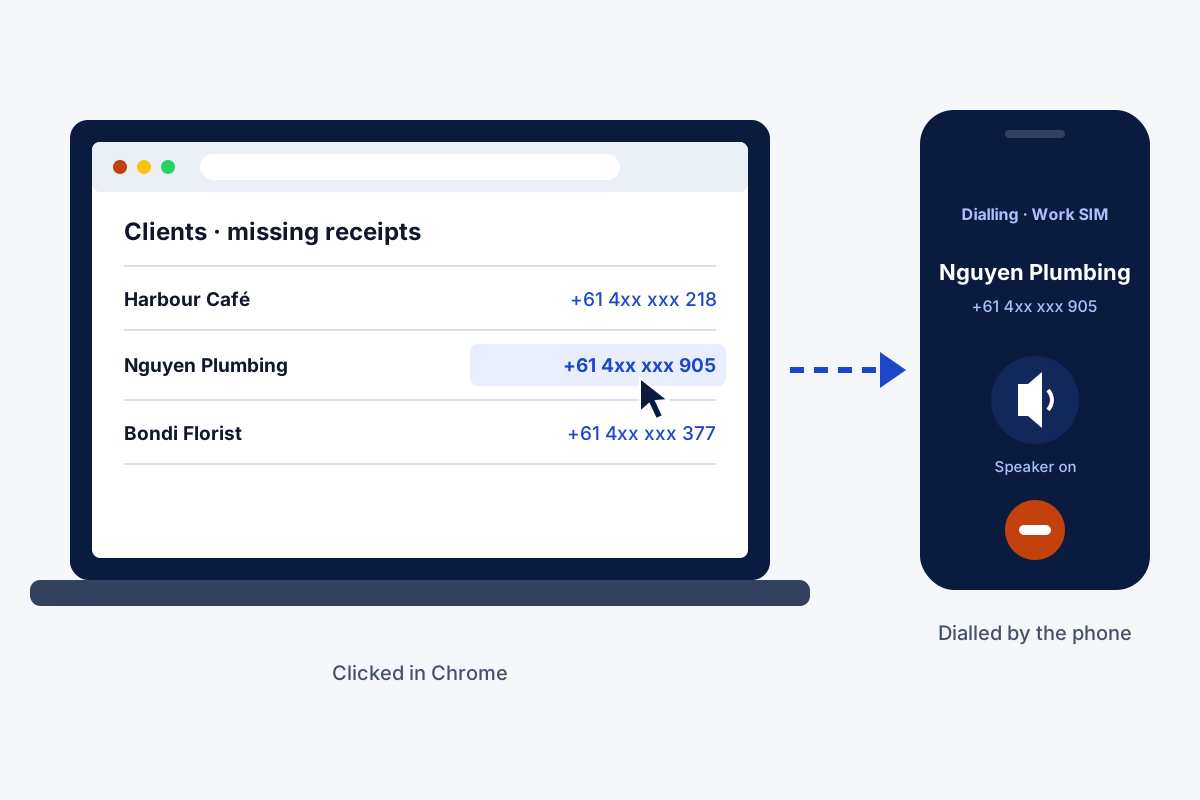
Click to call is a way to place a phone call with one click on a number shown on a screen, with no keypad involved. With Field Team Tracking, pressing a number inside Chrome on a laptop or desktop makes your Android handset ring it.
- Click in the browser, talk on the phone
- Choose the SIM and the speaker in advance
- Logged on the handset and on the customer's record
What is click to call?
It is a link or button that turns a phone number into something you can click to dial. On websites it opens a calling app; in sales tools it sends the number to a phone.
Field Team Tracking uses it to dial from Chrome on a desktop or laptop through your own mobile number.
- No desk phone or internet calling line needed.
- Customers see your usual mobile number.
- The call is logged like any other phone call.
Click to call between a computer and an Android phone
Click to call ends the habit of reading a number off a screen and typing it into a phone. With Field Team Tracking, a salesperson working at a laptop clicks a phone number in Chrome, on a supplier list, an email or a web form, and the Android phone on the desk dials it. Three settings decide what happens. The SIM setting picks the card, so a dual-SIM phone always calls on the work number. The auto-call setting decides whether the phone dials straight away. The speaker setting can switch the speaker on, so both hands stay on the keyboard. The talk itself happens on the phone, over the mobile network, so the caller ID stays the familiar mobile number. Afterwards, the call sits in the history like any other, and leads finished this way show “click to call” in the Done tab.
Click to call benefits
No typing
Click the number, the phone dials.
Right SIM
Work calls always leave on the work card.
Keep typing
Optional speaker while you type notes.
Known number
Customers see your usual mobile.
Logged
The call joins the history and the lead.
Counted as done
The Done tab records click to call.
Click to call alongside the phone app
Click to call is one doorway into the same calling tools. The incoming side, missed-call lists and history filters are on the call management app page. Long lists are better dialled in one unattended session through the auto dialer app, and leads with their stages and notes are covered on the CRM with dialer page.
Click to call settings
| Setting | What it controls | Typical choice |
|---|---|---|
| SIM | Which card places the call | The work SIM |
| Auto-call | Whether the phone dials straight away | On, for speed |
| Speaker | Whether the speaker turns on | On, while typing notes |
Click to call setup
- Install the app on your Android phone.
- Turn on dial from computer in the app’s settings.
- Decide on the card, auto-call and speaker options.
- Click a number in Chrome and check that the phone dials.
Click to call limits
- Audio. You talk on the phone; sound does not come through the computer.
- Website buttons. It is not a call button for your site’s visitors.
- Browser. It works from Chrome.
- iPhone. The phone that dials must run Android.
Click to call example: an accounting practice in Sydney
An invented practice, numbers for illustration only. A small accounting practice in Sydney works from desktops all day, phoning clients about missing receipts. Staff copied numbers from the practice software onto their mobiles, and a wrong digit cost a call every few days.
Each accountant now clicks the client’s number in the browser, and the handset next to the screen rings out with the speaker on. Calls still show the practice mobile numbers clients recognise, and the day’s calls appear in the owner’s team call log for the partner to review.
Click to call FAQ
Which click to call tool rings through my own mobile number?
Field Team Tracking does: the number you click in Chrome is dialled by your Android phone, on the SIM you picked.
What is Field Team Tracking?
Field Team Tracking is a click to call, dialer and CRM app for Android sales teams, with WhatsApp tools and staff attendance.
Is click to call included in the Field Team Tracking price?
Yes. It is part of each user's seat; in India twelve months come to ₹1,908. Calls go over your SIM plan, and tax is extra.
How does click to call work?
Your click sends the number to your phone. The handset then dials it using the SIM, auto-call and speaker options you chose.
What does click to call mean on a website?
A phone number on the page is a link. Tapping it on a mobile opens the dialer with the number ready.
How can a number on my own website become clickable?
Turn it into a hyperlink that begins with tel: and then the international number. Phones then offer to dial it when tapped.
How do I turn off click to call?
For this tool, switch off dial from computer in the app's settings. For website links, change which app Chrome opens for phone numbers.
Can the call start without touching the phone?
Yes. With auto-call on, the phone dials straight away when you click.
Which SIM is used?
The SIM you set for computer dialling, so a dual-SIM phone always uses the work card.
Does the call show up in the CRM?
Yes. It is an ordinary mobile call, so it is listed in the phone's log and against the matching lead, and the after-call sheet can open.
Does it work with an iPhone?
Dialling from the computer is built for Android phones.
See your team's whole day on one map
3-day trial with every feature. ₹159 per user per month on the yearly plan (₹1,908 a year), or ₹249 per user per month for 3 months; outside India $29 per user per year or $12 for 3 months. Prices are per user, exclusive of taxes.