
Call management app
Call Management App by Field Team Tracking
Put simply, a call management app swaps the phone's built-in calling screen and history for ones made for work. You can then sort, return and count business calls. Field Team Tracking becomes the phone app on Android and keeps your contacts and old history as they were.
- Call history filtered by missed, connected, rejected and more
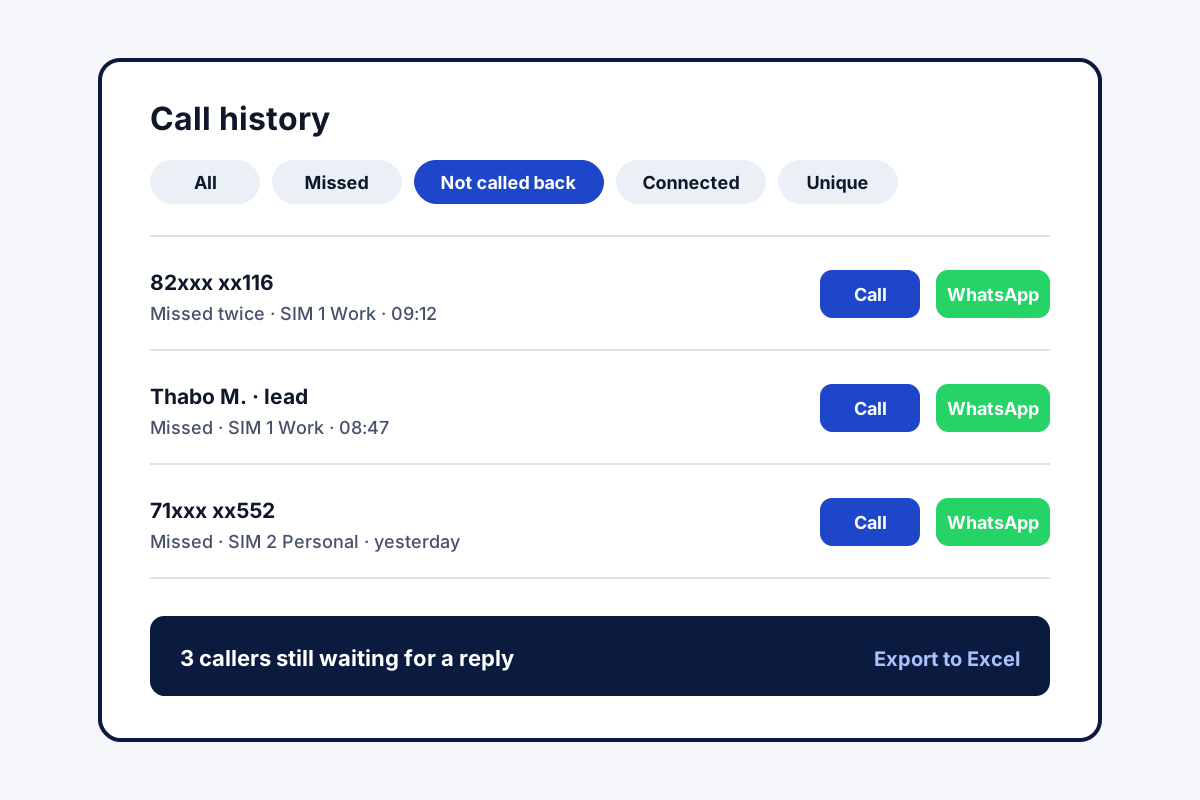
- People who rang and were never called back, in one list
- Dual SIM: choose per call or fix a work SIM
What is a call management app?
Standing in for the default phone app, a call management app decides how calls are placed, shown, sorted afterwards and followed up.
Field Team Tracking is a call management app that links each call to a lead and reminds you who still needs a call back.
- Contacts and earlier call history stay in place.
- Internet calls from WhatsApp, Meet or Zoom count too.
- Call counts for today, a week or a month sit in Analytics.
Call management app: what changes on the phone
A call management app replaces the screen you see when a call comes in and the list you scroll afterwards. Make Field Team Tracking the phone app on Android, and a ringing lead now shows up by name, with its stage and the latest remark, locked screen or not. Digits typed on the dial pad pull up matching contacts and leads at once. Afterwards, the history can be trimmed to a single type of call, from missed and rejected to spam, paying clients, lost leads or anyone you still owe a call. Each missed call shows a notice with two buttons: ring back on the chosen SIM, or send WhatsApp. Internet calls through WhatsApp, Google Meet or Zoom are listed among the ordinary ones. When the day ends, the analytics count the calls by type, and the history exports to Excel or PDF.
Call management app benefits
Caller in context
Lead name, stage and last remark show while it rings.
Outcome filters
Narrow the history to missed, rejected, spam or lost leads.
Unreturned calls
A Home list of callers still waiting for a reply.
SIM control
Choose a SIM each time, or lock one in for work.
Internet calls counted
Calls over WhatsApp or a video meeting are listed too.
Export
Any period of call history as Excel or PDF.
Call management app for teams
One phone is useful; a team of phones is where the owner gains. The owner’s login gathers the calls of every employee, and leads can be assigned and dialled in a queue, as described on the telecaller app and auto dialer app pages. Field staff can carry the same app for attendance, covered on the staff attendance app page. Owners comparing systems for the whole office should read the call management software page. How calls attach to leads is on the call management CRM page, and exports and backups on the call history manager page. Each person’s month in numbers is on the call tracking app page, while masked numbers and recording uploads for company phones belong to employee call monitoring. Staff at a computer can send numbers from Chrome to this phone through click to call. Changing handsets without losing history is covered in call log backup and restore.
Call management app filters
| Filter | What it shows | Use it when |
|---|---|---|
| Not called back | Missed numbers nobody has returned yet | Starting the day |
| Connected | Calls that were answered | Counting real conversations |
| Rejected | Calls the phone marked as rejected | Reviewing refused calls |
| Unique | Each number once, however often it called | Counting real callers |
| Paid clients | Calls with paying customers | Before a renewal |
| Lost leads | Numbers that never connected past your limit | Planning a win-back list |
Call management app setup
- Install the app and open its guided setup.
- Set it as the default phone app when Android asks.
- Choose a default SIM for work calls, or leave the choice per call.
- Open the call history and try the Not called back filter.
Call management app price
Twelve months for one user are ₹1,908, about ₹159 a month; three months are ₹747. Users outside India pay 29 US dollars yearly or 12 quarterly. Tax comes on top. The 3-day trial includes every filter and export.
Call management app limits
- iPhone. Apple keeps both the dialer role and the call history closed, so the call screens and filters on this page belong to Android.
- Recording. Audio files are only as good as the handset’s own recorder, which the app imports from.
- Business lines. There are no shared cloud numbers; each handset calls with its SIM or through WhatsApp.
- Personal calls. On a mixed phone, private calls sit in the history as well, though the account copy can be trimmed to working time.
Call management app example: a property agent in Johannesburg
An imagined agent, used to show the steps. A property agent in Johannesburg gets 25 calls a day from listings, and returns them between viewings. Some callers rang three times and still waited.
Now the agent checks the Not called back list after each viewing and clears it from the car. The Unique filter shows how many different people called each week, 60 on average, not the inflated total of rings. Renewals for landlords start from the Paid clients filter.
Call management app FAQ
What is call management on my Android phone?
Call management on an Android phone is how the phone handles calls: who it shows, which SIM it uses, and what the history lets you filter. Field Team Tracking can take over that job for work calls.
What is the best call management software for a call centre?
A call centre with many seats and cloud lines should choose contact centre software. Staff who ring customers on personal Android handsets suit Field Team Tracking.
Which call management app suits a business phone?
For business calls on Android, Field Team Tracking is worth a look: every call links to a customer, and unreturned missed calls get their own list. A personal user may only need the built-in phone app.
What is Field Team Tracking?
Field Team Tracking is a call management app and CRM that replaces the Android phone app, and adds attendance and field tracking for teams.
How much does a call management app cost with Field Team Tracking?
A Field Team Tracking user comes to ₹1,908 for twelve months, under ₹160 monthly, or ₹747 for three. Overseas, those terms are priced at 29 and 12 US dollars. Taxes are added, after 3 days of trial.
Which is the best dialer app for work?
A work dialer should search leads from the keypad, show the customer before you answer and save the outcome after. Field Team Tracking does these on Android.
Will I lose my contacts if I switch phone apps?
No. Your address book and past calls carry on untouched after the switch.
Can I see which missed calls I have not returned?
Yes. The Home screen keeps a list of people you never rang back from either SIM, and the history has a Not called back filter.
Does it handle two SIM cards?
Yes. Choose a card at each call, or make one card the default for work, and the history labels every call with the correct card.
Are WhatsApp calls counted?
Yes. Internet calls through WhatsApp, Google Meet or Zoom are added to the history, mixed in with ordinary calls.
Can I make conference calls?
Yes. While on one call, add another person, then join everyone into a single conversation.
Can I call from my computer?
Yes. A number clicked in the Chrome browser on your PC rings out from your phone, with your chosen SIM and speaker preferences.
Can the call history be exported?
Yes. Export the call history for any period to Excel or PDF.
See your team's whole day on one map
3-day trial with every feature. ₹159 per user per month on the yearly plan (₹1,908 a year), or ₹249 per user per month for 3 months; outside India $29 per user per year or $12 for 3 months. Prices are per user, exclusive of taxes.