
Lead follow up CRM
Lead Follow Up CRM by Field Team Tracking
A lead follow up CRM makes sure no enquiry goes quiet: each lead has a next action, a date, and the history needed to make that contact count. Field Team Tracking ties a ringing reminder to every lead, so following up starts with the full story on screen.
- A next callback set right after each call
- Overdue follow-ups carried into Today
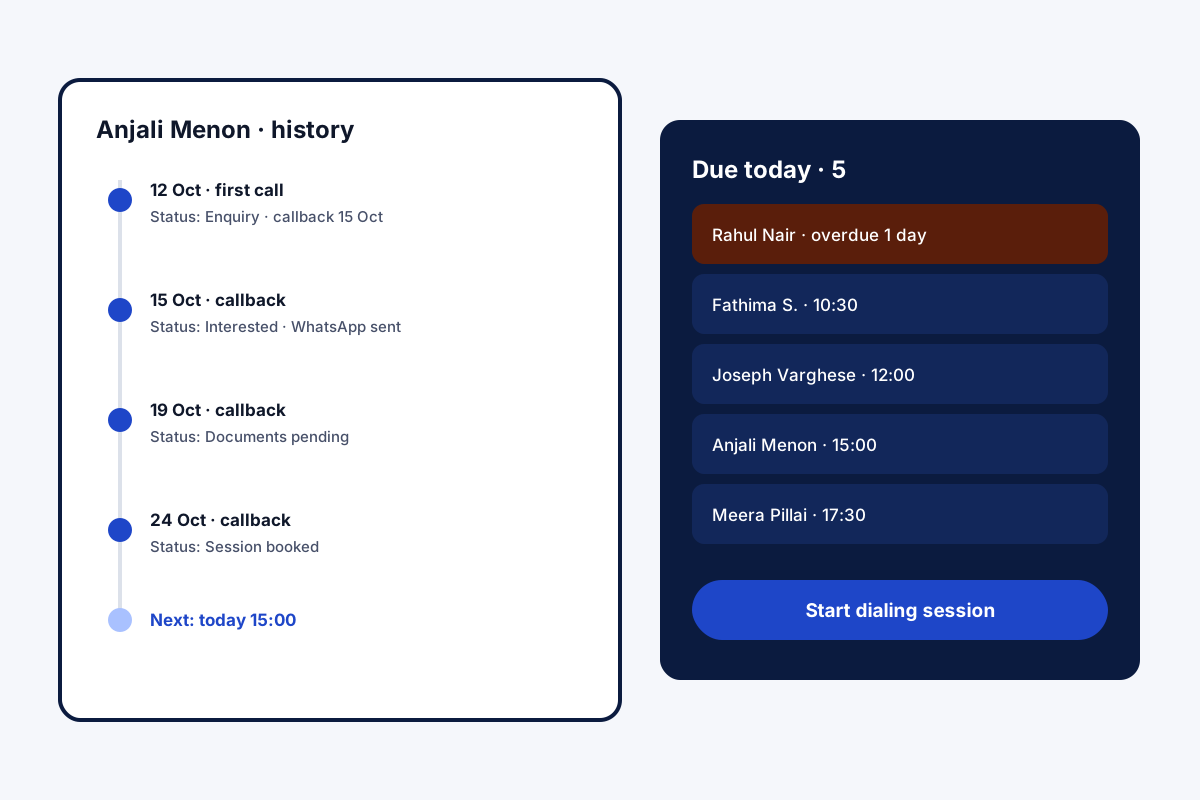
- Today's due follow-ups dialled in one session
What is a lead follow up CRM?
It is customer software focused on the steps after first contact: scheduling the next call or message, reminding the salesperson, and keeping the history together.
In Field Team Tracking those steps run from the phone, with alarms, WhatsApp and the dialer working on the same lead.
- Follow-ups sit on the lead beside its history.
- Lost leads gather in their own list.
- Follow-ups can send WhatsApp when they fire.
Lead follow up CRM: the loop after the first call
Many leads need several contacts before they decide, so a lead follow up CRM is really about the loop. In Field Team Tracking, the loop starts the instant the line goes quiet: a small form collects the outcome, a remark and the next callback, two taps in all. When that time comes, the phone sounds an alarm and the whole lead history is one tap away. Miss it, and it turns overdue and joins Today. A morning dialing run can work through everything due that day. A WhatsApp message can be attached to any follow-up and sent as it fires. Leads that never connect move to a lost leads list, and day-by-day WhatsApp series can keep warm leads engaged until a salesperson steps in.
Lead follow up CRM benefits
Next step every time
Callback set on the sheet after each call.
Alarms, not lists
Follow-ups ring at the set minute.
Overdue carried
Missed follow-ups wait in Today.
Due today, dialled
One session for all of today.
Message on cue
An attached WhatsApp message as it fires.
Lost leads
Never-connected numbers kept for later.
Lead follow up CRM within the lead record
Follow-ups live on the lead, beside its stage history, so anyone opening the lead sees what was promised and when. The alarm behaviour is covered on the follow up reminder app page, the list of leads with its filters on the lead management app page, and messages after each call on the auto WhatsApp message after call page. Follow-ups that happen in person are logged as described on the customer visit tracker page.
Lead follow up CRM: the follow-up loop
| Step | What the salesperson does | What the app does |
|---|---|---|
| Call ends | Taps a result and a callback time | Saves both on the lead |
| Callback due | Answers the alarm | Shows the lead and its history |
| Callback missed | Nothing yet | Marks it overdue and moves it to Today |
| Morning | Starts a session | Dials every follow-up due today |
| No answer ever | Moves on | Adds the number to lost leads |
Lead follow up CRM setup
- Import or capture your leads.
- After every call, set the next callback on the result sheet.
- Start each morning with the due-today dialing session.
- Clear overdue follow-ups before new calls.
Lead follow up CRM limits
- Email. No email follow-up sequences.
- Scoring. No automatic lead scoring.
- Calendar sync. Follow-ups stay in the app.
- iPhone calls. Calls are logged on Android only.
Lead follow up CRM example: a study abroad consultancy in Kochi
An invented consultancy, with sample figures. A study abroad consultancy in Kochi gets 300 student enquiries a month. Counsellors called each enquiry once, and many students were never contacted again.
Every call now ends with a callback booked, and counsellors start the day with the due-today session. Overdue follow-ups are cleared before new enquiries. Within two months, the share of enquiries reaching a counselling session rose from about one in eight to one in five.
Lead follow up CRM FAQ
Which lead follow up CRM works from a phone?
Field Team Tracking does: each lead's next callback rings as an alarm, and the calls and chats sit on the lead.
What is Field Team Tracking?
Field Team Tracking is a lead follow up CRM with a dialer, WhatsApp tools, reminders and field attendance.
What does the lead follow up CRM cost on Field Team Tracking?
Per user: three months for ₹747 in India; twelve months for USD 29 elsewhere; tax extra.
What is lead tracking in a CRM?
Following each lead through stages, with every contact recorded, so you know where it stands and what comes next.
What is a CRM follow-up?
A scheduled next contact with a lead or customer, set in the CRM so it is not forgotten.
What is a lead follow-up?
Every touch that comes after the first conversation, by phone, message or visit, meant to move the lead a step on.
How do I set the next follow-up?
After each call, the result sheet offers a callback time in two taps, from minutes to a month ahead.
What if a follow-up is missed?
It turns overdue and appears in Today until it is marked done.
Is there a quick way to work through today's callbacks?
Yes. Start a dialing run from today's due list and the calls come one after another.
Will a follow-up message the lead for me?
Yes. Attach a message, and it is sent, or opened ready, when the reminder fires.
What about leads that never answer?
Numbers that never connect wait in the lost leads list for another try.
See your team's whole day on one map
3-day trial with every feature. ₹159 per user per month on the yearly plan (₹1,908 a year), or ₹249 per user per month for 3 months; outside India $29 per user per year or $12 for 3 months. Prices are per user, exclusive of taxes.