
Sales team daily report format
Sales Team Daily Report Format by Field Team Tracking
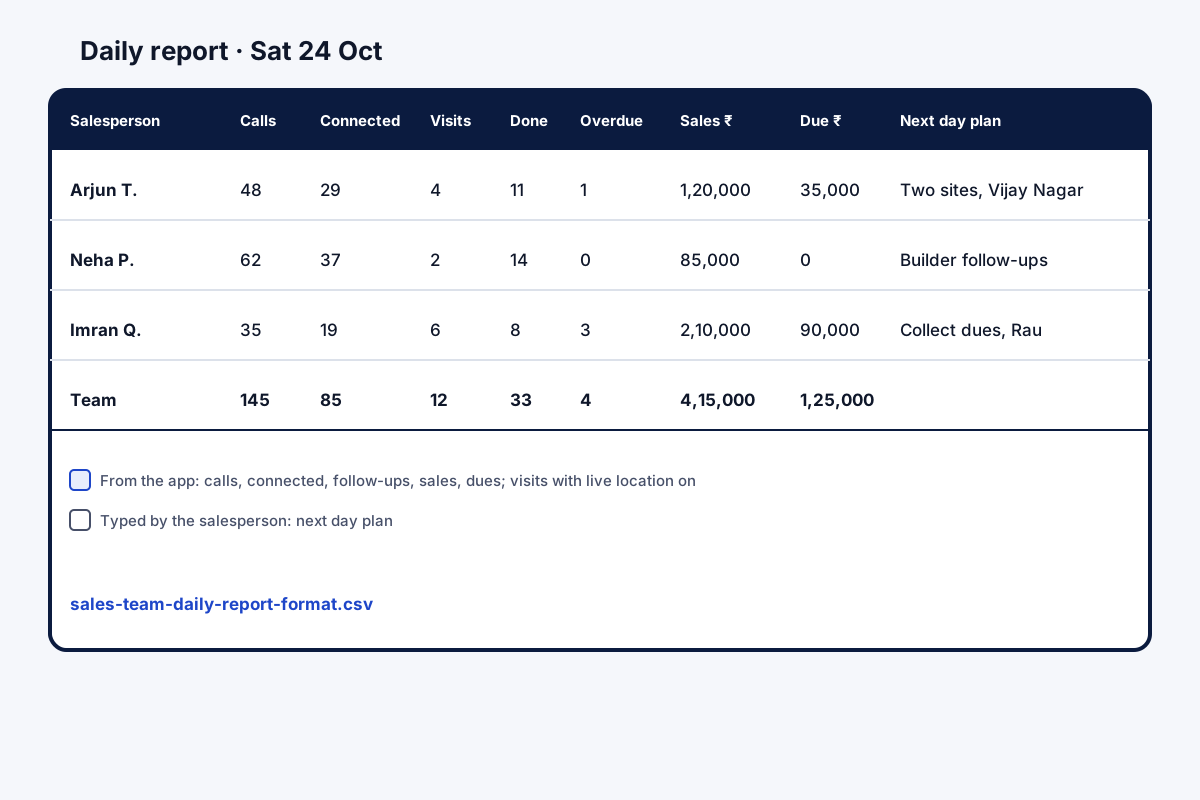
A sales team daily report format is a fixed layout each salesperson fills at day end: calls, meetings, results, money and the plan for tomorrow. Field Team Tracking publishes the layout as a spreadsheet file; the app then shows most of the numbers you copy in.
- Thirteen columns, one row per person per day
- Works in any spreadsheet program
- Call, callback and sales numbers ready in the app
What is a sales team daily report format?
It is a standard template for a salesperson's end-of-day report, listing activity, outcomes and next steps in the same order every day so a manager can compare.
Field Team Tracking offers a downloadable format and gives you the call, follow-up and sales numbers to copy in.
- Keep the same columns every day.
- Prefer numbers from records over memory.
- Add one line for tomorrow's plan.
Sales team daily report format: the columns that matter
A sales team daily report format works when every salesperson fills the same boxes in the same order. The layout offered here has thirteen columns: date, salesperson, calls made, connected calls, new leads, visits, follow-ups done, follow-ups overdue, sales count, sales amount, amount due, the next day plan and notes. Download the CSV format; any spreadsheet program reads it. A row for each person each day turns the week into a table rather than a pile of messages. Many of those numbers can be read from Field Team Tracking and copied in: call counts from the phone’s own log, callbacks done or overdue, sales and their dues from the sales recorded per client, and route stops as a guide to visits. New leads, the plan and notes are typed.
Sales team daily report format benefits
Ready layout
Thirteen columns in a CSV file.
Same order daily
Rows that compare across days and people.
Calls from records
Counts taken from the phone's log.
Follow-ups
Done and overdue from the Reminders tab.
Sales and dues
Paid and due amounts from client records.
Shareable
Daily call report sent on WhatsApp.
Sales team daily report format or an app report?
A sheet is a fine start for a small team. It breaks down when salespeople forget, round numbers up, or send their row late. The app’s daily call report gives you the call counts and missed callers to copy in, as the daily sales report app page explains. For turning a week of rows into coaching, read how to track sales team performance, and for the call counts themselves the call tracking app page.
Sales team daily report format: where each column comes from
| Column | Where to read it | Counted by the app? |
|---|---|---|
| Calls made, connected calls | Each phone's call analytics | Yes |
| Follow-ups done and overdue | Reminders tab | Yes |
| Sales, amount, amount due | Sales recorded per client | Entered once at the sale |
| Visits | Route stops of 5 minutes or more, as a guide | With live location on |
| New leads, next day plan, notes | The salesperson | No, typed |
Sales team daily report format setup
- Save the CSV and load it into your spreadsheet program.
- Share one sheet with the whole team, one tab per week.
- Ask each person to add a row before leaving.
- Later, copy the call and sales numbers from the app into those columns.
Sales team daily report format limits
- Manual sheet. The CSV does not fill itself; the app’s numbers are copied in.
- Formats. CSV only; no PDF or Word version.
- Team roll-up. Each phone has its own daily call report.
- Visits. Counting visits needs live location switched on.
Sales team daily report format example: a cement dealer in Indore
An invented dealer, with sample figures. A cement dealer in Indore has five salespeople who phone builders and visit sites. Each sent a long WhatsApp message every evening in a different style.
The team moved to the thirteen-column sheet, filling calls and follow-ups from the app’s numbers. The owner now reads one table on Saturday and can see that site visits, not calls, drive most orders.
Sales team daily report format FAQ
Where can I get a sales team daily report format to download?
Field Team Tracking offers one right here: a plain spreadsheet file with thirteen columns.
What is Field Team Tracking?
Field Team Tracking is a sales and field team app whose calls, follow-ups and sales records can fill a sales team daily report format.
Does the daily report format cost anything with Field Team Tracking?
There is no charge for the layout itself. The app that supplies the numbers is billed per user, USD 12 a quarter abroad or ₹747 in India, plus tax.
How do I write a daily sales report?
Fill the same columns each day: calls, connected calls, visits, follow-ups, sales and amount due, then one line on tomorrow's plan.
What is the recommended format for a sales report?
A table with one row per salesperson per day or week, numbers first, comments last, and the same order every time.
How do I make a DSR report?
DSR stands for daily sales report. Use the format here, and copy in the call counts from the app's daily call report and the sales you record per client.
Which columns should a daily report have?
At least calls made, connected calls, new leads, visits, follow-ups done and overdue, sales count and amount, amount due, and the next day plan.
Which columns can the app fill?
The app shows the numbers; you copy them in. Calls come from the phone's log, completed and overdue callbacks from the Reminders tab, and sales with paid and due amounts from the sales you record per client.
Which columns still need typing?
New leads, the next day plan and any comments, plus visits if live location is off.
Can the report reach my manager automatically?
Each phone's daily call report can arrive as a notification at a set time, and the salesperson can share it on WhatsApp.
Should the format be daily or weekly?
Daily for activity, weekly for review. The same columns work for both.
See your team's whole day on one map
3-day trial with every feature. ₹159 per user per month on the yearly plan (₹1,908 a year), or ₹249 per user per month for 3 months; outside India $29 per user per year or $12 for 3 months. Prices are per user, exclusive of taxes.