
Auto WhatsApp after call
Auto WhatsApp Message After Call by Field Team Tracking
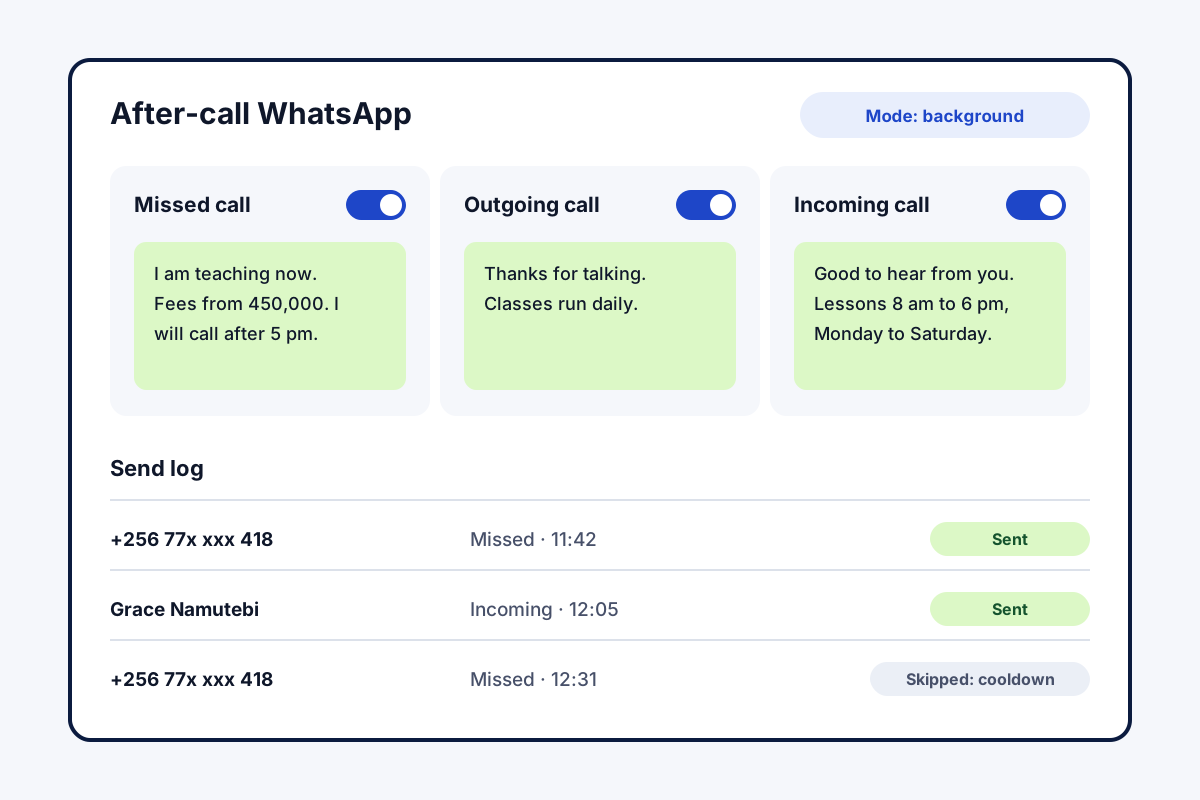
Put plainly, auto WhatsApp message after call means your phone sends or prepares a WhatsApp message to the other person the moment a call ends. Field Team Tracking holds a separate text for a missed, a dialled and a received call, and records what happened to each.
- Separate text per call type
- Background sending through a WhatsApp Business API
- Quiet hours, cooldown and excluded contacts
What is auto WhatsApp message after call?
It is a rule on your phone: when a call ends, a ready WhatsApp message is sent to that number, such as a thank-you, a brochure or a sorry-I-missed-you note.
In Field Team Tracking the rule runs on Android, and each message is either sent in the background or opened ready to send.
- Fully hands-off sending needs a WhatsApp Business API account.
- Without one, WhatsApp opens with the text typed in.
- Each send is logged as sent, skipped or failed.
Auto WhatsApp message after call: how the rule works
An auto WhatsApp message after call saves the minute everyone means to spend and rarely does. In Field Team Tracking you write three texts. An unanswered ring might get “Busy on site right now, expect my call by lunch.” A call you placed might get the price list, and one you picked up a thank-you with the shop location. As the line drops, the app chooses the matching text and sends it to that number. Sending works two ways, chosen per rule. With a WhatsApp Business API account connected, the message leaves in the background with no tap. Without one, WhatsApp or WhatsApp Business opens with the text ready, and one tap sends it. Silent night hours, a gap before the same number hears from you again, an optional prompt before each send, and a do-not-message list stop it becoming a nuisance.
Auto WhatsApp message after call benefits
Three messages
A text for unanswered, dialled and received calls.
Sent at once
The text goes out as the call ends.
Polite by design
Night silence, a resend gap and a blocked list.
Send log
See what went, what was skipped and why.
Ask first
Optionally confirm each message before it goes.
More triggers
Status changes, sales and reminders can send too.
Auto WhatsApp message after call for missed calls
The missed-call message does the most work. Someone whose ring went unanswered often tries the next shop on the list. A quick note that you will call back keeps them waiting for you instead. The callback itself can then come from the not-called-back list described with managing business calls. Callbacks set for later ring as alarms, covered on the follow up reminder app page, and every chat sits on the lead next to its calls, as the lead management app page shows. Replies to these messages arrive in the shared inbox of the WhatsApp CRM, and one offer to hundreds of customers goes out from the bulk WhatsApp sender.
Auto WhatsApp message after call send modes
| Mode | What happens after the call | What you need |
|---|---|---|
| Background | Message sent with no tap | A WhatsApp Business API provider |
| Ready to send | WhatsApp opens with the text typed in | WhatsApp or WhatsApp Business on the phone |
Auto WhatsApp message after call setup
- Open the app’s WhatsApp settings and switch on the after-call rule.
- Type the unanswered, dialled and received texts.
- Choose background or ready-to-send mode.
- Set quiet hours and a cooldown, then make a test call.
Auto WhatsApp message after call limits
- iPhone. iOS does not report call endings to apps, so the rule is for Android.
- Background sending. Hands-off sending needs a WhatsApp Business API account; its fees are separate.
- Template rules. WhatsApp may require an approved template for business-started messages through the API.
- SMS. The rule sends WhatsApp only, not text messages.
Auto WhatsApp message after call example: a driving school in Kampala
A made-up school, with numbers for illustration. A driving school in Kampala gets enquiry calls while the owner is out teaching. Many callers never rang back.
Now every missed call gets “I am teaching right now. Course fees start at 450,000 shillings; I will call you after 5 pm.” Answered calls get the weekly class hours. In the first month, the owner returned 70 missed calls, and most callers had already read the fees before the callback.
Auto WhatsApp message after call FAQ
Which app handles auto WhatsApp message after call on Android?
Field Team Tracking does this: it notices the call ending and sends the text set for that kind of call, whether missed, dialled or received.
What is Field Team Tracking?
Field Team Tracking is an Android app for sales and field teams that adds auto WhatsApp after calls to a dialer, CRM and attendance tracker.
What will after-call WhatsApp cost with Field Team Tracking?
The app costs ₹747 per user per quarter in India, or 12 US dollars elsewhere, plus tax. A WhatsApp Business API provider, if you use one, bills you separately.
Where do I switch on a WhatsApp text after each call?
In the app's WhatsApp settings, turn on the after-call rule, type a text for each call type, then pick background or ready-to-send mode.
Can WhatsApp itself reply after a phone call?
WhatsApp Business can greet new chats and answer while you are away. It does not react to phone calls, and this rule fills that gap.
How can I automate WhatsApp messages without the API?
Choose the ready-to-send mode. Each time a call ends, WhatsApp opens on that chat with your words in the box, waiting for one tap.
Does it work on iPhone?
No. iOS does not tell apps when a call ends, so the after-call message is for Android phones.
Will the same person get a message after every call?
Not if you set a cooldown. A per-number cooldown skips repeat messages within the time you choose.
Can I stop messages at night?
Yes. During quiet hours messages are skipped, and excluded contacts never get one.
Can I check whether a message went out?
Yes. Every automatic message is listed with its outcome (gone, skipped or broken) and the reason.
What other events can send WhatsApp automatically?
Moving a lead to a new stage, recording a sale and an alarm going off can each have a text of their own.
See your team's whole day on one map
3-day trial with every feature. ₹159 per user per month on the yearly plan (₹1,908 a year), or ₹249 per user per month for 3 months; outside India $29 per user per year or $12 for 3 months. Prices are per user, exclusive of taxes.