
Employee hours tracking app
Employee Hours Tracking App by Field Team Tracking
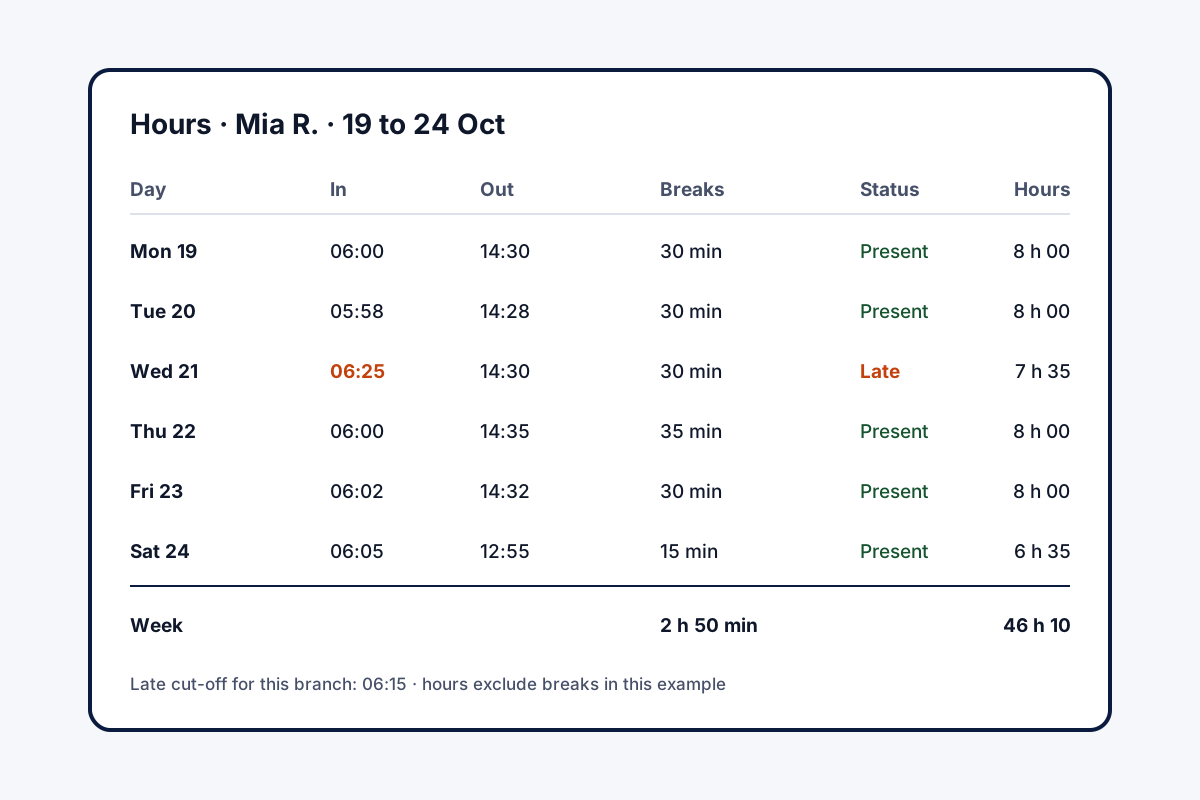
An employee hours tracking app measures how long each person worked: when they started, when they stopped, and the breaks in between. Field Team Tracking takes those hours from selfie punches, so the times come from the employee's own phone, not a timesheet typed later.
- Start and finish from live selfie punches
- Every break saved and shown in the hours
- Late marks and half days by branch rules
What is an employee hours tracking app?
It is a phone or web tool that records the start, finish and breaks of each employee's working day and totals the hours for payroll or review.
In Field Team Tracking the hours come from attendance punches, with breaks and lateness worked out by the branch's rules.
- Day-level hours, not per-project timers.
- Field staff also get worked and idle time.
- Export the hours to Excel for payroll.
Employee hours tracking app: where the numbers come from
An employee hours tracking app is only as honest as its start time. In Field Team Tracking, the day begins with a selfie punch that must pass a live check, inside the office circle unless the branch accepts punches elsewhere. Pauses are marked with Break and Resume work buttons, and each break is kept. The finishing punch closes the day. From those times, the branch rules decide whether the arrival was late and whether a short day counts as half. Employees see their own report in four views, from today back to the month before, hours and pauses shown together. The owner picks a branch and a date range in the web report, which lists every day’s start, finish, hours and pauses, and downloads it as Excel for payroll. For field staff, the route view adds worked time, idle time and time spent at the office.
Employee hours tracking app benefits
Real start times
Each day opens with a live selfie punch.
Breaks recorded
Break and Resume buttons keep every pause.
Late and half day
Worked out from each branch's rules.
Staff see their own
Week and month hours on their phone.
Excel for payroll
Punch times, hours and breaks per day.
Field extras
Worked and idle time for staff on the road.
Employee hours tracking app or a project timer?
Many hours apps on the market are timers: start a clock on a task, stop it, bill the client. That suits freelancers and agencies. This app tracks the working day itself, which suits shops, sales teams, service crews and office staff whose pay depends on attendance. Teams still on paper can begin with the staff attendance sheet layout, and the punch screen is described on the punch in punch out app with location page. The punch rules are explained on the staff attendance app page, the live face check on the selfie attendance app page, and field routes on the staff time clock and tracking page. Hours set beside places visited are shown on the employee time and location tracking app page, and policies for a dispersed workforce on the field workforce management software page. Late marks and absences across a month are on the staff attendance tracker page.
Employee hours tracking app report columns
| Column | Meaning |
|---|---|
| Punch in and punch out | Start and finish times from the selfie punches |
| Hours | Shown beside the breaks |
| Breaks | Each pause recorded with the Break button |
| Totals | Present, late and absent for the period |
| Kilometres | Distance for staff with live location on |
Employee hours tracking app setup
- Create a branch and enter its working hours and days off.
- Decide when a punch counts as late and when a short day becomes a half.
- Invite employees to put the app on their phones.
- At month end, export the hours to Excel.
Employee hours tracking app limits
- Projects. No timers per task, client or project.
- Overtime pay. Hours are recorded; pay rules are applied in your payroll.
- Shared devices. Each person punches on their own phone.
- Payroll. Salaries and deductions are worked out in your own payroll software.
Employee hours tracking app example: a cleaning company in Melbourne
An invented company, with sample hours. A cleaning company in Melbourne sends 25 cleaners to offices on early and late shifts. Paper timesheets arrived a week late, often with rounded times.
Each client building is set up as a branch with its own office location, so cleaners punch in on arrival and press Break during meal stops. The office exports the fortnight’s hours to Excel for payroll on the day the period closes, and disputes about rounded times stopped.
Employee hours tracking app FAQ
Which employee hours tracking app works for staff who are not at a desk?
Field Team Tracking does: hours come from selfie punches on each person's phone, wherever the branch allows them to punch.
What is Field Team Tracking?
Field Team Tracking is an employee hours tracking app that also covers field routes, sales calls and leads.
What is the cost of the employee hours tracking app on Field Team Tracking?
The yearly seat covers it: ₹1,908 per person in India, USD 29 elsewhere, plus tax.
How should a business keep track of staff hours?
Let the punch itself record the time, on the employee's phone with a live check, and total the hours automatically. Typed timesheets drift.
How do I track employee working hours?
Set working hours, a late cut-off and half-day rules per branch, then have staff punch in and out and press Break when they pause.
Can I track hours per project or task?
No. Hours are tracked per day from attendance, not with project timers.
Are breaks taken out of the hours?
Breaks are recorded with Break and Resume work buttons, and the report shows hours and breaks side by side, so you can read both.
What does the employee see?
Their own report on the phone, covering the day, the past seven days, this month and the previous one, hours and pauses included.
What extra do I get for field staff?
The route view adds worked time, idle time, distance and time spent at the office for each day.
Can I export the hours for payroll?
Yes. Pick the branch and dates in the web report and download it as Excel.
Does it work on iPhone?
Yes. Attendance and hours work on Android and iPhone.
See your team's whole day on one map
3-day trial with every feature. ₹159 per user per month on the yearly plan (₹1,908 a year), or ₹249 per user per month for 3 months; outside India $29 per user per year or $12 for 3 months. Prices are per user, exclusive of taxes.