
Auto dialer from Excel
Auto Dialer from Excel by Field Team Tracking
An auto dialer from Excel takes the phone numbers in a spreadsheet and rings them in order, so nobody copies digits from a screen to a keypad. Field Team Tracking turns the spreadsheet into a lead list on an Android phone, then dials it from the SIM.
- Excel, CSV or JSON, even shared from WhatsApp or email
- Repeated numbers dropped, country codes handled
- Rows that could not be read listed with the reason
What is auto dialer from Excel?
It means ringing the numbers in a spreadsheet automatically: the file is loaded into a dialer, which calls each number in turn so nobody keys them in.
In Field Team Tracking each import stays a separate list, ready to narrow down, call through or delete later.
- Android phones place the calls by SIM.
- A linked Google Sheet adds rows on a schedule.
- Deleting an import touches only its own leads.
Auto dialer from Excel in four steps
- Prepare the file. Keep one row per contact, with the phone number in its own column and the name beside it.
- Import it into the app. Open the import screen and pick the file, or share it straight from WhatsApp, email or the browser.
- Match columns and check skipped rows. Link each column to a lead field, set the country, and read why any row was left out.
- Start the calling session. Open the new list, filter it if needed, and start the dialer; it rings each number after the last call ends.
Auto dialer from Excel: from spreadsheet to calls
Most sales lists start life in a spreadsheet, and an auto dialer from Excel saves the slow part: typing each number. With Field Team Tracking, the file goes onto the phone in one of several ways: picked from storage, or shared straight from a WhatsApp chat, an email or a browser download. The import screen asks which column holds the number, which holds the name, and which country the numbers belong to. Repeated numbers are dropped, and the import reports every unusable row with its reason, so a typo does not vanish silently. Your file turns into a list of its own: narrow it with filters, start the dialer, and each number rings after the previous call ends, with the pause you set. Link a Google Sheet instead, and fresh rows keep arriving.
Auto dialer from Excel benefits
Any common file
Excel, CSV or JSON.
Share to import
Send the file from WhatsApp or email.
Clean list
Repeats dropped, country codes handled.
Skipped rows explained
Each rejected row shows why.
Rings in order
Next number after each call ends.
Share the work
Split the list among callers in turns.
Auto dialer from Excel: after the import
Once the list is in, it behaves like any other lead list. Results saved after each call stay on the lead, unanswered numbers can be tried again, and the list can be split among callers. The calling session itself is on the auto dialer app page, sharing one long list is on the bulk calling app page, and repeat attempts are on the auto redial app page.
Auto dialer from Excel import checks
| Check | What happens | What you see |
|---|---|---|
| Number column | You link it to the phone field | Numbers read from that column |
| Country | Set once for the file | Numbers formatted for dialing |
| Repeated numbers | Dropped | Fewer rows than the file |
| Unusable rows | Left out | Each one with its reason |
| Result | A new list | Ready to filter or dial |
Auto dialer from Excel limits
- Desktop dialing. The calls come from an Android phone, not from Excel on a computer.
- iPhone. The iPhone app has no call log access, so run the SIM dialer on Android.
- Internet calls. Calls use the SIM, or WhatsApp within a daily limit, not a VoIP line.
- Unreadable rows. Rows the app cannot read as a number are listed as skipped, with the reason.
Auto dialer from Excel example: a loan agent in Jaipur
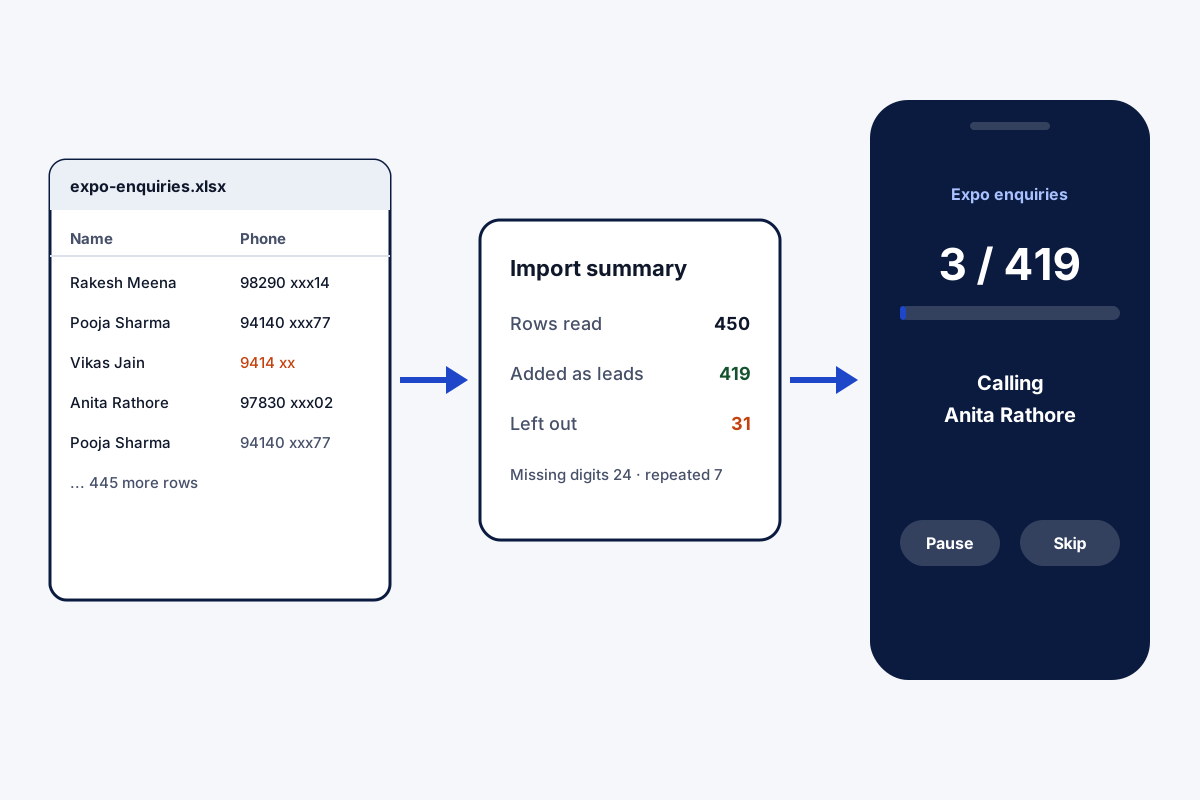
An invented agent, with sample figures. A home loan agent in Jaipur received 450 enquiries from a property expo as a spreadsheet. Dialing them by hand would have taken most of a week.
He shared the file from WhatsApp into the app, linked the number and name columns, and saw 31 rows left out: 24 for missing digits and 7 repeats. The remaining list rang through in three afternoon sessions, and every result sat on the lead for the next follow-up.
Auto dialer from Excel FAQ
Which app works as an auto dialer from Excel on Android?
Field Team Tracking does: import the spreadsheet once, and the dialer rings its numbers in order from your phone's SIM.
What is Field Team Tracking?
Field Team Tracking is an auto dialer and lead CRM for Android, with WhatsApp tools and staff attendance.
What does dialing from Excel cost with Field Team Tracking?
Importing and dialing come with the seat: ₹249 a month per user on quarterly billing in India, or USD 12 a quarter abroad. Tax is extra.
What does setting up an auto dialer involve?
Install the dialer app, allow its phone permissions, load a list of numbers, set the pause between calls, and start a session.
Can I dial from a Google Sheet instead?
Yes. Link the sheet, and new rows are pulled into the app on a schedule.
What file types work?
Excel, CSV and JSON files.
What happens to duplicate numbers?
Repeats are removed as the file loads, and the country you choose formats every number.
Why were some rows skipped?
Each one is listed with its cause, for example a number with too few digits.
Can I split the file between callers?
Yes. Share the imported leads among teammates in turns, with a preview before anything moves.
Can I delete an imported list later?
Yes, and only the leads that came from that file disappear.
Does it work on iPhone?
Apple keeps the call log away from apps on iPhone, so use an Android phone for SIM dialing.
See your team's whole day on one map
3-day trial with every feature. ₹159 per user per month on the yearly plan (₹1,908 a year), or ₹249 per user per month for 3 months; outside India $29 per user per year or $12 for 3 months. Prices are per user, exclusive of taxes.