
Punch in punch out app with location
Punch In Punch Out App with Location by Field Team Tracking
A punch in punch out app with location records the start and end of an employee's shift on their phone, along with where they were at that moment. Field Team Tracking pairs each punch with a live selfie and checks it against the branch's office radius.
- A live selfie behind every punch
- Location checked against the office circle
- Saved offline, sent when signal returns
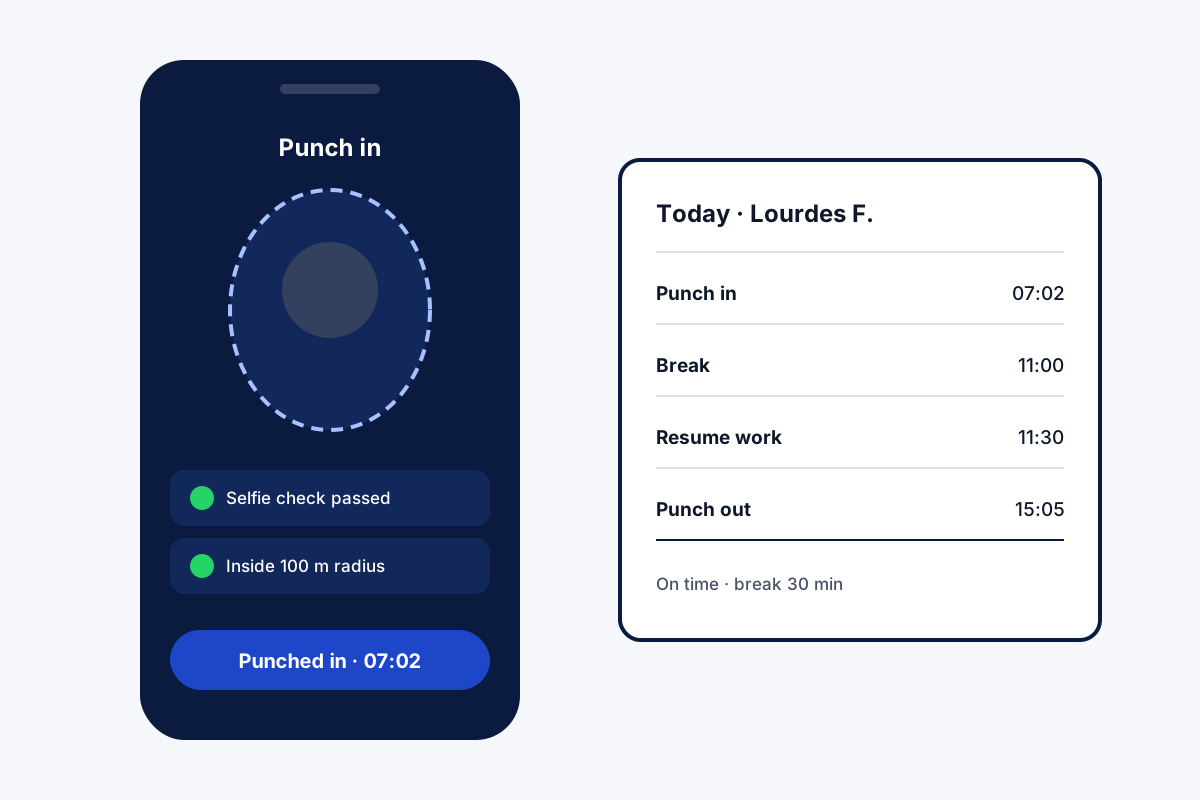
What is a punch in punch out app with location?
It is a time clock on the phone: staff tap to start and end work, and each tap records the time and the phone's location.
In Field Team Tracking each punch also needs a live selfie, and branch rules decide whether punches away from the office count.
- Break and Resume buttons between punches.
- Late and half-day marks follow branch rules.
- Works on Android and iPhone.
Punch in punch out app with location: what each punch checks
A punch in punch out app with location is only as trustworthy as the punch. Here the employee faces the front camera, blinks, then copies one movement chosen at random; a printed photo cannot follow along. In the same instant, the handset’s GPS reading is compared with the ring the owner set around the branch office. Whether a reading outside that circle is accepted is a branch setting: strict for a shop floor, relaxed for a team that starts at client sites. Without coverage nothing is lost, because the punch is uploaded later. Pauses during the shift are logged with two buttons, Break and Resume work. Late arrivals and half days follow the branch’s own rules, each employee can read their own record, and the owner downloads the branch report as a spreadsheet.
Punch in punch out app with location benefits
Live selfie
A blink and a random move on each punch.
Location check
Compared with the office circle.
Outside punches
Allowed or refused by branch rule.
Offline punches
Saved, then sent with signal.
Breaks
Break and Resume between punches.
Excel report
Punches for any branch and dates.
Punch in punch out app with location versus a plain time clock
A plain time clock app records a time and maybe a pin on a map. Adding a live selfie stops photo proxies, and branch rules stop punches from the wrong place. For staff who travel, live location can continue between the punches, only on duty and after consent. Branch rules in full are on the staff attendance app page, the office radius on the GPS attendance app page, and hours from punches on the employee hours tracking app page. Choosing the circle’s size is covered on the geofence attendance app page, and the whole chain from punch to branch report on the GPS attendance tracking system page.
Punch in punch out app with location: a day’s punches
| Moment | What is recorded |
|---|---|
| Punch in | Time, live selfie check, location against the office circle |
| Break | Start of the pause |
| Resume work | End of the pause |
| Punch out | Time, selfie check and location |
| Day status | Late or half day by branch rules |
Punch in punch out app with location setup
- Enter the branch office’s position and the size of its circle.
- Choose whether punches outside the office are allowed.
- Invite staff and have each install the app on their phone.
- Try a punch in, a break and a punch out on day one.
Punch in punch out app with location limits
- Shared devices. No kiosk mode; each person punches on their own phone.
- Face matching. The selfie is checked as live, not matched to a stored photo.
- Payroll. Punches export to Excel for payroll; salaries are not calculated.
- Camera. A working front camera is needed.
Punch in punch out app with location example: a hotel housekeeping team in Goa
An invented hotel team, with sample numbers. A beach hotel in Goa has 22 housekeeping staff on three shifts. A paper register at the staff gate was often signed by one person for several colleagues.
Staff now punch in on their phones at the gate, inside the hotel’s radius, with the selfie check. Breaks are recorded with the button. The supervisor exports the fortnight’s punches for payroll, and the register signing for absent colleagues stopped.
Punch in punch out app with location FAQ
Which punch in punch out app with location also checks a selfie?
Field Team Tracking does: a punch only counts once the face on camera blinks and follows a random prompt, and the punch meets the branch's location rule.
What is Field Team Tracking?
Field Team Tracking is a punch in punch out app with location, plus field routes, calls and leads for the same team.
What does the punch in punch out app cost on Field Team Tracking?
Billed per employee: USD 29 yearly outside India; in India, ₹747 covers three months. Tax is extra.
What is the best app for punching in and out?
One that checks the person is really there, records location, and works offline. Field Team Tracking does all three.
Can the app see my location?
At each punch it checks location. All-day location runs only for staff who switch it on after the consent screen, and only on duty.
Can I track my husband's phone location with this app?
No. It is for a business's own staff, who install it and agree on their own phones.
What if I punch in away from the office?
That is a branch setting. A shop-floor branch can insist on the office circle, while a branch of travelling staff can accept punches anywhere.
Can I take a break without punching out?
Yes. Press Break and then Resume work; each break is saved.
Does it work without internet?
Yes. Punches made without coverage are uploaded as soon as the network is back.
Can I see my own punches?
Yes. On the phone you can open four views of your own punches: today, the past week, the current month and the one before.
Can the owner export the punches?
Yes. Pick the branch and dates on the web report and download it as a spreadsheet.
See your team's whole day on one map
3-day trial with every feature. ₹159 per user per month on the yearly plan (₹1,908 a year), or ₹249 per user per month for 3 months; outside India $29 per user per year or $12 for 3 months. Prices are per user, exclusive of taxes.