
Selfie attendance app
Selfie Attendance App by Field Team Tracking
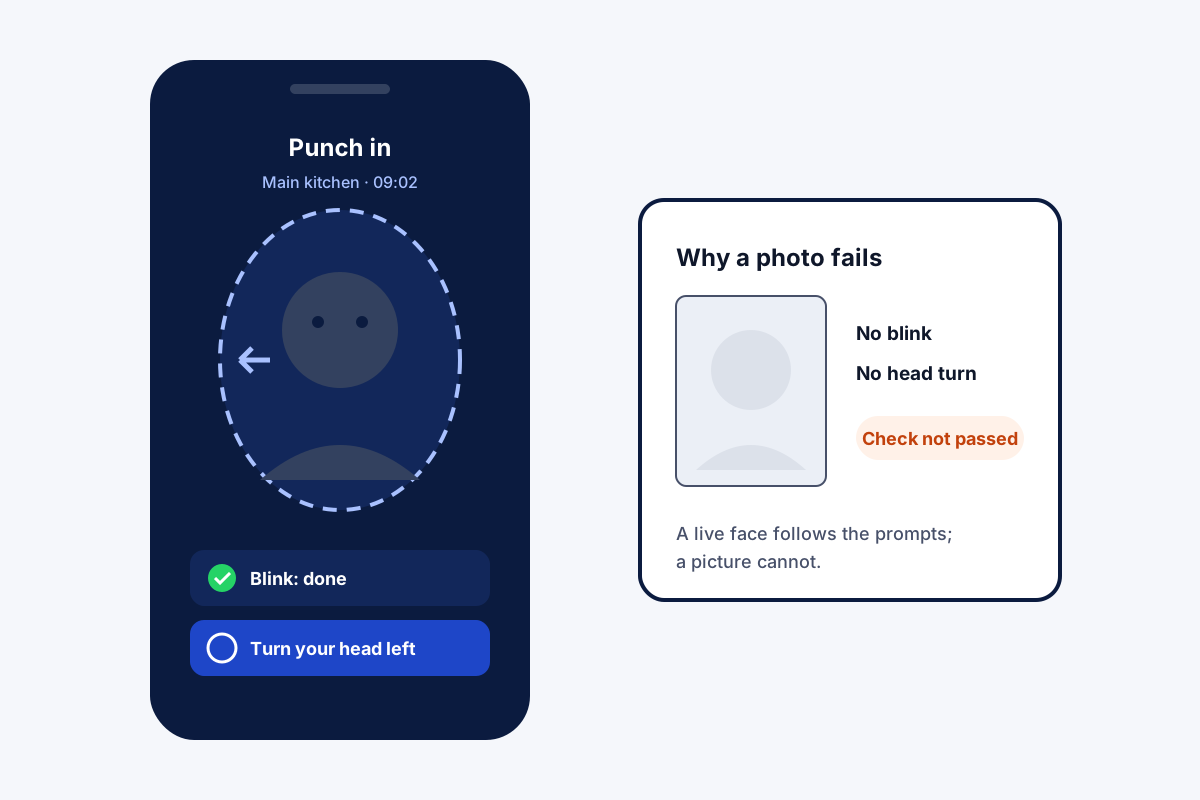
A selfie attendance app records a worker's arrival with a picture taken on their own phone at the moment of punching in. Field Team Tracking adds a liveness test to that picture: the face must blink, then follow a move the app picks at random.
- A held-up photo fails the live check
- No shared fingerprint machine to touch
- Works with no signal; sends the punch later
What is a selfie attendance app?
It is a phone app where staff mark attendance by taking a selfie, usually with a time stamp and a location check, instead of a register or a fingerprint device.
In Field Team Tracking the selfie must pass a live check, and the branch can also require the office location.
- The live check targets proxy punching with photos.
- It confirms a live face, not a stored face match.
- Android and iPhone both supported.
Selfie attendance app: what happens at punch in
A selfie attendance app is only useful if the selfie is real. Proxy punching, where a colleague marks a friend present with a saved photo, is the problem most owners want solved. In Field Team Tracking, the employee opens the app and points the front camera at their face. The app asks for a blink, then for one move it picks at random, such as turning the head. A photo held up to the camera cannot follow those prompts, so the punch does not go through. If the branch requires it, the phone must also be inside the office radius. Without coverage, the punch is kept on the handset until a connection appears. Late marks and half days then follow the branch rules, and the owner reads present, late and absent totals in the web report.
Selfie attendance app benefits
Live face check
A blink plus a random move at every punch.
No photo proxies
A saved picture cannot pass the prompts.
Office radius
Optionally require the branch location too.
Offline punches
Saved on the phone, sent when back online.
Late and half day
Marked by each branch's own rules.
Web report
Present, late and absent, exported to Excel.
Selfie attendance app compared with fingerprint machines
A fingerprint machine sits at one door, so field staff cannot use it, and everyone touches the same sensor. A selfie on each person’s phone works wherever the branch allows, and nothing is shared. The machine does match fingers to people, which this app does not claim for faces; the app’s strength is the live check plus location. Branch rules such as hours, days off and half days are set out on the staff attendance app page, the office radius on the GPS attendance app page, and attendance beside calls and routes on the office and field staff page. The paper-to-sheet step many teams take first is laid out in the staff attendance sheet. Rolling selfie punches out across a company is planned on the selfie attendance system page.
Selfie attendance app methods compared
| Method | Stops proxies | Works for field staff | Shared device |
|---|---|---|---|
| Paper register | No | No | Yes |
| Fingerprint machine | Yes, by finger | No | Yes |
| Plain selfie app | Weakly, photos can pass | Yes | No |
| Selfie with live check | Yes, against photos | Yes | No |
Selfie attendance app setup
- Create a branch with its hours and late cut-off.
- Decide whether punches outside the office are allowed.
- Add employees and ask them to install the app.
- Watch the first morning’s punches arrive in the report.
Selfie attendance app limits
- Face matching. It checks the face is live; it does not match it to an enrolled photo.
- Shared phones. Each employee punches from their own phone.
- Payroll. Attendance feeds payroll, but salaries are worked out elsewhere.
- Camera. A working front camera is needed.
Selfie attendance app example: a restaurant group in Bangkok
A fictional restaurant group, with sample numbers. A restaurant group in Bangkok runs three kitchens with 45 staff on split shifts. A shared paper register let early arrivals sign in for late friends.
Every kitchen got its own branch, with a radius around its door and its own shift times. Staff punch in on their phones with the live check, and the managers stopped seeing punches made with a saved photo. At month end, the web report gives late and absent totals for each kitchen.
Selfie attendance app FAQ
Which selfie attendance app stops staff punching in with a photo?
Field Team Tracking does: the selfie must blink and then follow a random move, which a printed or on-screen photo cannot do.
What is Field Team Tracking?
Field Team Tracking is a selfie attendance app that also tracks field routes, sales calls and leads for the same team.
What is the price of the selfie attendance app on Field Team Tracking?
Attendance is part of each employee's seat: in India, close to ₹249 a month when billed every quarter. Tax is added.
Is there a face attendance app that costs nothing?
Some basic apps charge nothing, often with limits on staff or features. Weigh whether they include a live check, branch rules and reports.
What makes a good self-attendance app?
A check that the person is really there, rules for late and half days, offline punching, and a report the owner can export.
Does the app recognise who the face belongs to?
It checks that the selfie is live, with a blink and a random move. It does not claim to match the face against a stored photo.
How does a face recognition attendance system work?
In general, it compares a fresh face scan with an enrolled one and logs the match with the time. Liveness checks stop photos being used.
What if there is no internet at the office?
It stays on the phone, live check and all, and is delivered when the network is back.
Can staff punch in from home?
Only when the branch is set to accept punches beyond the office circle; otherwise the phone has to be inside it.
Does it work on iPhone?
Yes. Selfie attendance runs on Android and iPhone.
Can I see who came late?
Yes. Late marks follow the branch's cut-off time, and the web report lists present, late and absent totals.
See your team's whole day on one map
3-day trial with every feature. ₹159 per user per month on the yearly plan (₹1,908 a year), or ₹249 per user per month for 3 months; outside India $29 per user per year or $12 for 3 months. Prices are per user, exclusive of taxes.