
Call management CRM
Call Management CRM by Field Team Tracking
Picture a call management CRM as a filing clerk for the phone. Every ring, answered or not, gets pinned to a customer, with what was said and what comes next. Field Team Tracking does that filing from the SIM in each employee's handset.
- Calls matched to leads by phone number
- Stage and remark chosen right after hanging up
- Unknown callers turned into leads in a tap
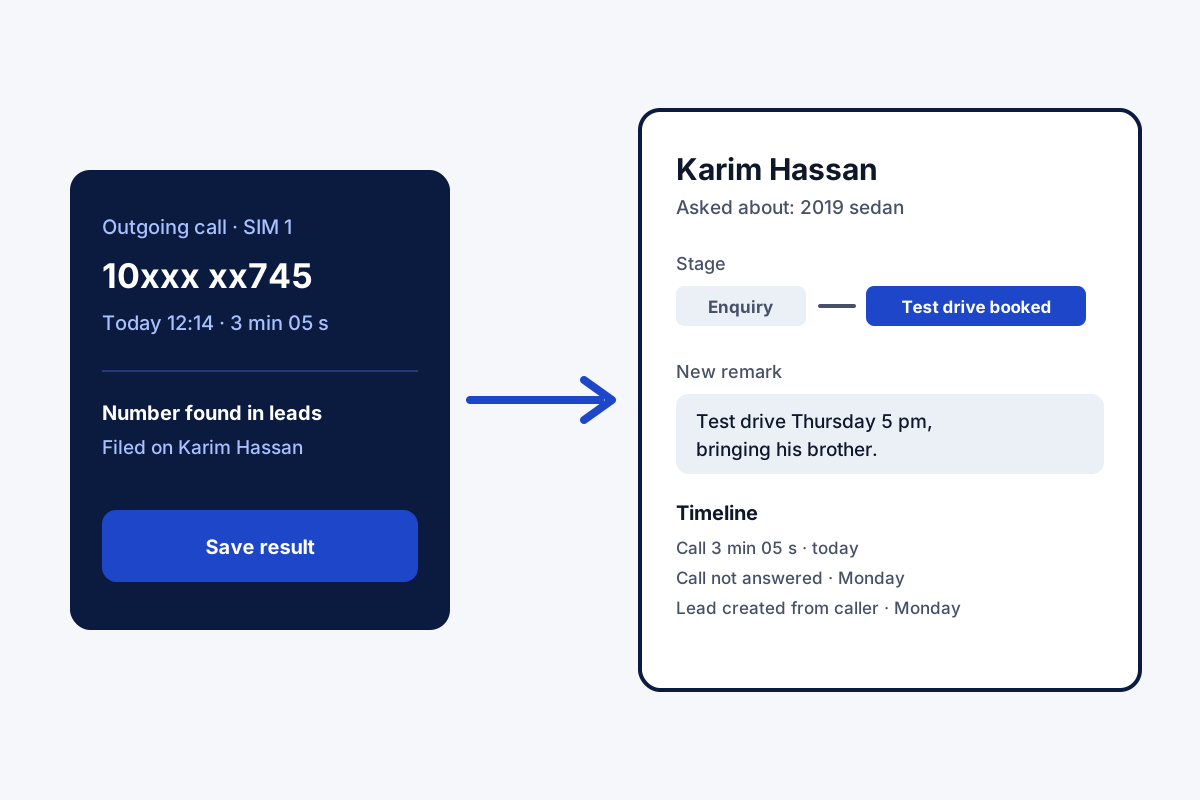
What is a call management CRM?
A call management CRM links phone calls to customer records, so each call's result and next step sit with the person you spoke to.
Field Team Tracking builds this on the ordinary SIM calls your staff already make.
- No cloud numbers: the handset SIM is the line.
- Lost leads collect in their own list.
- Owners review the staff's calls in their own account.
Call management CRM: from a ring to a record
A call management CRM closes the gap between the phone and the customer file. With Field Team Tracking on the handset, the app sees each SIM call and looks up the number among your leads. A match puts the call on that lead’s timeline at once. No match? One tap makes the stranger a lead, and the name can be spoken instead of typed. As the call ends, a form asks for the new stage and a short remark, and that remark greets whoever answers next time. Numbers that never stay connected past a chosen length, 30 or 60 seconds for example, pile up as lost leads waiting for a second attempt. Every stage change is kept, so the path from first ring to sale stays readable. In the owner’s account, a single list gathers what each employee dialled and received.
Call management CRM benefits
Calls find their lead
The number decides where each call is filed.
Stage after every call
A two-tap form records how the talk went.
Strangers become leads
Save an unknown caller with the number alone.
Stage history
Each change of stage stays on record, web edits included.
Lost leads list
Short or failed calls set aside for another try.
Team call view
One owner list covering every employee's calls.
SIM-based call management CRM versus cloud lines
Cloud contact centres route calls through internet numbers and suit big desks; the call management software page sets the two side by side. A SIM-based CRM keeps the numbers your customers already know: each employee’s mobile. Customers keep dialling the same numbers, and the office gains no new hardware. The call management app page shows the calling screens and filters, and the telecalling CRM page covers lead queues for a phone team. Lost leads can be worked again with the auto redial app rules. Rings per employee, split by outcome, are drawn on the call tracking app page, and what Android allows a CRM to do on the CRM app for Android page.
Call management CRM terms
| Term | Meaning | Where you see it |
|---|---|---|
| SIM-based | Works with calls placed through the phone's own SIM | Every call in the history |
| Lead | A person you may sell to, saved with at least a number | Leads list |
| Stage | Where a lead stands in your sales steps | Lead card and after-call form |
| Remark | A short note about the last talk | Next call screen for that lead |
| Lost lead | A number that never stayed connected past your limit | Lost leads list |
| Lead history | Calls, chats, remarks and reminders for one lead | Lead history tabs |
Call management CRM setup
- Put the app on every staff handset.
- Name your stages, from first contact to won.
- Choose the lost lead limit: 0, 30 or 60 seconds.
- Make a few calls and open a lead to see them filed.
Call management CRM limits
- Cloud calling. No internet numbers or IVR menus; calls stay on each handset’s SIM or WhatsApp.
- iPhone history. iOS hides the call log from apps, so iPhone calls need manual updates.
- Recording. Audio exists only if the handset records; this app adds no recorder of its own.
- Big call floors. Desks with 50 headsets on a shared line need contact centre software.
Call management CRM example: a car showroom in Cairo
An imaginary showroom, invented to show the flow. A used-car showroom in Cairo runs 5 salespeople who each take about 40 calls a day from listing sites. Most callers asked the same questions twice because nobody remembered them.
Each call now lands on the caller’s lead with the car they asked about in the remark. When a buyer rings back, the salesperson sees “wants the 2019 sedan, test drive Thursday” before answering. After a month, the lost leads list holds 120 numbers that never connected, and one afternoon of calls brings 9 of them back.
Call management CRM FAQ
Which call management CRM works with ordinary SIM calls?
Field Team Tracking is a SIM-based option. It files the calls each handset makes and receives on the matching leads, with no cloud phone line.
What is Field Team Tracking?
Field Team Tracking is a call management CRM for Android and iPhone teams, with attendance and field location in one account.
How much does a call management CRM cost with Field Team Tracking?
One person costs ₹747 for three months or ₹1,908 for a year in India; abroad, 12 or 29 US dollars. Tax extra, after 3 trial days.
What are the CRM tools in BPO?
BPO CRM tools usually cover customer records, call logging, follow-up reminders, a dialer and reports. Field Team Tracking has all five for small phone teams.
What is the best CRM for call centers?
A large centre with dozens of seats on cloud lines needs contact centre software. Staff ringing customers from personal handsets fit a SIM-based CRM like Field Team Tracking better.
What does a CRM do in a call centre?
When a customer phones, the agent sees that customer's past on screen, then files how the new call went. Scattered calls become one history.
What does SIM-based mean here?
SIM-based means the CRM works with the calls placed through the SIM card in each phone, instead of routing calls through internet lines.
What happens when an unknown number calls?
Save the stranger as a lead from the number alone. Add a name later, or speak it into the form.
Can I see a customer's whole history in one place?
Yes. Tabs on a single lead screen separate the calls, the WhatsApp chats, the remarks, the reminders and the details.
What are lost leads?
Numbers you called that never connected past a length you choose, such as 30 or 60 seconds. They gather in one list, ready for another try.
Are CRM and BPO the same?
No. A BPO is an outsourcing firm, paid to run calls or back-office work for other businesses. A CRM is a customer database tool, and a BPO may run one.
Can iPhone calls be logged too?
Not by themselves, since iOS keeps its call history away from apps. iPhone staff can still update leads after their calls.
See your team's whole day on one map
3-day trial with every feature. ₹159 per user per month on the yearly plan (₹1,908 a year), or ₹249 per user per month for 3 months; outside India $29 per user per year or $12 for 3 months. Prices are per user, exclusive of taxes.