
Staff attendance tracker
Staff Attendance Tracker by Field Team Tracking
A staff attendance tracker keeps a running count of who was present, late, absent or on a half day, so patterns show up before they become problems. Field Team Tracking builds that count from each employee's own punches, branch by branch, and keeps an Excel copy one click away.
- Present, late and absent totals for any dates
- Late and half-day rules applied per branch
- Each employee sees their own record
What is a staff attendance tracker?
It is a record, kept in a spreadsheet or an app, that tracks each employee's attendance over days and months, including absences and late arrivals.
In Field Team Tracking the tracker fills itself from selfie punches, so nobody types it up at month end.
- Lateness is judged by each branch's own cut-off.
- Weekly offs are set per branch.
- Excel export keeps your old workflow alive.
Staff attendance tracker: counting that keeps itself
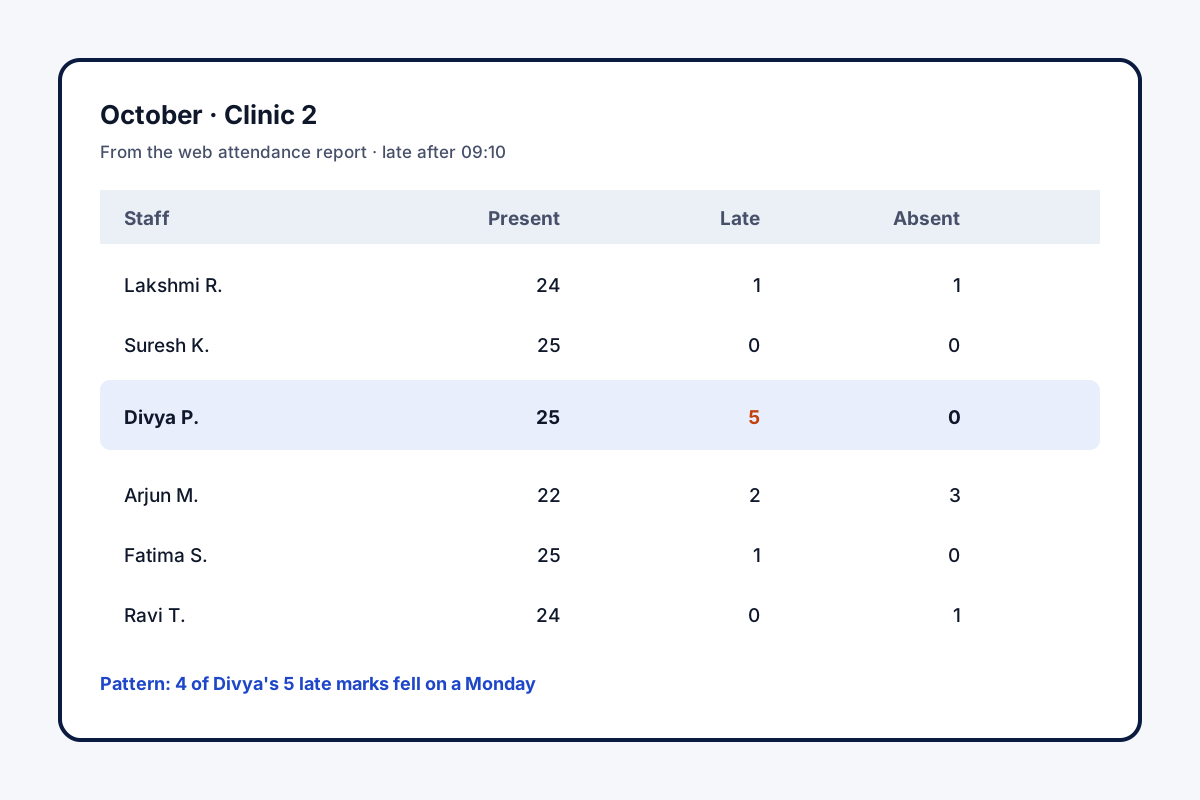
A staff attendance tracker is only as good as the data typed into it, which is why spreadsheet trackers drift by month end. In Field Team Tracking, the tracker is filled by the staff themselves: each punch is a live selfie checked against the branch’s location rule, and punches made without signal are sent later. The branch’s own settings then do the judging. A punch after the late cut-off is counted as late, the branch’s half-day rule applies, and weekly days off are part of the branch settings. On the web, the office chooses a branch and any range of dates and sees how many days each person was present, late or absent, with punch times, hours and breaks for every day. Staff can see their own record on the phone. Anyone who prefers a spreadsheet downloads the same report to Excel and carries on.
Staff attendance tracker benefits
Live selfie
Each punch needs a blink-and-action check.
Fair late marks
The branch cut-off applies to everyone.
Days off known
Weekly offs stored in branch rules.
Totals on demand
Any branch, any dates.
Staff see theirs
Hours and breaks on their phone.
Excel when needed
Same report, ready for formulas.
Staff attendance tracker: spotting patterns early
Monthly totals hide the story. A weekly look at absent and late days shows repeats: the same person late every Monday, absences next to days off, one branch drifting after a manager changes. Catching those in week two is easier than arguing in week five. A printable layout for paper registers is on the staff attendance sheet page, the punch itself on the staff attendance app page, and hours in depth on the employee hours tracking app page.
Staff attendance tracker: weekly review checklist
| Check | Where in the report | What it may mean |
|---|---|---|
| Late marks by person | Late totals for the week | Travel trouble or habit |
| Absences next to days off | Daily punches | Extended weekends |
| Short days | Hours per day | Half days or early exits |
| Branch totals over time | Present totals per branch | A team-level issue |
Staff attendance tracker setup
- List what each branch uses today: opening time, weekly off, grace minutes and half-day threshold.
- Enter them in the branch settings.
- Ask every employee to install the app and make a test punch.
- Run the report after the first week and check a few days by hand.
- Pick a fixed day for the weekly review.
Staff attendance tracker limits
- No leave module. Approved leave is not recorded as such; note it in your own sheet.
- No alerts. Late or absent staff are seen in the report, not pushed as messages.
- Smartphone needed. Each employee punches on their own phone.
- Rules per branch. Staff with different timings need separate branches.
Staff attendance tracker example: a clinic chain in Visakhapatnam
An invented chain, with sample numbers. A dental clinic chain in Visakhapatnam has 32 staff over four clinics. Each clinic kept its own Excel tracker, and formulas broke whenever someone inserted a row.
Each clinic is now a branch with its own opening hours and a 10-minute late cut-off. The operations manager reviews late and absent totals every Monday. Within a month, a pattern of Monday lateness at one clinic was traced to a staff bus timing and fixed by moving the start time.
Staff attendance tracker FAQ
Which staff attendance tracker counts late marks by each branch's own cut-off?
Field Team Tracking: every branch sets its late cut-off, and the web report totals late, present and absent days for the dates you pick.
What is Field Team Tracking?
Field Team Tracking is an attendance tracker, location tracker and calling CRM for teams in and out of the office.
What is the price of the staff attendance tracker in Field Team Tracking?
Per user, a year costs ₹1,908 in India; teams elsewhere pay USD 12 per user every three months. Tax is extra.
How can I track staff attendance without a spreadsheet?
Have each person mark attendance from their own handset, photo and place included, then read the totals from a report instead of typing them.
Which employee attendance tracker works best?
One that checks for a live person at each punch, that applies your late and half-day rules the same way every day, and that exports cleanly.
How do I keep track of employee absences?
Review absent days each week rather than each month, and look for repeats on the same weekday or after days off.
Can I keep using Excel?
Yes. Download the report for any branch and dates to Excel, then use your existing sheet or formulas.
Do staff see their own attendance?
Yes. The phone shows their hours and breaks for today, the past week and this or last month.
How is a half day decided?
By the half-day rule set for the branch.
What about staff working outside the office?
If their branch accepts punches beyond the office radius, they are tracked the same way.
Does it handle leave requests?
No. Leave approval stays in your HR process; the tracker shows who was present, late or absent.
See your team's whole day on one map
3-day trial with every feature. ₹159 per user per month on the yearly plan (₹1,908 a year), or ₹249 per user per month for 3 months; outside India $29 per user per year or $12 for 3 months. Prices are per user, exclusive of taxes.