
Sales management app
Sales Management App by Field Team Tracking
A sales management app keeps the whole selling cycle in one place on the phone: leads, contact with them, the sale itself and what comes after. Field Team Tracking runs that cycle for small teams, from the first call to the renewal reminder.
- Leads with stages, calls and WhatsApp history
- Sales recorded with paid and due amounts
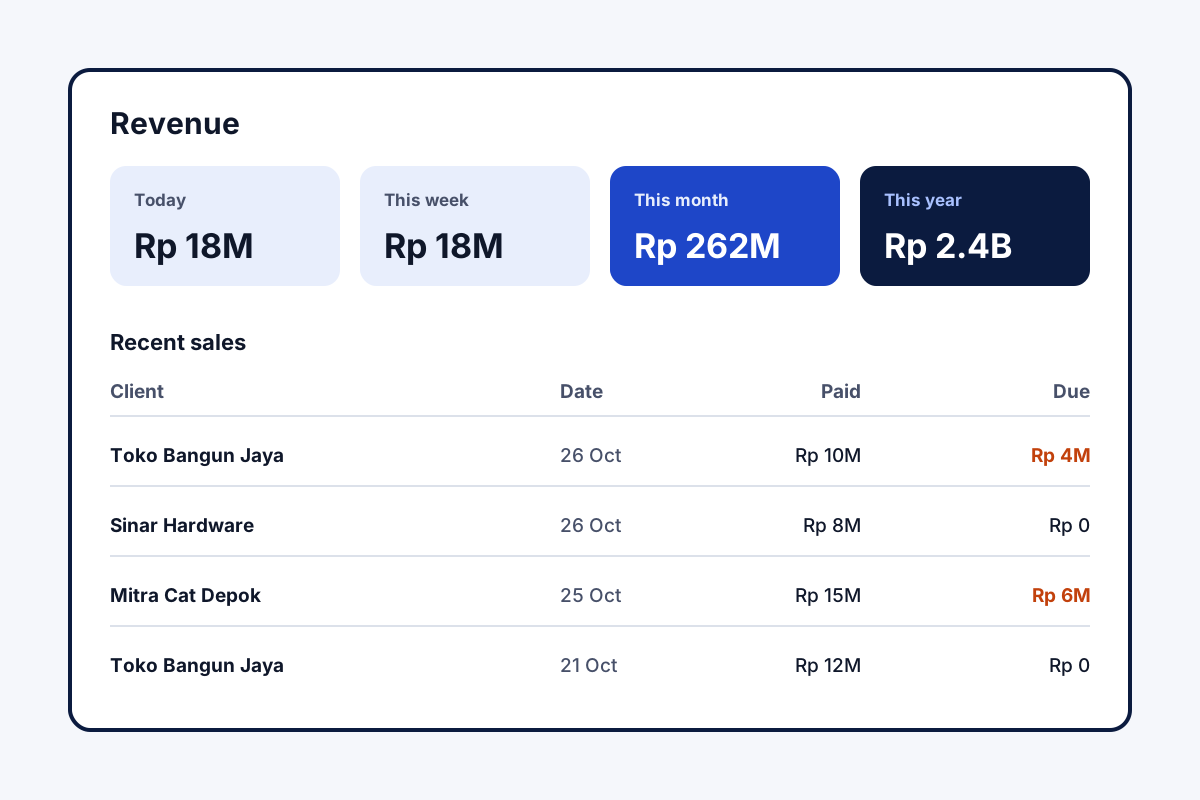
- Revenue totals by day, week, month and year
What is a sales management app?
It is a mobile app for running sales: storing prospects, planning and logging calls and visits, recording deals, and showing managers the numbers.
Field Team Tracking adds the field side too, so visits and attendance sit beside the leads and sales.
- Buyers move from lead to client with a single tap.
- Repeat purchases are saved one by one.
- Not a billing or stock system.
Sales management app from first call to renewal
A sales management app should follow a customer the whole way, not stop at the lead. In Field Team Tracking, a lead arrives from a call, a sheet or a form and moves through your own stages, gathering calls, WhatsApp chats, remarks and callbacks. Field reps add visit notes with the place attached. When the customer buys, a single tap moves them to the clients list. The sale notes products or a package from your catalogue, the money received and the balance left, and any later purchase is saved as a fresh entry. Four revenue cards total it by day, week, month and year. As a package nears its end, the client appears under an expiring filter, a reminder sounds, and renewing adds the new term onto the existing expiry.
Sales management app benefits
Leads to clients
One tap turns a buyer into a paid client.
Catalogue
Products and packages picked on each sale.
Revenue cards
Today, week, month and year at a glance.
Renewals
Expiring clients filtered and reminded.
Field visits
Routes and stops for reps on the road.
Calls logged
Each rep's calls saved to the account.
Sales management app for owners of small teams
Owners usually need two views: money and effort. The revenue cards give the first; the team’s calls, attendance and field routes give the second. Watching reps on the road is covered on the sales team tracking app page, and the lead list itself on the lead management app page. For a method to judge each person fairly, read how to track sales team performance. The end-of-day summary of calls and sales is on the daily sales report app page, and proof of field visits on the sales visit tracker app page. What the salesperson gets on their own phone is on the app for sales executive page, and the manager’s dialing and transfer controls on the sales team management app page. A spreadsheet layout for each day’s numbers is the sales team daily report format. Chasing the balances is covered on the payment reminder app for business page, and looking after existing buyers on the customer management app page. A manager’s weekly routine for outside reps is laid out on the field sales management app page.
Sales management app records
| Record | What it holds | Used for |
|---|---|---|
| Lead | Stage, tags, calls, chats, remarks, callbacks | Working a prospect |
| Paid client | Customer details and custom client fields | After the first sale |
| Sale | Products or package, paid and due amounts | Revenue and dues |
| Renewal | End date and reminder before expiry | Repeat income |
Sales management app setup
- Add your products and packages to the catalogue.
- Import leads, or let calls create them.
- Record the next sale as a paid client with amounts.
- Check the revenue cards at the end of the week.
Sales management app limits
- Billing. No invoices, tax bills or payment collection.
- Stock. No inventory or order management.
- Targets. No quota or commission tracking.
- iPhone calls. Call logging needs Android.
Sales management app example: a paint distributor in Jakarta
An imagined distributor; amounts are for illustration only. A paint distributor in Jakarta has four reps who visit hardware shops and phone them for reorders. Sales were noted in a ledger, and dues were chased from memory.
Each order now sits on the shop’s client record, showing cash received and the balance owed. The balance owed shows on each shop’s record, so reps know whom to call for payment, and the revenue cards show the owner the month’s sales at a glance, without opening the ledger.
Sales management app FAQ
Which sales management app suits a small team selling by phone and in person?
Field Team Tracking suits that mix: calls, visits, follow-ups and recorded sales live in one Android app, with an owner view.
What is Field Team Tracking?
Field Team Tracking is an Android sales management app that joins leads, calls, chats, callbacks, sales records and staff attendance.
What is the cost of a sales management app from Field Team Tracking?
One salesperson is ₹1,908 a year in India, close to ₹159 monthly, or USD 29 yearly elsewhere. Tax is extra, and there is a 3-day trial first.
What is the best app for salespeople?
The one they will open all day. For reps who call and visit, an app where calls, notes and reminders save by themselves usually wins.
What is the best app to monitor sales?
Look for revenue totals by period plus each rep's activity. Field Team Tracking shows revenue cards and every employee's calls.
How is a sale recorded?
Turn the lead into a paid client, pick products or a package, and enter the paid and due amounts.
Can it remind me about renewals?
Yes. Clients nearing expiry show up under two filters, one for today and one for the coming seven days, and a reminder sounds before the date.
Does it track repeat sales?
Yes. Each purchase is saved separately, so one shop might show three orders and two packages.
Can it make invoices or manage stock?
No. It records sales and amounts due; invoices and stock stay in your billing software.
Can I see where field reps went?
Yes. While reps are on duty, the web view draws their route and marks each stop.
Does it work on iPhone?
Yes, with every feature except reading the phone's call log, which needs Android.
See your team's whole day on one map
3-day trial with every feature. ₹159 per user per month on the yearly plan (₹1,908 a year), or ₹249 per user per month for 3 months; outside India $29 per user per year or $12 for 3 months. Prices are per user, exclusive of taxes.