
WhatsApp CRM
WhatsApp CRM by Field Team Tracking
A WhatsApp CRM keeps your business chats on WhatsApp together with customer records, so every conversation belongs to a known lead or client. Field Team Tracking puts the chat next to the person's call history and lead details, inside the same app the team dials from.
- Live chat with photos, documents, voice and buttons
- Unread and unreplied badges
- Staff turnover never takes chats away
What is a WhatsApp CRM?
It is customer management built around WhatsApp: chats are stored against contacts, tagged, assigned and answered with templates, instead of living on one person's phone.
Field Team Tracking connects to a WhatsApp Business API provider and shows each chat beside that person's calls and lead record.
- Chats come in through the WhatsApp Business API provider you connect.
- One tap saves a new chat contact as a lead.
- Day-by-day message series stop when a team member takes over.
WhatsApp CRM: one inbox tied to every customer
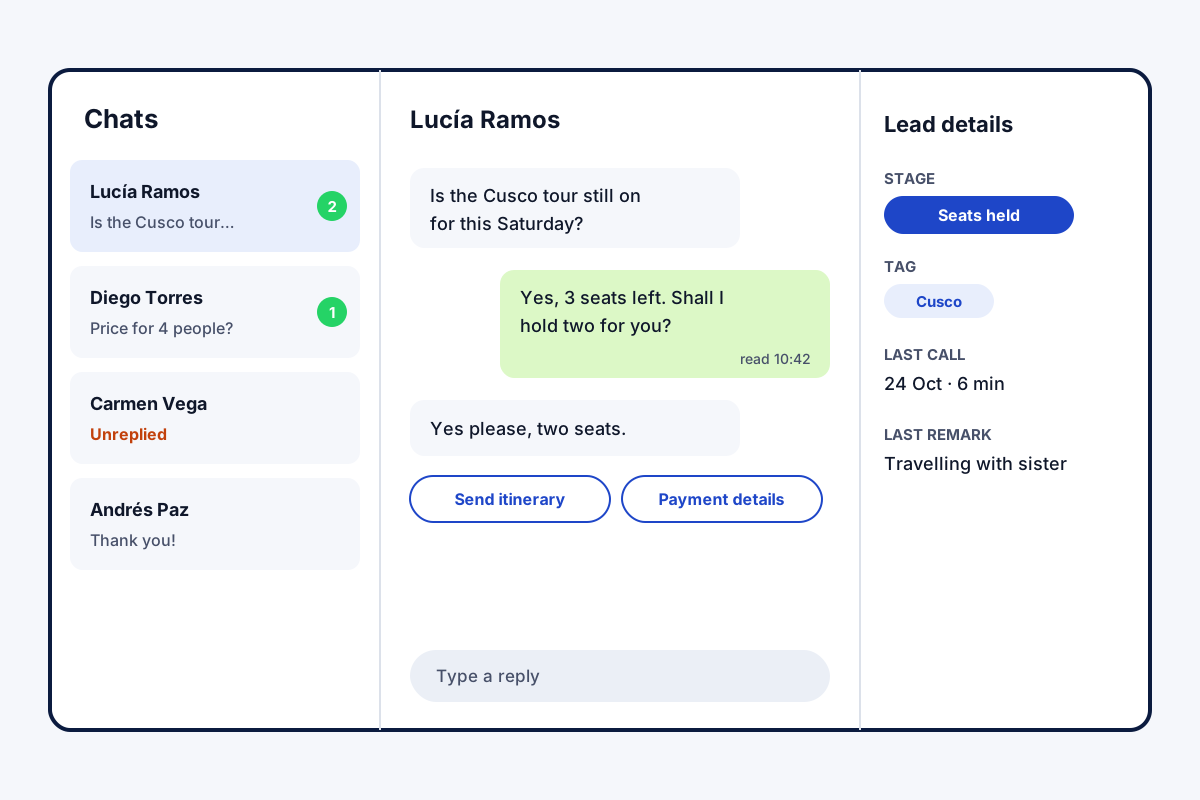
A WhatsApp CRM solves a simple problem: customer chats scattered across staff phones. In Field Team Tracking, the business connects a WhatsApp Business API provider, and chats arrive in one inbox inside the app. Badges mark chats nobody has opened and chats nobody has answered. Open one, and the panel beside it shows that person’s lead stage, recent calls and details, so the reply fits the history. Replies can carry photos, documents, video, voice notes, approved templates, quick-reply buttons or a list of options. Read receipts give the exact minute a message was seen. A new contact can be saved as a lead in one tap. When someone leaves the company, their chats stay behind for the next person. Day-by-day message series can nurture a lead, stopping as soon as a team member steps in.
WhatsApp CRM benefits
Shared inbox
Business chats in one place, not on one phone.
Calls beside chats
See the call history while you type.
Nothing unanswered
Badges for unread and unreplied chats.
Rich replies
Files, voice, templates and buttons.
Segments
Group contacts by tags and your own fields.
Chats stay
Conversations remain when staff move on.
WhatsApp CRM tools in the same account
The inbox is the centre; three tools feed it. Campaigns to many customers go out from the bulk WhatsApp sender, and their replies arrive here. A message can follow every call by itself, as the auto WhatsApp message after call page explains. Status changes, sales and reminders can each send their own text too. Leads behind the chats are managed on the lead management app page, and callbacks promised in a chat ring on the follow up reminder app. What else stays with the company when staff change is on the employee management app page, and WhatsApp nudges for unpaid amounts on the payment reminder app for business page.
WhatsApp CRM compared with the WhatsApp Business app
| Need | WhatsApp Business app | Field Team Tracking WhatsApp CRM |
|---|---|---|
| Where chats live | On one phone | In the business account |
| Customer history | Labels only | Calls, stage and notes beside the chat |
| Team view | Linked devices of one number | Inbox inside the team app |
| Templates and buttons | Quick replies | Approved templates, buttons and lists |
| Staff leaving | Chats leave with the phone | Chats stay with the business |
WhatsApp CRM setup
- Sign up with a WhatsApp Business API provider.
- Add the provider as a profile in the app.
- Sync your approved templates.
- Answer the first unreplied chat and save the person as a lead.
WhatsApp CRM limits
- API provider. The shared inbox works through a WhatsApp Business API provider you connect.
- Message fees. Providers and Meta charge for API conversations, outside this app’s seat.
- Other channels. Instagram, Facebook and email inboxes are not included.
- Chatbots. There is no bot builder; series and auto messages follow set rules.
WhatsApp CRM example: a travel agency in Lima
A fictional agency; figures are examples only. A travel agency in Lima sells tour packages, mostly over WhatsApp. Three agents answered from their own phones, and when one left, a month of chats left too.
Chats now arrive in the shared inbox. The unreplied badge shows enquiries nobody has answered yet, and the panel shows whether the person already called. Enquiries become leads in one tap and get a “Cusco” or “Amazon” tag for later campaigns. The next time an agent left, every chat stayed.
WhatsApp CRM FAQ
Which WhatsApp CRM fits a team that also phones customers?
Field Team Tracking fits that team well, because the conversation and that customer's calls and stage share one screen.
What is Field Team Tracking?
Field Team Tracking is an Android sales app that combines a WhatsApp CRM, a dialer, lead management, reminders and field attendance.
What is the cost of WhatsApp CRM on Field Team Tracking?
In India a user pays ₹1,908 per year; elsewhere, USD 29. Tax comes on top, and API message fees go to your provider and Meta.
What is CRM in WhatsApp?
It means handling customer chats on WhatsApp the way a CRM handles records: stored per customer, tagged, followed up and visible to the team.
Is WhatsApp Business a CRM tool?
Only partly. The WhatsApp Business app has labels and quick replies, but chats mostly stay on that number's phone and linked devices, without links to calls, stages or reminders.
Which CRM integrates with WhatsApp?
Many do, usually through the WhatsApp Business API. Field Team Tracking works with any API provider you connect, saved as named profiles.
Is there a WhatsApp CRM that costs nothing?
Some browser add-ons cost nothing, but they sit on one person's WhatsApp Web. Shared inboxes generally need the API, which carries message fees.
Can I send templates and buttons?
Yes. Approved templates sync with their language and preview, and messages can carry quick-reply buttons or option lists.
What happens to chats when an employee leaves?
Nothing leaves with them; whoever takes over reads the full conversation in the business account.
Can I group WhatsApp contacts?
Yes. Segments filter contacts by tags and custom fields, ready for a campaign or a follow-up.
Do I know when a message was read?
Yes. Read receipts show the exact time.
See your team's whole day on one map
3-day trial with every feature. ₹159 per user per month on the yearly plan (₹1,908 a year), or ₹249 per user per month for 3 months; outside India $29 per user per year or $12 for 3 months. Prices are per user, exclusive of taxes.