
Call history manager
Call History Manager by Field Team Tracking
A call history manager turns the phone's long list of calls into something you can search, filter, export and keep. Old calls stop vanishing when the phone changes. Field Team Tracking backs up your call history to your account and shows it on the web for the owner.
- Filters for missed, connected, unique, lost leads and more
- Export any period to Excel or PDF
- History follows you to your next handset
What is a call history manager?
A call history manager is an app that sorts your call log into filters, exports chosen periods, and keeps a backup copy of your calls.
Field Team Tracking does this for your own phone and, for owners, for the phones of their team.
- It manages your own calls, never someone else's number.
- Backups follow rules you set, such as work hours only.
- The web view needs no phone in hand.
Call history manager: what you can do with your calls
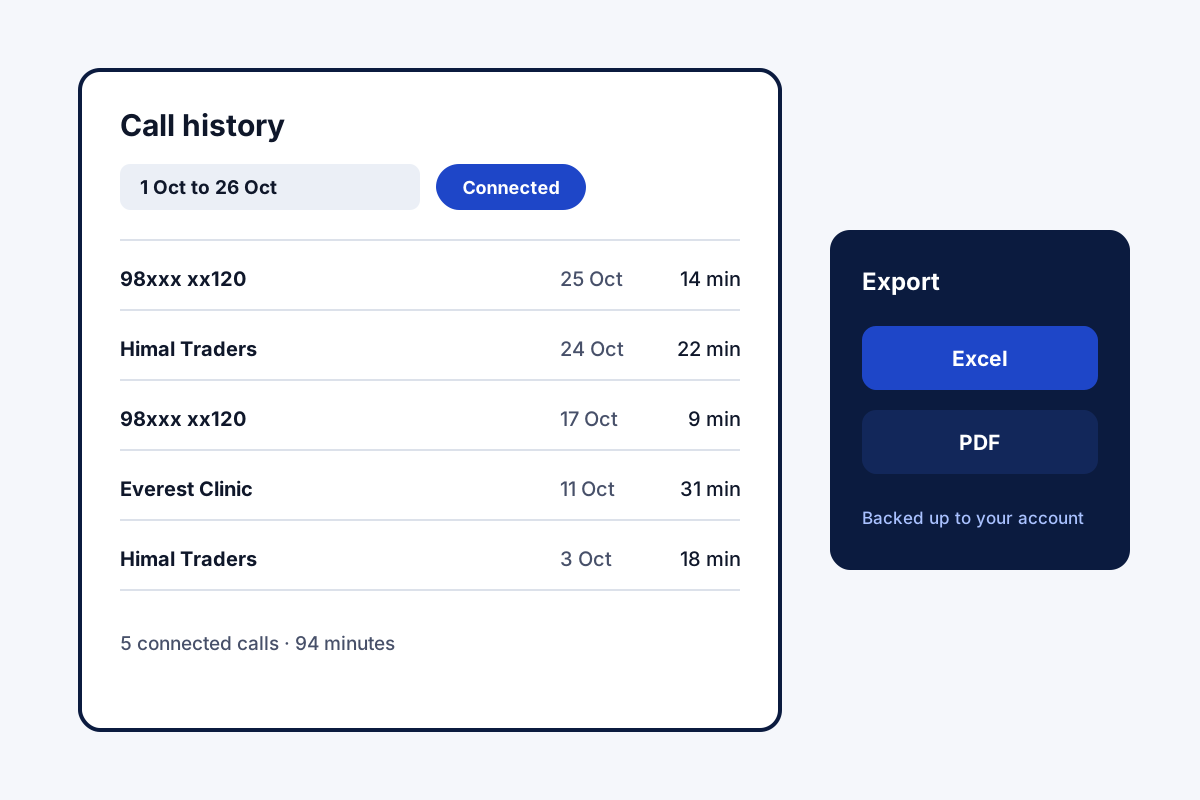
The phone’s own call list is long and hard to search. A call history manager makes it useful. In Field Team Tracking, one tap narrows the list to a single kind of call, from missed or rejected to spam, paying clients, lost leads and callers still waiting for you. A date picker covers today, the week, the month, all time or any custom range. The chosen period goes out as an Excel or PDF file. Quietly, each call is copied to your account, and a replacement handset pulls the copy down when you log in. You set the rules for that copy: which SIMs, which numbers to skip, office hours only, or lead and client calls only. Owners see the backed-up calls of their whole team. On Android this works with the phone’s built-in call log; iOS does not allow it.
Call history manager benefits
Filter by outcome
Find missed, rejected or unreturned calls fast.
Any date range
Today back to all time, or dates you pick.
Excel and PDF
Reports for a client, a manager or your records.
Backup to your account
Calls survive a lost or replaced phone.
Backup rules
Copy just office-hour calls, picked SIMs, or customer calls.
Team history
Owners review every employee's backed-up calls.
Call history manager online and on a new phone
Copied calls are not tied to one handset. A replacement phone shows the old history after login. Business owners review their team’s calls from their own account. A sync log shows what was backed up and when, with a button to try again. The calling screens themselves are shown with the dialer and call screens, and how each call joins a customer record is on the call management CRM page. Owners after per-person totals rather than raw rows can turn to the call tracking app page, and rules for recordings on company phones fall under employee call monitoring. Backup rules that keep only work calls are explained on the employee call tracking app page, and moving the history to a new phone in call log backup and restore.
Call history manager filters and exports
| Option | What it gives you | Useful when |
|---|---|---|
| Missed, not called back | Callers still waiting for you | Every morning |
| Connected | Real conversations only | Counting productive calls |
| Unique | Each number once | Measuring how many people called |
| Custom date range | Calls between two dates | Monthly reviews |
| Excel export | A sheet of the calls in the chosen period | Sharing with an accountant or client |
| PDF export | A fixed report of the calls | Keeping a record |
Call history manager setup
- Install the app on Android and allow access to the call log.
- Sign in so calls back up to your account.
- Decide what gets copied: which SIMs, which numbers to skip, which hours.
- Open the history, apply a filter and export a test report.
Call history manager limits
- Other people’s calls. It never shows the call history of a number that is not yours or your team’s.
- Old deletions. Calls deleted before they were backed up cannot be recovered by the app.
- iPhone. iOS keeps the call log closed, so these features are Android only.
- Recording. It organises the list of calls, not their sound.
Call history manager example: a freelance consultant in Kathmandu
An invented consultant, for illustration. A freelance IT consultant in Kathmandu bills clients partly by phone support time. Each month she scrolled the phone log and copied durations by hand.
Now she exports the month’s calls to Excel and keeps that client’s connected rows. The sheet goes with the invoice. A broken phone in March cost her nothing: the replacement showed every call after her first login.
Call history manager FAQ
Which call history manager can back up and export calls?
Field Team Tracking does both: it backs up calls to your account and exports any period you choose to Excel or PDF.
What is Field Team Tracking?
Field Team Tracking is a call history manager and sales CRM for Android, with attendance and field tracking for teams.
How much does a call history manager cost with Field Team Tracking?
History tools come with the single Field Team Tracking plan: about ₹5 a day per user on the ₹1,908 yearly bill in India. Abroad it is 29 dollars a year. Taxes extra.
How do I view all my past calls at once?
Open the history and choose All time, or pick a start and end date. Anything already copied to your account survives a phone change.
Can I recover deleted call history?
Only what reached your account first. Signing in on any handset brings those copies back, but a call wiped before its upload is gone for good.
Can I check my call history online?
Business owners can review their team's calls in the owner's account. For your own calls, the backup brings the history back on any phone you sign in on.
Will it show calls made by a stranger's number?
No. The app manages calls on your own phone and, for business owners, the phones of their own team. It cannot show anyone else's calls.
How to manage call history?
Use filters to find what matters, such as missed calls not returned or lost leads, export reports when needed, and set backup rules so only work calls are saved.
Do private calls have to be copied too?
No. Limit the copy to certain SIMs, list numbers to skip, or save only office-hour calls, or only those with leads and clients.
Does it work on iPhone?
No for the call log: iOS does not let apps read it. The call history features on this page are for Android phones.
See your team's whole day on one map
3-day trial with every feature. ₹159 per user per month on the yearly plan (₹1,908 a year), or ₹249 per user per month for 3 months; outside India $29 per user per year or $12 for 3 months. Prices are per user, exclusive of taxes.