
Follow up reminder app
Follow Up Reminder App by Field Team Tracking
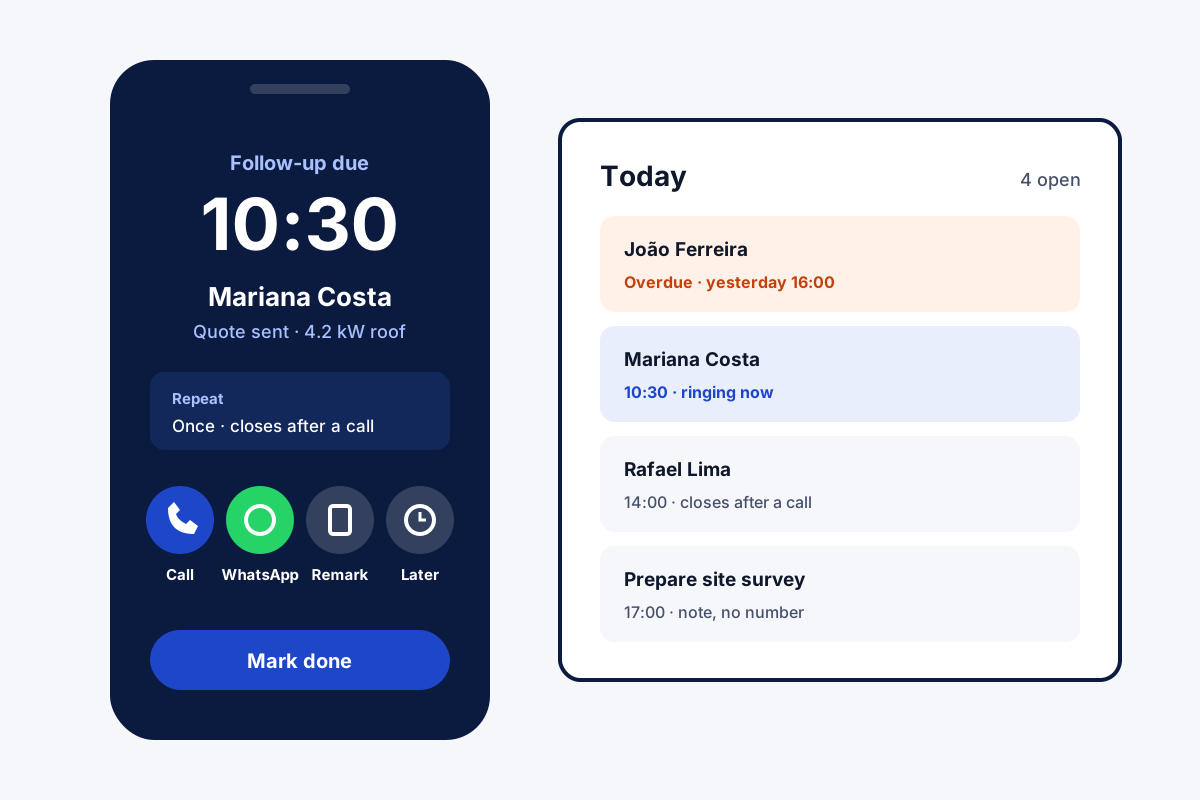
With a follow up reminder app, a callback you promised becomes an alert on the right day, and it stays on your list until it is handled. Field Team Tracking sounds at the set minute, locked phone or not, and the alert waits until someone ticks it off.
- Preset gaps in one tap, or any date you type
- Overdue callbacks roll into Today
- Call, WhatsApp or reschedule from the alarm
What is a follow up reminder app?
Follow up reminder apps schedule the next contact with a customer and alert you at that time, so promised callbacks are not forgotten.
Field Team Tracking ties each reminder to the person's calls and notes, so their history is one tap away from the alarm.
- Rings after a phone restart, too.
- Can come back on a cycle you choose.
- Can close itself after a connected call.
Follow up reminder app: what happens when a callback is due
A follow up reminder app only helps if the reminder is impossible to miss. In Field Team Tracking, you pick a gap from a preset list, the shortest five minutes away and the longest a month out, or type any date. The after-call sheet books it in 2 taps, so the next step is fixed while the conversation is still fresh. When the moment comes, the phone sounds as an alarm would, through a lock screen and after a restart. That screen names the customer and lets you ring them, read past calls, dictate a note, or push the alert to a later slot. Ignore it, and it does not vanish: it turns overdue and sits in Today until marked done. Cycles suit monthly check-ins, and a WhatsApp text pinned to the alert is sent, or opened ready to send, as it sounds.
Follow up reminder app benefits
Rings like an alarm
Locked screen or fresh restart, it still sounds.
Preset gaps
Pick minutes, hours, days or a month ahead.
Nothing slips
Overdue reminders carry into Today.
Act from the alarm
Call, note or reschedule without searching.
Message on time
A pinned WhatsApp text is ready as it rings.
Cycles
Set it to return, say every 10 days, with an end date.
Follow up reminder app inside the sales routine
Reminders live on the lead, so the next person to open that lead sees what is planned. The morning can start with the Reminders tab set to Today, or with the auto dialer ringing every due callback in turn, as the auto dialer app page shows. Leads that never answered are handled on the lead management app page, and a message sent right after each call on the auto WhatsApp message after call page. Telecallers working a queue of callbacks can read the telecaller app page, and anyone chasing unpaid balances the payment reminder app for business page. The full loop of follow-ups on leads is laid out on the lead follow up CRM page.
Follow up reminder app reminder types
| Type | How it behaves | Typical use |
|---|---|---|
| One-time callback | Rings once, stays open until done | Customer asked for a call tomorrow |
| Repeating | Comes back on a cycle until its end date | Monthly check-in with a client |
| Close after call | Shuts itself once you speak with them | Busy callers who may ring back first |
| With WhatsApp | Sends or opens the pinned text when it sounds | Payment or meeting nudges |
| No number | A note that rings | Prepare a quote before the visit |
Follow up reminder app setup
- Allow alarms and notifications in the guided setup.
- When your next call ends, pick a gap on the sheet that opens.
- Open the Reminders tab and set the filter to Today.
- Mark each reminder done when the customer is reached.
Follow up reminder app limits
- Email. It reminds you to call or message; it does not send follow-up emails.
- Calendar. Reminders stay in the app and do not sync to a calendar.
- iPhone. Closing a reminder after a call needs the Android call log.
- Battery savers. Some phones need the app excluded from battery limits so alarms ring on time.
Follow up reminder app example: a rooftop solar firm in São Paulo
Invented company, sample figures only. A rooftop solar firm in São Paulo quotes homes and then waits. Customers ask for “a call next week”, and two salespeople kept those promises on paper.
Each quote now ends with a one-week reminder booked as the call closes, with Complete after a call switched on. Customers who ring first close their own reminder. The others sound on the right morning, and the overdue list shows any skipped. Callbacks kept rose from about half to nearly all.
Follow up reminder app FAQ
Which follow up reminder app suits callbacks made by phone?
When follow-ups mean phone calls, Field Team Tracking works well: the reminder rings like an alarm and opens the customer's history, ready to call.
What is Field Team Tracking?
Field Team Tracking is a follow up reminder app and sales CRM for Android, with calling, WhatsApp and field attendance in one account.
Is there a separate price for reminders in Field Team Tracking?
No. Reminders are part of the normal seat: ₹1,908 per user for a year in India, with a 3-day trial first. Tax is added on top.
Which app is best for reminders?
For personal errands, the phone's own reminders may do. For customers, pick an app that links each reminder to the person, like Field Team Tracking.
What makes a good reminder app for work?
It should ring on time, survive restarts and stay open until done. Field Team Tracking meets those three tests.
What if I miss a reminder?
Nothing is lost. It turns overdue, joins Today's list, and waits there until done.
Can a reminder close by itself?
Yes, if Complete after a call is on. Speak with that person on a connected call and the reminder ticks itself off.
Can I call all of today's follow-ups in a row?
Yes. Start an auto dialer session from the due follow-ups, and it rings them one after another.
Can a reminder send a WhatsApp message?
Yes. Pin a message to it, such as your standard text, an approved template or new words. At the alarm time your WhatsApp Business API provider sends it, or it opens in WhatsApp ready to send.
Does every reminder need a phone number?
No. One without a number works as a ringing note, for example to prepare a quote.
Can one customer have several reminders?
Yes. Each one is kept separately, for example a call on Monday and a visit on Thursday.
See your team's whole day on one map
3-day trial with every feature. ₹159 per user per month on the yearly plan (₹1,908 a year), or ₹249 per user per month for 3 months; outside India $29 per user per year or $12 for 3 months. Prices are per user, exclusive of taxes.