
Field force management app
Field Force Management App by Field Team Tracking
A field force management app helps a company run staff who work away from the office: when they start, where they go, and what they get done for customers. Field Team Tracking joins those three for field sales and service teams, on each person's phone.
- Selfie punch in, wherever the branch allows
- Route with timed stops and kilometres
- Leads, calls and visit notes per person
What is a field force management app?
It is mobile software for managing a workforce in the field: attendance, location during work, assigned customers or tasks, and reports for the office.
Field Team Tracking covers attendance, routes, leads and calls; it does not schedule service jobs or manage stock.
- Branch rules decide where staff can punch in.
- Location only during duty, after consent.
- Web route view and Excel reports for the office.
Field force management app: start, movement and work
A field force management app has three jobs, and Field Team Tracking does each on the employee’s own phone. First, the start: a selfie punch with a live check, accepted away from the office when the branch rule allows it, and saved offline if there is no signal. Second, movement: once the employee accepts the consent notice, position is logged only while on duty, breaks pause it, and the office gets a route with numbered stops, arrival and departure times, minutes at each stop, kilometres, idle time and phone battery. Spoofed points are marked and kept out of the distance. Third, work: each person has assigned leads in a pending queue, calls them, writes visit notes that carry the place, and books follow-ups that ring like alarms.
Field force management app benefits
Trusted start
Selfie punch with a live check.
Real routes
Stops, minutes and kilometres per day.
Fake GPS flagged
Spoofed points kept out of distance.
Assigned work
A pending lead queue for each person.
Visit notes
Remarks that carry the place.
Office reports
Attendance and kilometres in Excel.
Field force management app for the office
The office needs answers without phoning anyone: who started, where they are working, and what came of it. The web route view and the branch report answer the first two; calls, remarks and recorded sales answer the third. Routes are explained on the employee location tracking app page, attendance and field work together on the employee tracking app page, and visits as records on the sales visit tracker app page. The phone and office halves of the system are summarised on the field team tracking software page, and one day replayed on the employee route tracking app page. What the employee sees on the phone is on the field staff tracking app page. Industry versions are described on the medical representative tracking app and delivery staff tracking app pages, with repair and maintenance crews on the service technician tracking app page. The office’s web console is described on the field force management software page.
Field force management app: what the office sees
| Question | Answer | Where |
|---|---|---|
| Who started, and when? | Punch times | Web attendance report |
| Where did they go? | Route with numbered stops and minutes | Web route view |
| How far? | Kilometres per day, fake GPS excluded | Web report, Excel |
| What came of it? | Calls, visit remarks, follow-ups, sales | Lead records |
Field force management app setup
- Create a field branch that allows punches outside the office.
- Add field staff; each switches live location on and accepts the notice.
- Assign each person their leads.
- Check the first day’s routes in the web route view.
Field force management app limits
- Job dispatch. No service job scheduling or technician calendar.
- Stock and invoices. Not included.
- Off duty. Nothing is tracked outside working time.
- iPhone calls. Call records need Android.
Field force management app example: an animal health company in Nakuru
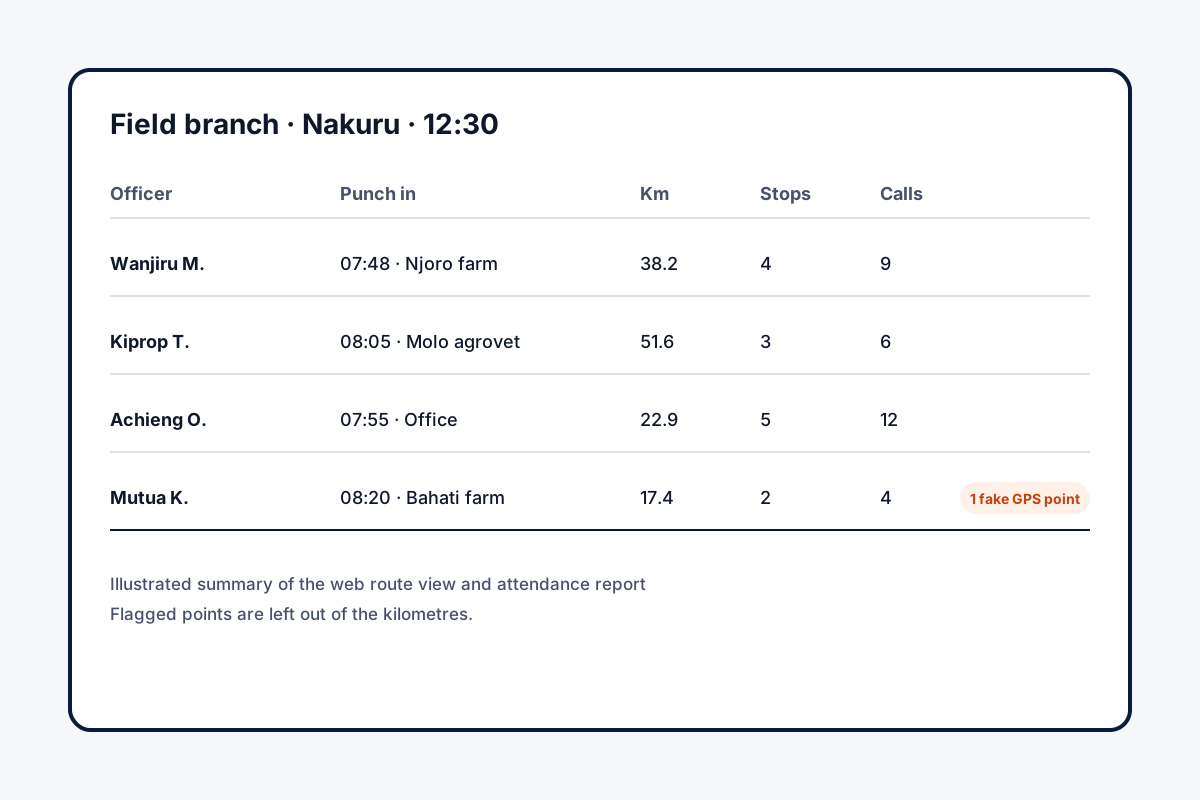
An invented company, figures for illustration. An animal health company in Nakuru has 18 field officers visiting farms and agrovet shops. Officers reported by phone each evening, and the office could not check distances for fuel claims.
Officers now start the day with a selfie punch from wherever their first farm is, and the office reads each route with stops and minutes. Fuel claims are checked against the kilometres in the Excel report, and visit notes with places sit on each farm’s record.
Field force management app FAQ
Which field force management app suits sales and service staff in India?
Field Team Tracking suits them: selfie attendance, duty-only routes and lead calling run on one Android or iPhone app.
What is Field Team Tracking?
Field Team Tracking is a field force management app that joins attendance, location, leads, calls and WhatsApp for one team.
What does the field force management app cost on Field Team Tracking?
Per field employee, about ₹159 a month on a yearly plan in India; abroad, a quarter costs USD 12. Tax is extra.
What is field force management?
The work of organising staff who operate outside the office: their attendance, movement, customer visits and results.
What is the best attendance app for field staff?
One that lets field staff punch in away from the office by rule, checks a live selfie, and keeps working offline.
Is there field service software that costs nothing?
A few basic tools cost nothing for tiny teams. Route checks, reports and lead management usually come with a paid plan.
What should Indian firms look for in a field staff tracker?
Pick one with duty-only tracking and consent, flagged fake GPS, stops with times, and an Excel report of kilometres.
Does it schedule service jobs?
No. Work is given as leads with follow-up reminders; there is no job dispatch or technician calendar.
Can the office see stops and times?
Yes. The web route view shows numbered stops with arrival, departure and minutes, plus worked and idle time.
Are fake GPS apps caught?
Yes. The office sees a warning on spoofed points and impossible jumps, and neither counts toward distance.
Does it work on iPhone?
Yes. Punches and routes work on both Android and iPhone; call records need Android.
See your team's whole day on one map
3-day trial with every feature. ₹159 per user per month on the yearly plan (₹1,908 a year), or ₹249 per user per month for 3 months; outside India $29 per user per year or $12 for 3 months. Prices are per user, exclusive of taxes.