
CRM app for Android
CRM App for Android by Field Team Tracking
A CRM app for Android keeps customer records on the phone and ties them to the calls, messages and reminders that happen there. Field Team Tracking goes further on Android: it can become the phone app itself, so every call lands on a lead.
- Becomes the default phone app, contacts intact
- Unknown callers saved as leads from the number
- Guided setup and a 3-day trial
What is a CRM app for Android?
It is a customer management app built for Android phones, holding leads and clients with their calls, notes and follow-ups, usable without a computer.
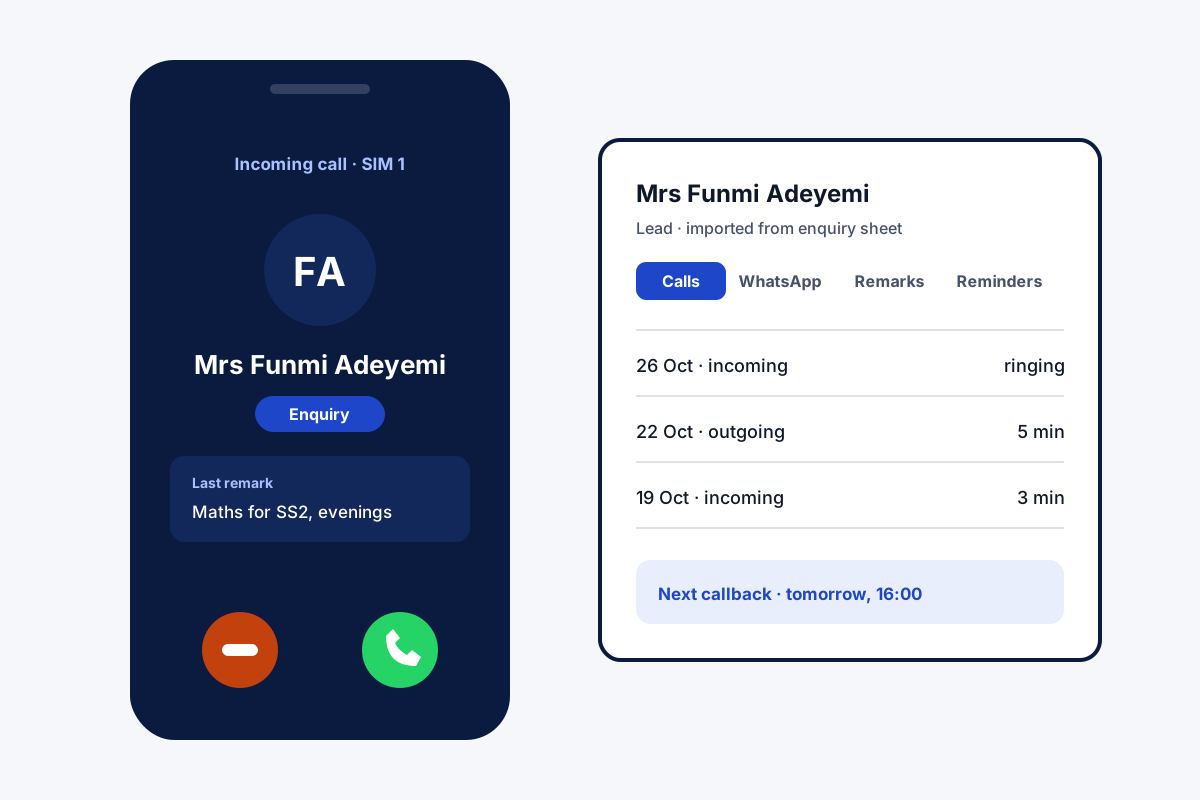
Field Team Tracking uses Android's dialer role and call log, which iPhone does not open to apps, to log calls on leads by themselves.
- Call logging by itself needs Android.
- Leads, notes and reminders also work on iPhone.
- Guided setup asks for each permission.
CRM app for Android: why Android matters
A CRM app for Android can do something iPhone apps cannot: read the call log and take over as the phone app. Field Team Tracking uses both. Once set as the default phone app, it keeps your contacts and history, displays the customer’s current stage and most recent remark as the phone rings, and after hanging up asks for the outcome and the next callback on one small sheet. An unknown number that rings can become a lead from just the number. Everything about a lead, from calls and chats to notes and callbacks, is arranged in tabs. Prefer the phone’s original dialer? CRM team mode runs next to it and still shows the result sheet. Setup is guided: install, follow the permission steps, import an Excel file or link a Google Sheet, and use the 3-day trial to test it.
CRM app for Android benefits
Phone app role
Calls land on leads without typing.
Caller in context
Stage and last remark as it rings.
After-call sheet
Result and callback in two taps.
Quick import
Excel, CSV, JSON or a Google Sheet.
One lead screen
Calls, chats, notes and reminders in tabs.
Guided setup
Each permission explained as you go.
CRM app for Android compared with iPhone
The same account works on both phones, but Android does more by itself. On iPhone, leads, notes, reminders, WhatsApp tools and attendance all work, while calls are not added to leads automatically, because iOS keeps its call log closed. Dialing from lead filters is described on the CRM with dialer page, the lead list on the lead management app page, and calls attached to customers on the call management CRM page.
CRM app for Android: Android and iPhone side by side
| Feature | Android | iPhone |
|---|---|---|
| Leads, notes, reminders | Yes | Yes |
| Calls saved on leads by themselves | Yes | No, the call log is closed to apps |
| Caller card on incoming calls | Yes | No, the dialer role is closed to apps |
| WhatsApp tools and attendance | Yes | Yes |
CRM app for Android setup
- Install the app and follow the guided permission steps.
- Accept Android’s prompt to make it the phone app.
- Import your customer list from Excel, or link a Google Sheet.
- Make a call and save the result on the sheet that appears.
CRM app for Android limits
- iPhone calls. Automatic call logging is Android only.
- Email. No email campaigns or inbox.
- Trial length. The trial lasts 3 days; then a paid plan is needed.
- Desk work. Built for phones; the web CRM handles lead routing and the AI first call.
CRM app for Android example: a tuition centre in Ibadan
An invented tuition centre, with sample numbers. A tuition centre in Ibadan takes enquiries from parents by phone and WhatsApp. Two counsellors kept names in notebooks and lost track of who had been called back.
The counsellors made the app their phone app on day one and imported last term’s enquiry sheet. Every parent’s call now lands on their lead with the counsellor’s note. Within the trial, the centre had all 300 past enquiries in one list with next callbacks booked.
CRM app for Android FAQ
Which CRM app for Android logs calls on leads by itself?
Field Team Tracking does: as the phone app, it saves each call on the matching lead and opens a result sheet afterwards.
What is Field Team Tracking?
Field Team Tracking is a CRM for sales teams on Android and iPhone, adding dialing, WhatsApp messaging, callback alarms and staff attendance.
How much is the CRM app for Android from Field Team Tracking?
Once the 3-day trial ends, a user costs about ₹249 a month on quarterly billing in India, or USD 29 a year abroad. Tax is added.
Which CRM app on Android saves the most typing?
For phone-heavy work, one that can act as the dialer, so calls never need logging by hand. Field Team Tracking does this.
Is there an Android CRM that costs nothing?
Some basic ones cost nothing with limits. Field Team Tracking starts with a 3-day trial before you pay.
Does Google have a CRM tool?
Google sells office tools, not a full CRM. Many small firms start with Google Sheets, which this app can import from on a schedule.
What is a CRM mobile app?
A phone app where you keep customers, their history and next steps, so you can work them from anywhere.
Will my contacts and call history stay?
Yes. Making it the phone app keeps your contacts and past calls as they were.
Can I import my existing customer list?
Yes. Bring in a spreadsheet or JSON file and repeated numbers are dropped, or connect a Google Sheet that adds new rows on a schedule.
Can I use it without being the default phone app?
Yes. In CRM team mode the usual dialer stays, and the result sheet still appears after calls.
What does the trial include?
Three days to try the app, so you can import leads, make calls and set reminders before choosing a plan.
See your team's whole day on one map
3-day trial with every feature. ₹159 per user per month on the yearly plan (₹1,908 a year), or ₹249 per user per month for 3 months; outside India $29 per user per year or $12 for 3 months. Prices are per user, exclusive of taxes.