
Staff attendance app
Staff Attendance App by Field Team Tracking
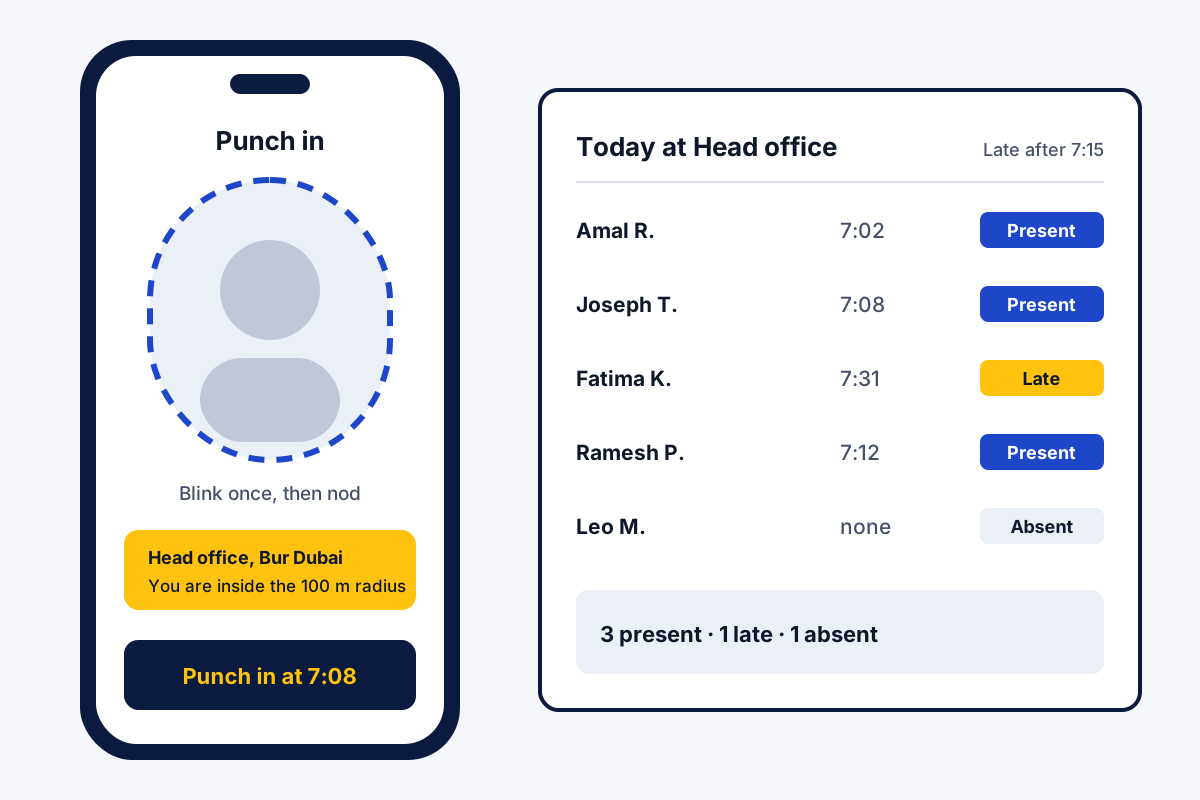
A staff attendance app is a phone app that lets each employee punch in and out from their own phone, so paper registers and shared fingerprint machines stop. Field Team Tracking asks for a selfie at every punch, can require the office area, and then builds the report for each branch.
- Selfie check: one blink, then one random move
- Punches saved on the phone when there is no signal
- Late, half day and absent marked by your rules
What is a staff attendance app?
Using each worker's own phone, a staff attendance app logs the start and finish of every shift and builds the daily register from those punches.
In Field Team Tracking the punch needs a live selfie and, if you set it, a position inside the office radius.
- No machine to buy and no queue at the door.
- Each branch has its own timings and weekly offs.
- The owner downloads any branch and any dates in Excel.
Staff attendance app punch in: how the check works
A staff attendance app replaces the register with a punch on each employee’s phone. Here is the Field Team Tracking flow. The worker opens the app and taps Punch in. The camera wants a blink first and then one movement chosen at random. If the owner has drawn a radius around the office, the app also confirms the phone is inside it. Once the checks pass, the punch is stored with its time. Without signal, it waits on the phone and goes to the account after the connection returns. Lunch and tea are logged with the Break button, and work restarts with Resume work. Each pause is kept. In the evening the worker punches out and sees the day’s hours. For every branch, the owner decides the radius, the shift timings, the weekly offs, the late rule and the half-day rule, and the web report applies them to each punch.
Staff attendance app benefits
Live selfie check
A blink and a random action check that a live person is at the phone.
Office radius
Set a radius per branch, and a punch must come from inside it.
Offline punches
No signal at the gate? The punch saves and is sent later.
Breaks on record
Break and Resume buttons keep every pause with its time.
Rules per branch
Shift timings, weekly offs, late and half-day rules, branch by branch.
Excel report
Present, late and absent totals with punch times, for any dates.
Staff attendance app for field staff and desk staff
Desk staff punch in at the office and stay inside the radius. Field staff can sit in a branch that accepts punches from outside the office. Those people may switch on live location the first time they punch in; after that it maps their route only while they are on shift.
The employee location tracking app page shows how those routes look. The sales team tracking app page shows how a visit joins the customer record. Owners who want attendance, calls and field work under one roof can read the staff management app page. The live face check has its own page, the selfie attendance app, and so does the radius rule, the GPS attendance app. Turning punches into weekly and monthly hours is covered on the employee hours tracking app page, and a spreadsheet layout for teams not ready for an app is the staff attendance sheet. What a single punch checks is shown on the punch in punch out app with location page, and boundaries per branch on the geofence attendance app page. Which location rule suits desk, field or mixed teams is explained on the employee attendance app with location page. Reading monthly absences and late marks is covered on the staff attendance tracker page, and a company rollout on the selfie attendance system page.
Staff attendance app setup for a new branch
- Create the branch and set the office location.
- Choose the radius, the shift timings, the weekly offs and the late rule.
- Choose if punches from outside the radius are allowed.
- Invite each employee and ask them to punch in once as a test.
Staff attendance app on Android and iPhone
| Feature | Android | iPhone |
|---|---|---|
| Live selfie punch in with blink check | Yes | Yes |
| Office radius check | Yes | Yes |
| Punch saved offline, sent later | Yes | Yes |
| Break and Resume work | Yes | Yes |
| Live location while on duty | Yes | Yes |
| Own attendance report on the phone | Yes | Yes |
| Work calls logged by themselves | Yes | No, the iPhone keeps its call log closed to apps |
Staff attendance app price per employee
Pricing counts employees, not branches. An Indian business pays ₹159 per employee each month with yearly billing, or ₹249 each month with quarterly billing. Businesses abroad pay USD 29 a year or USD 12 a quarter for each employee. Add tax to these figures. Let a few staff test it during the 3-day trial before the whole branch joins.
Staff attendance app limits
- Payroll. No salary calculation and no salary slips. Export the Excel report into your payroll tool.
- Leave requests. There is no leave application and approval flow; days off are set per branch.
- Shift rosters. Hours are fixed per branch, so rotating shifts need a rostering tool.
- Shared devices. Each employee punches on their own phone; one tablet at the door is not a supported setup.
Staff attendance app example: a facility company in Dubai
Sample business, invented for this page. A facility services firm in Dubai has 3 sites and 60 cleaners and guards. Supervisors used to collect paper sheets on Thursday and type them on Friday.
Each site is now a branch with its own radius and a 7:15 late cut-off. Guards punch in with a selfie at the gate. At one site the signal is weak, so 4 punches reach the account later, after the phones reconnect. At month end the office downloads the report for each of the 3 branches, and the Friday typing stops.
Staff attendance app FAQ
What is the best app for tracking staff attendance at more than one branch?
Field Team Tracking suits businesses with several branches, because every branch gets its own radius, timings and late rule, and the web report runs for any branch you pick.
Which app is best for attendance?
Choose an app where the punch itself is hard to fake and the rules match your branches. Field Team Tracking uses a live selfie check and branch rules for this.
What is Field Team Tracking?
Field Team Tracking is a staff attendance app that confirms each punch with a selfie and, when set, the office area, and also maps field staff routes while they are on duty.
How much does a staff attendance app cost with Field Team Tracking?
Each employee on the annual plan is ₹1,908, roughly ₹159 monthly; the quarterly plan is ₹747. Abroad the annual plan is USD 29 and the quarterly one USD 12. Tax comes extra, and you can test everything with three trial days.
How to track staff attendance?
Give each employee the app. They punch from their own phone, a selfie confirms each punch, and the web report then marks every day as present, late or absent.
How do I track staff attendance without a fingerprint machine?
Turn the phone camera into the punch clock. Field Team Tracking takes a selfie, wants one blink and one movement chosen at random, and checks the office radius if you drew one.
Can staff mark attendance with an old photo?
The selfie step wants a blink plus one unplanned movement, which a saved or printed photo cannot give.
Does the app work when there is no internet at the office?
Yes. Field Team Tracking holds the punch on the device and uploads it the moment the connection returns.
Can I allow some staff to punch in from outside the office?
Yes. Each branch has a setting that allows or blocks punches from outside its radius, so field staff can sit in a branch with different rules from desk staff.
How are late and half days marked?
For each branch you set the shift hours, the last on-time minute and the half-day rule. Every day in the report is then labelled present, late, half day or absent.
Does the staff attendance app calculate salary?
No. Field Team Tracking runs no payroll and makes no salary slips. Its Excel report gives hours, breaks and attendance totals for your payroll tool.
What is the best app for staff management?
Field Team Tracking covers attendance, breaks, field location, work calls and leads in one app. It does not run payroll, leave approval or shift rosters.
Can employees see their own attendance?
Yes. Every employee can open their own record on the phone, from today back to last month, with hours and breaks.
See your team's whole day on one map
3-day trial with every feature. ₹159 per user per month on the yearly plan (₹1,908 a year), or ₹249 per user per month for 3 months; outside India $29 per user per year or $12 for 3 months. Prices are per user, exclusive of taxes.