
Geofence attendance app
Geofence Attendance App by Field Team Tracking
A geofence attendance app draws an invisible boundary around a workplace and uses it to decide whether a staff punch was made in the right place. Field Team Tracking lets the owner set that boundary for each branch, and choose whether punches beyond it are accepted.
- One boundary per branch, sized by the owner
- Outside punches refused or allowed by rule
- Paired with a live selfie at punch time
What is a geofence attendance app?
It is attendance software that compares the phone's location at punch time with a virtual area around the office, and accepts or refuses the punch accordingly.
In Field Team Tracking the geofence is a radius around each branch's office location, combined with a live selfie check.
- Branches can differ: strict offices, open field teams.
- Leave room for indoor GPS drift when sizing.
- Tracking between punches is a separate opt-in.
Geofence attendance app: drawing the line around work
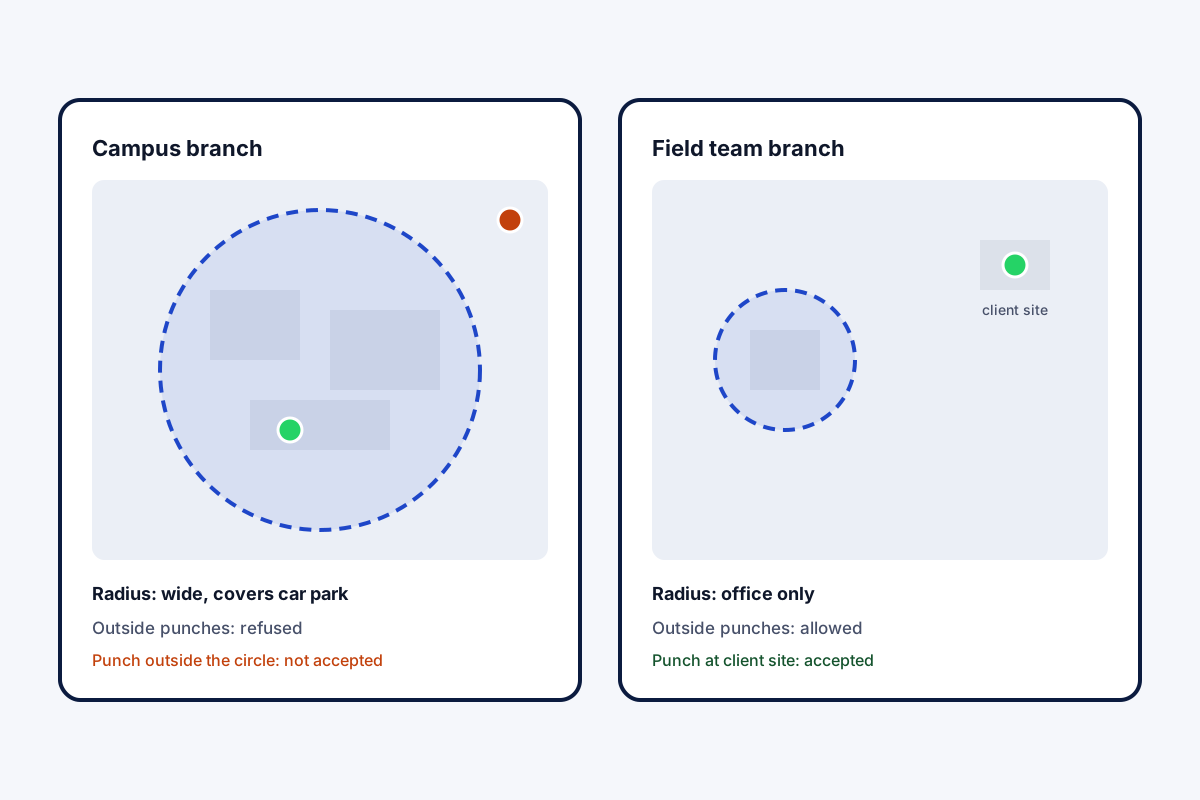
A geofence attendance app turns “were you at work?” into a yes or no the phone can answer. In Field Team Tracking, every branch holds one office point plus a boundary size the owner picks, and together they form its geofence. When an employee punches, the app compares the phone’s position with the boundary and checks a live selfie at the same moment. What happens beyond the line is a branch decision. A shop or clinic can refuse punches made outside, so nobody marks attendance from the bus. A sales or service branch can accept them, so a technician can begin at the first customer’s door. The boundary is checked at punch time only; following staff between punches is a separate feature they switch on after agreeing to a notice.
Geofence attendance app benefits
Boundary per branch
Each office gets its own radius.
Strict or open
Refuse or accept punches beyond the line.
Face at the punch
A live selfie alongside the location.
Offline safe
Punches upload when coverage returns.
Branch rules
Hours and late cut-off set per branch.
No all-day tracking
Only the punch is checked by default.
Geofence attendance app: sizing the boundary
Phones estimate location, and indoors the estimate can wander by tens of metres. A boundary drawn tight around the walls will reject honest punches; one drawn too wide lets punches through from next door. Start with the building plus its parking and a margin, test with a few staff, then adjust. The radius check and duty-only routes are covered on the GPS attendance app page, the punch screen on the punch in punch out app with location page, and all branch rules on the staff attendance app page. Ready setups by type of team are on the employee attendance app with location page.
Geofence attendance app: example settings
| Workplace | Outside punches | Boundary approach |
|---|---|---|
| Small shop or clinic | Refused | Building plus a small margin |
| Office in a large building | Refused | Wider, to cover upper floors and drift |
| Factory or campus | Refused | Cover gates and parking |
| Sales or service team | Allowed | Office boundary for office days only |
Geofence attendance app setup
- Create the branch and set its office position.
- Choose a starting radius with a margin for drift.
- Decide whether punches beyond the boundary count.
- Ask a few staff to punch from inside and just outside, then adjust.
Geofence attendance app limits
- One boundary. Each branch has one office location and radius.
- Circles only. The boundary is a radius, not a drawn shape.
- No auto clock-in. Staff still punch; entering the area does not punch for them.
- GPS drift. Indoor readings can be off; size the radius with that in mind.
Geofence attendance app example: a school in Sharjah
An invented school, with sample settings. A private school in Sharjah has 60 teachers and support staff across one large campus. A first, tight boundary around the main block rejected punches from the sports hall.
The school widened the radius to cover the whole campus, including the staff car park, and kept outside punches refused. Bus supervisors were moved to a separate branch that allows punches at pick-up points. Rejected punches dropped to almost none within a week.
Geofence attendance app FAQ
Which geofence attendance app lets each branch have its own boundary?
Field Team Tracking does: every branch carries its own office location, radius and rule on punches beyond it.
What is Field Team Tracking?
Field Team Tracking is a geofence attendance app that also covers field routes, sales calls and leads.
What is the price of the geofence attendance app on Field Team Tracking?
It is part of the seat: a quarter is ₹747 in India and USD 12 elsewhere, plus tax.
What is geofencing in attendance?
Using a virtual boundary on a map, usually a circle around the workplace, to check where an employee is when they mark attendance.
Is there a location-based attendance app for field staff?
Yes. Field branches can accept punches beyond the boundary, so staff can start at a client site while office branches stay strict.
How big should a geofence be?
Big enough to cover the building and parking with some margin for indoor GPS drift, small enough to exclude the café down the road.
Is geofencing legal?
Often allowed when staff are told and checks are limited to work, but rules differ by country and state. This is general guidance, not legal advice.
Does the geofence track me all day?
No. The boundary is checked at punch time. Continuous location is a separate feature staff switch on after consent.
Can one branch have two buildings?
Each branch has one office location; a second building can be set up as its own branch.
What happens offline?
The punch is kept on the handset and uploaded later.
Does it work on iPhone?
Yes. Geofenced punches work on Android and iPhone.
See your team's whole day on one map
3-day trial with every feature. ₹159 per user per month on the yearly plan (₹1,908 a year), or ₹249 per user per month for 3 months; outside India $29 per user per year or $12 for 3 months. Prices are per user, exclusive of taxes.