
Service technician tracking app
Service Technician Tracking App by Field Team Tracking
A service technician tracking app follows repair and maintenance staff from one customer site to the next, so the office knows which visits happened and how long each took. Field Team Tracking lets technicians punch in at the first job, records every site stop, and keeps photos and checklists on the customer's record.
- Start the day at a customer's door, with a selfie
- Time on each site from arrival to departure
- Next service due rings as a repeating reminder
What is a service technician tracking app?
It is a phone app for repair, installation and maintenance teams that records where technicians go during duty, how long they stay at each site, and what they did there.
In Field Team Tracking the site visits come from live location, and the work notes, calls and next service date sit on each customer.
- A stop of five minutes or more becomes a timed site visit.
- Notes on a customer hold photos, voice and a checklist.
- There is no job dispatch or invoicing module.
Service technician tracking app: a day of site visits
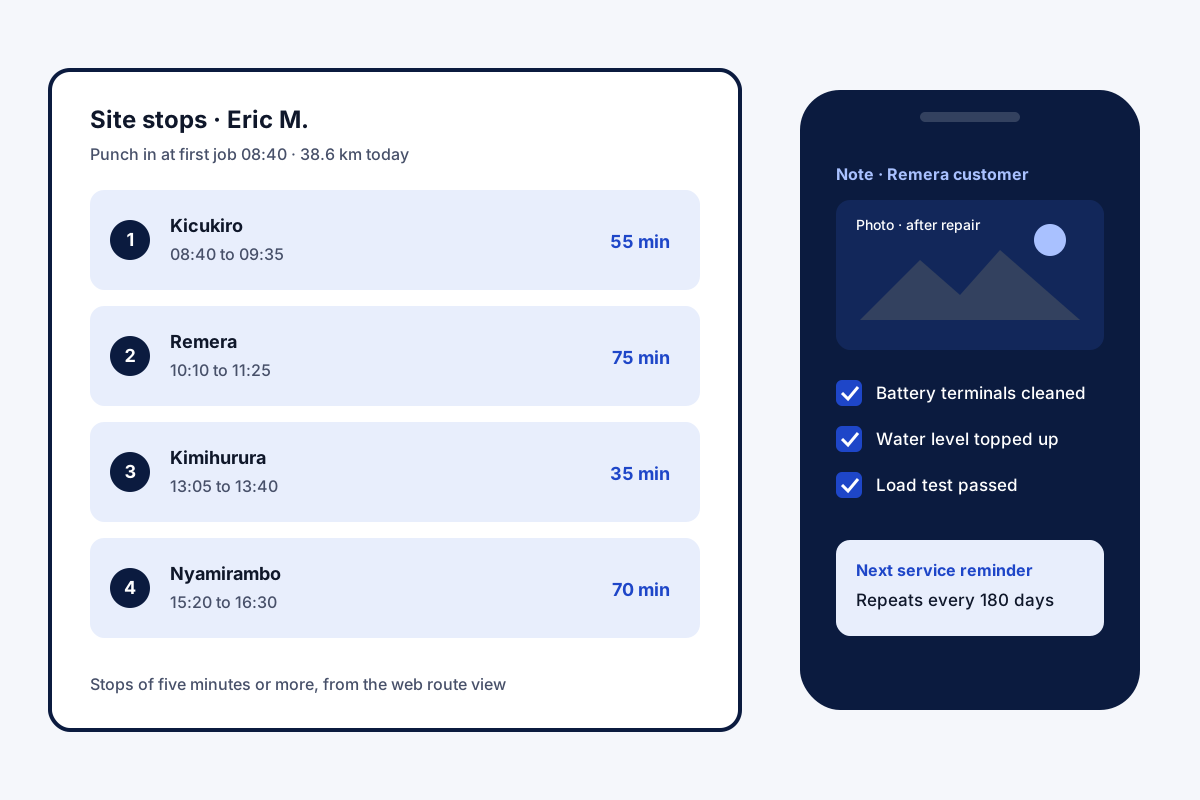
A service technician tracking app answers the questions a service manager asks every evening: did the technician reach each customer, how long did each job take, and when is the next visit due. In Field Team Tracking, a technician can mark attendance at the first customer’s address, selfie included, provided the branch permits off-site punches. Until the shift closes, the handset logs position quietly and skips breaks. Any halt lasting five minutes or longer becomes a site stop, labelled by locality, showing when the technician came, when they left, and the time in between. At the site, the technician opens the customer’s record, adds a note with before and after photos, ticks a checklist, and can set the next service as a reminder that repeats every month or every few weeks. The office reads the route on the web and the job notes on the customer.
Service technician tracking app benefits
Start on site
Punch at the first job, not the office.
Minutes per job
Arrival and departure for every site stop.
Proof of work
Photos, voice and checklists in a note.
Repeat service
Reminders every month or every X days.
Contract renewals
Yearly packages warn before they end.
Distance per day
Kilometres with fake GPS points left out.
Service technician tracking app for the service manager
The manager does not need to call each technician for an update. The web route view shows the day as numbered stops on a map, with worked time, distance, idle time and phone battery. When a customer says nobody came, a stop in their area, with its minutes, helps check it. Job notes keep every edit with a date, so the earlier text stays visible. Movement for every role is covered on the employee route tracking app page, office-wide controls on the field force management app page, and repeat visits and contract renewals on the customer management app page.
Service technician tracking app: what each part of a job leaves behind
| Job stage | What is recorded | Where it shows |
|---|---|---|
| Start of day | Selfie punch and time | Attendance report |
| Travel | Route and kilometres | Web route view |
| On site | Stop with arrival, departure and minutes | Web route view |
| Work done | Note with photos, voice or checklist | Customer record |
| Customer call | Call, remark and auto WhatsApp | Customer history |
| Next visit | Repeating reminder | Reminders tab |
Service technician tracking app setup
- Create a branch for the service team and allow punches beyond the office.
- Add technicians; every one accepts the location notice once, on their handset.
- Save customers as leads or paid clients, with their service package.
- Ask technicians to add a note with photos at every job.
- Set each customer’s next service as a repeating reminder.
Service technician tracking app limits
- No dispatch. Jobs are not assigned or scheduled from a board; agree the day’s list your own way.
- No work orders or invoices. Billing stays in your accounts software; paid and due amounts can be noted on a sale.
- No parts stock. Spare parts used are not tracked as inventory.
- No signatures. Customer sign-off can be a photo in the note, not a signed form.
Service technician tracking app example: an inverter service company in Kigali
An invented company, with sample numbers. An inverter and battery service company in Kigali runs 9 technicians who visit homes and shops. Customers often phoned to ask whether anyone was coming, and annual service visits were missed because the dates lived in a diary.
Technicians now punch in at their first job and add two photos to a note at each site. The manager checks site minutes on the route view each evening. Every contract customer has a reminder that repeats every 180 days, so the twice-yearly checks now show up on time.
Service technician tracking app FAQ
Which service technician tracking app shows minutes at each stop in a customer's area?
Field Team Tracking does: on the web, each site halt of five minutes or more lists when the technician came and went, and the time between.
What is Field Team Tracking?
Field Team Tracking is an app for staff who work away from the office, joining attendance, routes, calls and customer records.
How much does a service technician tracking app cost on Field Team Tracking?
A technician seat is USD 12 per three months outside India; Indian teams pay ₹747 for each three-month block. Tax comes on top.
What are the best mobile apps for service technicians?
Ones the technician will open without being told: quick punch, customer history in one tap, photos of the work, and reminders for the next visit.
What is the best repair service tracking software?
It depends on whether you need job scheduling. For knowing where technicians went, how long they stayed and what they noted, a tracking app is enough.
What is the best maintenance tracking app?
For repeat maintenance, look for reminders that repeat every month or every X days, and a record of each past visit on the customer.
Can a technician punch in at a customer's site instead of the office?
Yes, when the branch allows punches beyond its office boundary. A live selfie is still needed.
How do I record the work done at a site?
Add a note on the customer with photos, a voice clip or a checklist. The visit's area and coordinates are added to remarks by themselves.
Can I set reminders for annual maintenance contracts?
Yes. Record the contract as a sale on a yearly package, and the app reminds you ahead of its end date.
Does it track technicians after work?
No. Recording starts at the punch and ends when the technician punches out or the branch's day closes; breaks are skipped.
Does it work on iPhone?
Yes. Attendance, live location and customer records work on Android and iPhone; the phone's call log is Android only.
See your team's whole day on one map
3-day trial with every feature. ₹159 per user per month on the yearly plan (₹1,908 a year), or ₹249 per user per month for 3 months; outside India $29 per user per year or $12 for 3 months. Prices are per user, exclusive of taxes.