
GPS attendance app
GPS Attendance App by Field Team Tracking
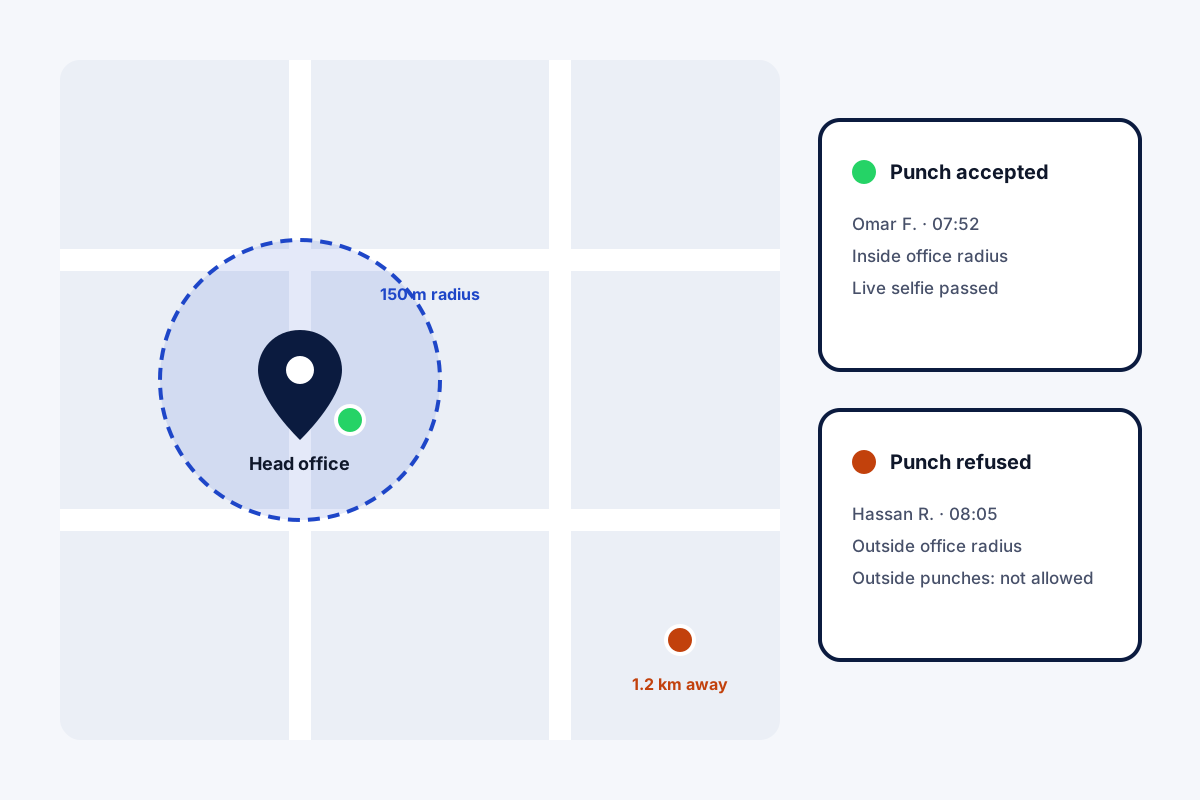
A GPS attendance app uses the phone's location to confirm where an employee is when they punch in or out. Field Team Tracking checks each punch against a circle drawn around the branch office, with a radius the owner sets.
- A radius per branch, set by the owner
- Outside punches allowed or blocked by rule
- Field staff tracked only while on duty
What is a GPS attendance app?
It is a mobile attendance tool that reads the phone's position at punch time and accepts the punch only at an approved place, or records where it happened.
Field Team Tracking pairs that location check with a live selfie, and keeps a route for field staff during working hours.
- Office staff: the punch must fall inside the radius.
- Field staff: the branch can allow punches anywhere.
- Location is never tracked outside duty.
GPS attendance app: how the radius check works
A GPS attendance app answers one question at punch time: is this person where they should be? In Field Team Tracking, the owner sets each branch’s office location and a radius around it. When an employee punches in, the phone’s location is compared with that circle, alongside the live selfie. Inside the circle, the punch is accepted; outside it, the result depends on the branch rule. Office branches can refuse outside punches, while branches with field staff can allow them, so a rep can start the day at a client site. Punches made without signal are stored and sent later. After punch in, field staff who agreed on the consent screen are tracked until punch out or closing time, never in the evening, and breaks pause it.
GPS attendance app benefits
Branch radius
A circle around each office, sized by you.
Outside punch rule
Allow it for field staff, refuse it for the office.
Selfie too
Location plus a live face at every punch.
Duty-only routes
Tracking stops at punch out or closing time.
Fake GPS flagged
Spoofed route points left out of distance.
Branch report
Attendance and kilometres for any dates.
GPS attendance app for office staff and field staff
The same app treats the two groups differently by branch rule. Office staff punch inside the radius, and a late punch follows the cut-off. Field staff may punch wherever the day begins, and their route then shows stops and kilometres. How a day becomes a route is on the employee location tracking app page, the live face check on the selfie attendance app page, and all branch rules on the staff attendance app page. Telling staff and collecting consent before tracking starts is the subject of how to track employee location, and the office side of the system the field team tracking software page. What happens between the punches is covered in live location tracking for employees, and the punch itself on the punch in punch out app with location page. Sizing the boundary is discussed on the geofence attendance app page. Setups for desk, field and mixed teams are on the employee attendance app with location page, and branch policies on the field workforce management software page. How one punch moves from phone to report is traced on the GPS attendance tracking system page.
GPS attendance app branch rules
| Rule | What it controls | Typical setting |
|---|---|---|
| Office location and radius | Where a punch counts as at the office | The building, plus a small margin |
| Outside punches | Whether punches beyond the radius are accepted | Off for office, on for field |
| Working hours and days off | When duty starts and ends | Your shift times |
| Late cut-off and half day | How late arrivals and short days are marked | Your policy |
GPS attendance app setup
- Create the branch and set its office location.
- Set the radius and decide on outside punches.
- Add staff; field staff switch on live location themselves the first time, accepting the consent notice.
- Check the first day in the web attendance report.
GPS attendance app limits
- Accuracy. Phone GPS can drift indoors; leave a sensible radius margin.
- One office per branch. Each branch has one office location.
- After hours. Location is not tracked outside duty, by design.
- Payroll. Attendance totals feed your salary process elsewhere.
GPS attendance app example: a construction firm in Doha
An invented firm; figures for illustration only. A construction firm in Doha has an office team and 30 site supervisors who start at different sites each week. Office punches came from a machine, while supervisors phoned in their start times.
The office is now a branch with a tight radius and outside punches off. Supervisors belong to a field branch that accepts punches anywhere, so each one starts the day wherever concrete is being poured, and the route shows the moves between sites. Each group now has its own web report, with present, late and absent totals.
GPS attendance app FAQ
Which GPS attendance app lets each branch set its own radius?
Field Team Tracking does: every branch has its own office location, radius, hours and rule on outside punches.
What is Field Team Tracking?
Field Team Tracking is a GPS attendance app with selfie punches, field routes, sales calls and leads in one account.
How is the GPS attendance app priced on Field Team Tracking?
Per employee, twelve months cost ₹1,908 in India and USD 29 in other countries, after a 3-day trial. Tax is added.
What is a GPS attendance system?
A setup where staff punch in on phones and the punch carries a location, checked against an allowed area such as the office.
What is geotag attendance?
Attendance where each punch is stamped with the place it was made, so the owner knows where the employee was at that moment.
What is the best app for tracking attendance?
For staff who all sit in one office, a basic app may do. For teams with field staff, pick one that handles both radius checks and outside punches.
Can a field employee punch in at a client site?
Yes, when the branch they belong to accepts punches beyond the office circle.
Does the app keep tracking location after work?
No. Once the day's last punch is made, or the branch shuts, recording stops; a break pauses it too.
What about fake GPS apps?
Route points that come from location-faking apps get a warning for the owner and add nothing to the kilometres.
Does it work without internet?
Yes. Without a connection the punch is held on the handset and goes up as soon as there is coverage.
Does it work on iPhone?
Yes. GPS attendance and field tracking run on Android and iPhone.
See your team's whole day on one map
3-day trial with every feature. ₹159 per user per month on the yearly plan (₹1,908 a year), or ₹249 per user per month for 3 months; outside India $29 per user per year or $12 for 3 months. Prices are per user, exclusive of taxes.