
Call management software
Call Management Software by Field Team Tracking
Call management software gives a business control over its calls: who answers, what gets noted, who rings back. Calls stop slipping through the cracks. Field Team Tracking delivers this on the mobiles your staff already carry, without desk phones or a switchboard.
- No PBX box, headsets or cloud numbers to buy
- The whole staff's calling in the owner's account
- Excel or PDF call reports for any period
What is call management software?
Call management software tracks a company's incoming and outgoing calls, links them to customers, and shows managers how calls are handled and followed up.
Field Team Tracking is phone-based call management software for small teams that sell and serve by mobile.
- Set up by installing an app, not wiring an office.
- Calls, leads and follow-ups share one account.
- Field staff get attendance and location in the same app.
Call management software for small business: how it is set up
Call management software used to mean a switchboard box, desk phones and a technician. For a team of five or fifty people with smartphones, Field Team Tracking replaces all of that with an app. Each employee installs it and makes it the phone app on Android. The SIM stays the same, yet every conversation now gets matched to a customer. Ringing leads appear with their stage and the last note. Missed callers who were never phoned back wait in a list. The owner’s account shows the whole team’s calls, with totals for missed, connected and unique callers, and month-by-month trends. Any period exports to Excel or PDF. The same account carries leads, follow-up alarms, an auto dialer and, for staff who travel, attendance and route tracking.
Call management software benefits
Nothing to wire
An app on each phone replaces the switchboard.
Team calls in one place
The owner reviews every employee's calls in one account.
Call analytics
Totals by type, monthly trends and any date range.
Reports out
Excel or PDF exports, or a WhatsApp daily count.
No forgotten callers
Missed calls nobody returned stay listed until handled.
Field staff included
Attendance and routes for people who leave the office.
Call management software: phone app or cloud phone system
| Need | Phone-based app (this one) | Cloud phone system |
|---|---|---|
| Hardware | Staff smartphones only | Headsets or desk phones, plus computers |
| Phone numbers | Each employee's own SIM | Shared virtual numbers |
| Call queues and IVR | No | Usually yes |
| Works away from a desk | Yes, built for it | Depends on the mobile app |
| Lead record per call | Yes | Often through a separate CRM |
| Best for | Small sales and service teams on the move | Large desks with inbound queues |
Call management software setup
- Load the app onto each staff handset and follow the permission guide.
- Make it the default phone app on Android.
- Add your leads or import them from Excel or a Google Sheet.
- Open the owner’s account after the first day of calls.
Day-to-day calling screens are on the call management app page; how calls attach to customers is on the call management CRM page. Report exports and backups are explained on the call history manager page. For outbound teams, the dialling rules an owner can lock are listed on the auto dialer software page, and desk staff can start calls from their browser with click to call. A small calling desk built on mobiles is described on the call center software for small business page.
Call management software limits
- Inbound queues. No call queues, hold music or IVR menus; calls ring the phone they were dialled to.
- Shared numbers. No virtual numbers that several people answer.
- iPhone logs. iPhone calls are not logged by themselves.
- Recording. The app imports the handset’s own recordings; it records nothing itself.
Call management software example: a tile trader in Kuala Lumpur
Fictional trader, numbers for illustration only. A tile trading company in Kuala Lumpur has 4 sales staff in the showroom and on building sites. A quote for a desk phone system came with a box, desk sets and a monthly line fee.
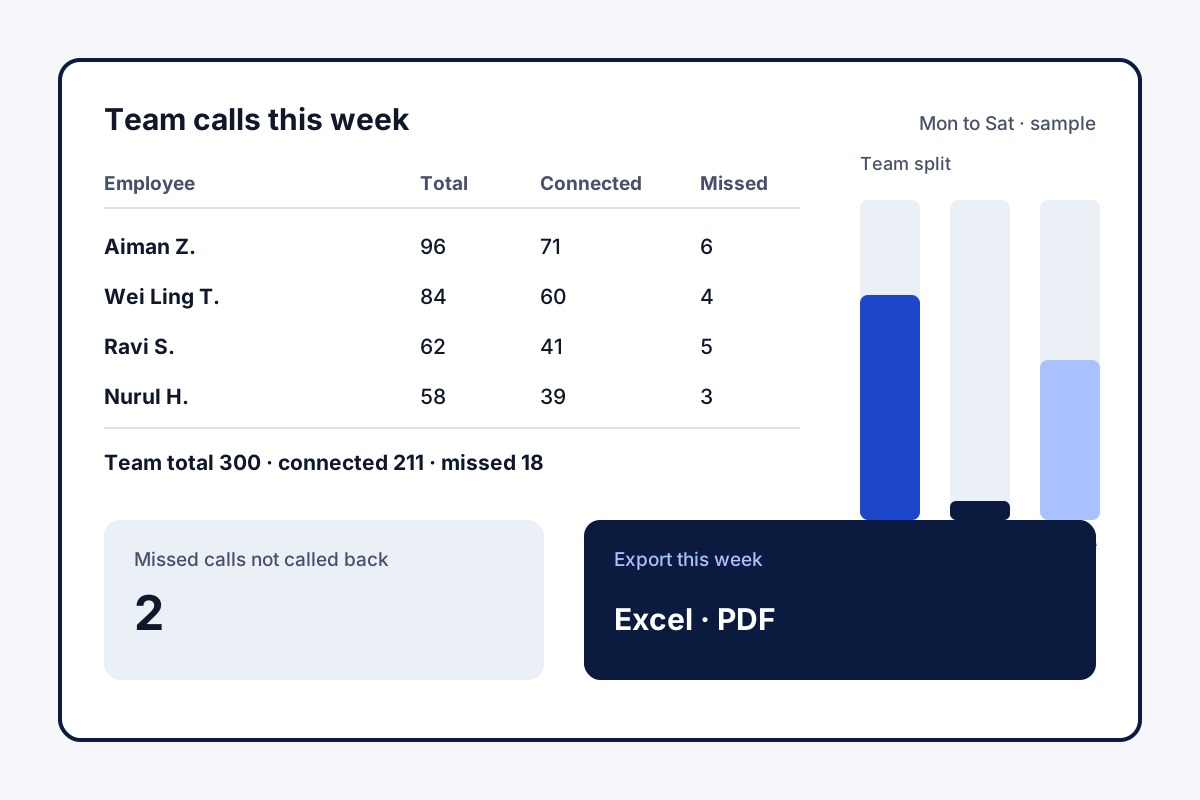
They installed the app on the phones they already had instead. The owner now sees about 300 calls a week across the team, with 15 to 20 missed calls returned by the next morning. The two who visit sites use the same app to punch in, so one bill covers calls and attendance.
Call management software FAQ
Which call management software suits a shop or office of ten people?
Where everyone already carries a smartphone, Field Team Tracking is a practical choice: no office installation, and each call ties to a customer record.
What is Field Team Tracking?
Field Team Tracking is call management software that runs on staff phones, with a CRM, an auto dialer and field attendance in the same account.
How much does call management software cost with Field Team Tracking?
With Field Team Tracking, a user is ₹249 monthly on the quarterly bill, dropping to ₹159 monthly on the yearly one. International teams pay in dollars, 12 a quarter or 29 a year. Taxes extra, after a 3-day trial.
What is the best call management software?
The best fit depends on team size: large desks need cloud contact centre suites, while small mobile teams suit a phone-based app like Field Team Tracking.
What software do most call centers use?
Larger call centres mostly use cloud contact centre suites with shared numbers, queues and IVR menus. Small teams on mobiles often use phone-based apps instead.
Do I need special hardware?
No. Each employee installs the app on their own smartphone. There is no switchboard, desk phone or headset system to buy.
Can the owner see calls made by staff?
Yes. The owner's login collects each staff phone's calls, so the review happens in one place.
Which software is used in BPO?
A BPO usually runs contact centre software with queues and call routing. Field Team Tracking suits smaller outsourcing teams that call from their own phones.
Can I export call reports?
Yes. Choose dates and download a spreadsheet or a PDF, or send today's totals over WhatsApp.
Does it work for incoming calls too?
Yes. Incoming calls from saved leads show the lead's details as the phone rings, and missed callers who were never called back get their own list.
How do I turn off call management on Android?
Set a different app as the default phone app in Android settings. Field Team Tracking then stops showing its call screens.
See your team's whole day on one map
3-day trial with every feature. ₹159 per user per month on the yearly plan (₹1,908 a year), or ₹249 per user per month for 3 months; outside India $29 per user per year or $12 for 3 months. Prices are per user, exclusive of taxes.