
Staff attendance sheet
Staff Attendance Sheet by Field Team Tracking
A staff attendance sheet is a table that records, for each employee and day, when they arrived, when they left and whether they were present, late or absent. Field Team Tracking hands you a nine-column file to start with, and its app records the same details from selfie punches.
- Nine columns: punch times, breaks, hours, status
- Any spreadsheet program can read it
- The app's web report exports the same in Excel
What is a staff attendance sheet?
It is a daily or monthly register of staff presence, usually a spreadsheet, showing arrival and departure times and marking each day as present, late, half day or absent.
Field Team Tracking replaces the hand-filled sheet with punches on each employee's phone and an Excel export.
- One row per employee per day.
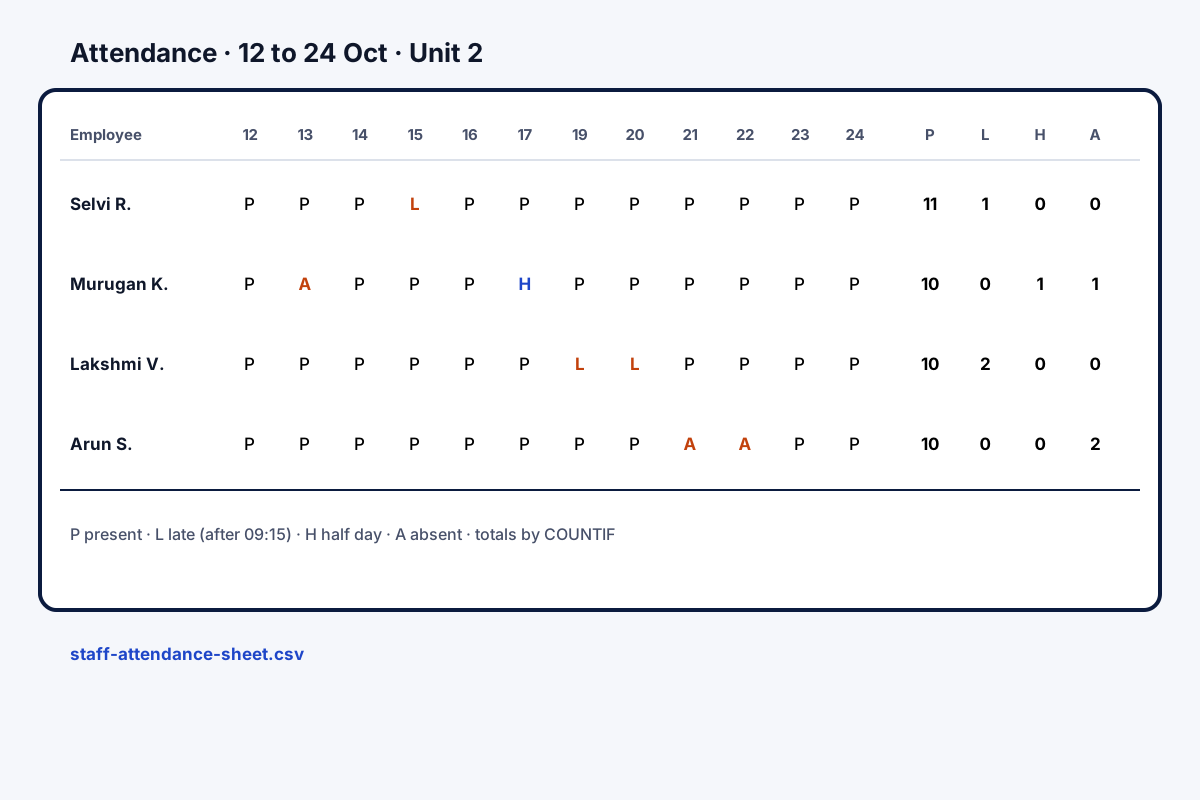
- Use letter codes for status: P, L, H, A.
- Total the month at the bottom.
Staff attendance sheet: a layout you can use today
A staff attendance sheet only works if it is filled the same way every day. The layout offered here has nine columns: employee, branch, date, punch in, punch out, break minutes, hours, a status letter (P, L, H or A: present, late, half day or absent), and remarks. Download the CSV attendance sheet and load it in a spreadsheet. Give each worker a fresh row every day, and at month end count each letter with COUNTIF. When the sheet becomes a chore, Field Team Tracking produces the same information without a register: employees punch in on their phones with a live selfie, a button records each break, and the web report lists daily start and finish times next to hours and pauses, totals the presents, lates and absences, and downloads as Excel.
Staff attendance sheet benefits
Ready layout
Nine columns in a CSV file.
Month at a glance
One row per person per day.
Simple codes
P, L, H and A for each day.
App punches
Real times from selfie punches.
Breaks counted
Each pause saved by the app.
Excel export
The app's report downloads as Excel.
Staff attendance sheet versus an attendance app
A sheet costs nothing to start and suits a small shop with one supervisor. Its weak points are rounded times, proxy entries and the month-end tally. An app fixes those by taking the time from the punch itself. Punch rules are on the staff attendance app page, hours and breaks on the employee hours tracking app page, and the live face check on the selfie attendance app page. Spotting late and absence patterns week by week is the subject of the staff attendance tracker page.
Staff attendance sheet columns
| Column | On the sheet | In the app |
|---|---|---|
| Punch in and punch out | Typed by a supervisor | From the selfie punches |
| Break minutes | Typed | Break and Resume buttons |
| Hours | Worked out by hand or formula | In the report beside the breaks |
| Status | P, L, H or A typed | Present, late and absent totals |
| Branch | Typed | Set when the employee is added to a branch |
Staff attendance sheet setup
- Get the file and open it in your spreadsheet.
- Write your late and half-day rules at the top.
- Fill one row per employee per day.
- At month end, count each status with COUNTIF.
Staff attendance sheet limits
- Manual entry. The CSV does not fill itself.
- Formats. CSV only; no PDF version is offered.
- App report. It totals present, late and absent; half days follow your branch rules.
- Proxy marks. A sheet cannot tell who wrote a time; app punches can.
Staff attendance sheet example: a garment workshop in Tiruppur
An invented workshop, with sample numbers. A garment workshop in Tiruppur has 60 tailors on two shifts. A supervisor filled a paper register and typed it into a sheet each month, which took two days.
The workshop used the CSV layout for a month to agree the columns, then moved to phone punches. The month-end sheet now comes from the web report’s Excel export, with the punch times, hours and breaks the supervisor used to type.
Staff attendance sheet FAQ
Where can I download a staff attendance sheet?
Field Team Tracking offers a staff attendance sheet on this page: a spreadsheet file with nine columns, ready to fill.
What is Field Team Tracking?
Field Team Tracking is a phone app for attendance, routes and sales calls; its punches replace the hand-filled sheet.
Does the attendance sheet cost anything with Field Team Tracking?
Using the file costs only your time. The app that replaces it is ₹1,908 per worker for twelve months in India, USD 29 elsewhere, plus tax.
How do I make a simple attendance sheet?
Put employees in rows and dates in columns, or one row per person per day. Record in and out times, and a status letter.
Can I download an Excel template for an employee attendance sheet?
The file here is a CSV, which Excel opens directly. Save it as an Excel workbook after opening if you prefer.
What do P, L, H and A mean?
Present, late, half day and absent. Decide your own rules for late and half day, and write them at the top of the sheet.
How do I total the month?
Count each letter per employee with a COUNTIF formula, for example counting P across the month's columns.
Why move from a sheet to an app?
Sheets are filled from memory or a register, so times get rounded. App punches record the real time with a selfie check.
What does the app's report show?
Choose a branch and period: you get presents, lates and absences in total, plus start and finish times, hours, pauses and distance per day, downloadable as Excel.
Can staff see their own attendance?
Yes. Each employee sees their own punches on the phone, from today back through last month.
Does it work for staff who work outside the office?
Yes, if their branch allows punches outside the office area.
See your team's whole day on one map
3-day trial with every feature. ₹159 per user per month on the yearly plan (₹1,908 a year), or ₹249 per user per month for 3 months; outside India $29 per user per year or $12 for 3 months. Prices are per user, exclusive of taxes.