
Tracking work, not screens
How to Track Employee Work by Field Team Tracking
Working out how to track employee work starts with one question: what does finished work look like in this job? For sales and field staff, Field Team Tracking records that work as calls, visits, closed leads and hours, not screenshots.
- Outcomes the phone records by itself
- Visible to staff, set up with their knowledge
- Built for phone and field jobs, not desk PCs
How do you track employee work?
Decide what finished work means for each role, record it from the tools staff already use, tell staff what is tracked, and review results rather than minutes on a screen.
Field Team Tracking does this for jobs done on a phone or on the road: calls, visits, leads worked and attendance.
- No screen recording or keystroke logging.
- Results matter more than activity.
- Laws differ; tell staff in writing.
How to track employee work in four steps
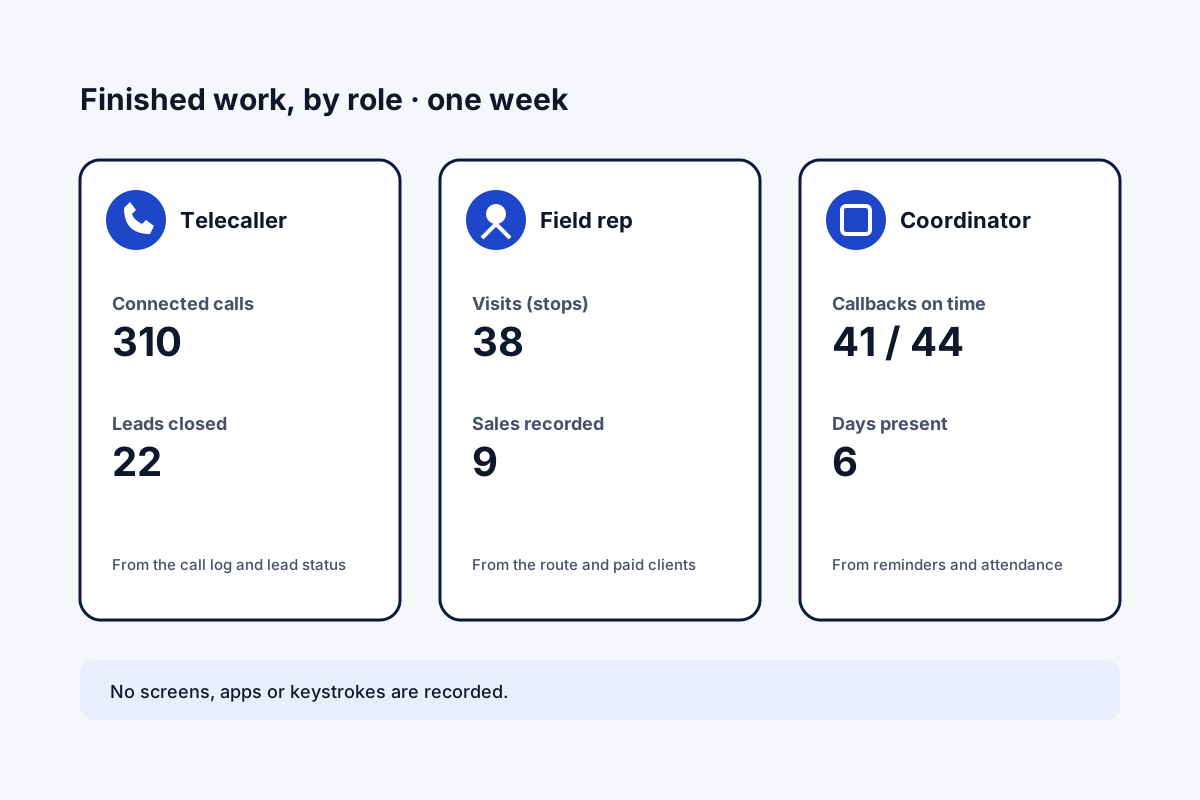
- Define finished work per role. For a telecaller: connected calls and leads closed. For a field rep: visits and sales. For office staff: agree the measure with them, as the app has no task board.
- Record it where the work happens. Use the phone's call log, the route's stops and the lead's status instead of asking staff to report it.
- Tell staff what is tracked. Write down what is recorded, when and why, and keep tracking to working time on work phones.
- Review results weekly. Look at outcomes per person against their own past weeks, and talk about one change at a time.
How to track employee work without watching screens
Most search results for this question sell software that records screens and keystrokes. For people who work on the phone or on the road, that misses the point: their work happens in calls, visits and customer records. Field Team Tracking records those directly. Each call lands in the team log with its result. Each lead keeps its calls, chats and remarks, and the Done tab records how each lead was closed: through a dialing session, a click-to-call, a hand-marked finish or a transfer. Field staff who agreed to location tracking show a route with timed stops during duty, and a visit remark can carry its place. Attendance adds hours and breaks. The four steps above turn those records into a fair weekly review, done in the open.
How to track employee work: measures by role
| Role | Finished work looks like | Where the app records it |
|---|---|---|
| Telecaller | Connected calls, leads moved forward | Call log, lead status history |
| Field rep | Visits made, sales recorded | Route stops, remarks, paid clients |
| Support or service | Callbacks done on time | Reminders: completed and overdue |
| Any role | Days and hours worked | Selfie punches and breaks |
How to track employee work features
Calls with results
Every call in the team log.
Leads finished
The Done tab shows how each closed.
Visits
Timed stops during duty.
Hours
Punches and breaks per day.
Callbacks
Completed and overdue reminders.
Open by design
Permissions and consent come from staff.
How to track employee work: what to avoid
Avoid tracking things that do not change results, such as minutes spent in an app. Avoid hidden tools; staff who know what is recorded are less likely to feel watched. Avoid tracking personal time or personal phones. More on calls is on the employee call monitoring page, on routes on the employee location tracking app page, and on weekly reviews in how to track sales team performance. What this kind of tracking leaves out, such as screenshots, is listed on the employee monitoring app page.
How to track employee work: limits of the app
- Computers. No screen, app or keystroke monitoring.
- Desk tasks. No general task board for office work.
- Personal time. Nothing is recorded outside duty.
- iPhone calls. Call records need Android.
How to track employee work example: an interior design firm in Muscat
An invented firm, with sample numbers. An interior design firm in Muscat has four sales consultants who phone enquiries and visit homes to measure rooms. The owner was offered computer monitoring software, but the consultants were rarely at a computer.
The firm tracks connected calls, home visits and leads reaching a custom “Quote signed” stage instead. After a month, one consultant’s visits were high but few led to quotes, so the owner joined two of her visits and helped her shorten the measuring step.
How to track employee work FAQ
Which app tracks employee work for sales and field staff?
Field Team Tracking records the work itself for those roles: calls and their results, visits from the route, leads finished and hours.
What is Field Team Tracking?
Field Team Tracking is an app for Android and iPhone, built for sales and field teams, that joins attendance, routes, calls and a lead CRM.
How much does tracking employee work cost with Field Team Tracking?
Per employee, ₹747 a quarter in India or 12 US dollars outside it; a year costs less per month. Tax is extra.
How can I monitor employees who work from home?
If their work is calls and leads on a phone, track the calls and lead outcomes. For desk work on a computer, a different kind of tool is needed.
Can this app see what employees do on their computers?
No. It does not record screens, apps or keystrokes. It tracks phone calls, field movement during duty and lead outcomes.
How can I tell if I am being monitored at work?
Ask your employer and check the apps and permissions on your work phone. This app needs permissions that you grant on your phone.
Is it legal to track employee work?
Usually on work devices with notice, but rules differ by country. This is general guidance; check local law.
How do I track employee working hours?
Use selfie punches with Break buttons; the attendance report then shows hours and breaks per day.
How do I know a lead was really worked?
Each lead keeps its calls, chats and remarks, and the Done tab shows how it was finished.
What about staff who visit customers?
During duty, their route shows stops with times, and a remark can carry the place it was written.
Can I track work on iPhone?
Attendance, routes and leads work on iPhone. Call records need Android.
See your team's whole day on one map
3-day trial with every feature. ₹159 per user per month on the yearly plan (₹1,908 a year), or ₹249 per user per month for 3 months; outside India $29 per user per year or $12 for 3 months. Prices are per user, exclusive of taxes.