
Employee tracking app
Employee Tracking App by Field Team Tracking
An employee tracking app is a work app that records when staff start, stop and take breaks, and where they go on duty, so timesheets stop being guesses. Field Team Tracking keeps the punches, the route and the work calls of each employee in one account.
- A selfie at both ends of the shift
- Hours and breaks for each day
- Location only while on duty
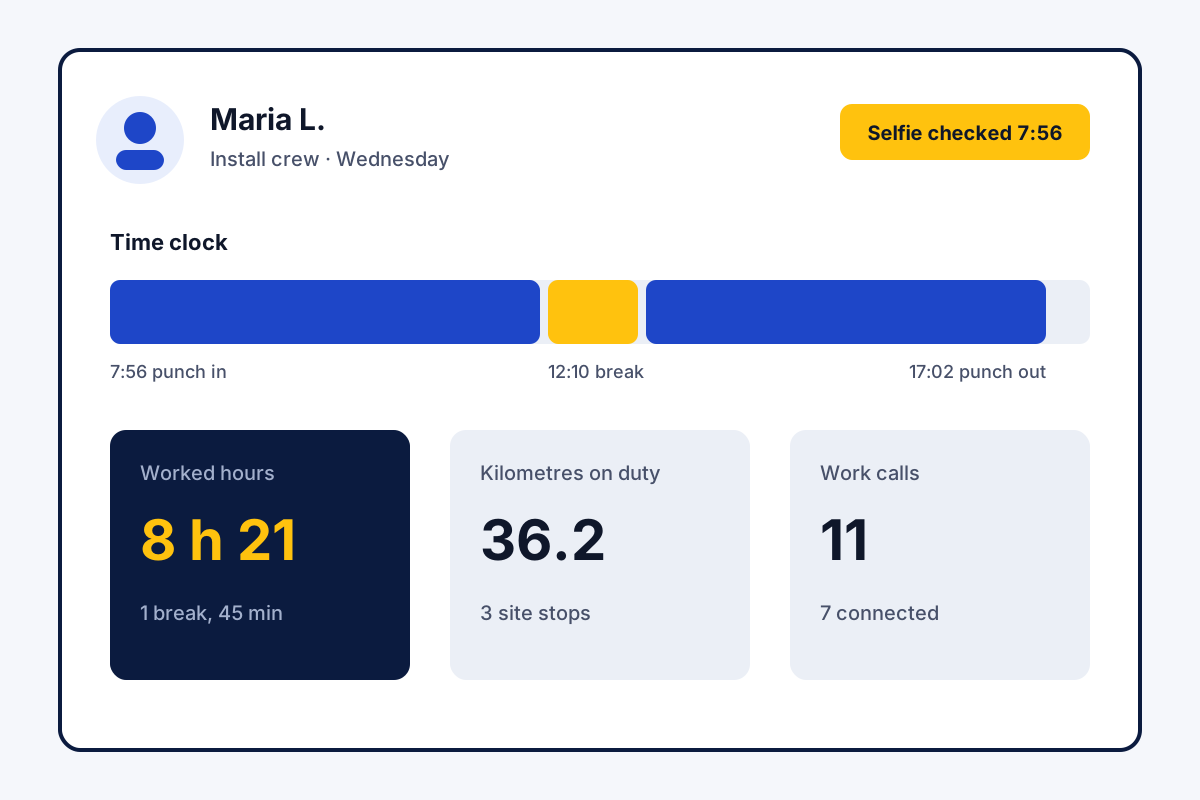
What is an employee tracking app?
An employee tracking app is software on staff phones that logs working time and on-duty activity and reports it to the employer by day and month.
Field Team Tracking reports hours, breaks, kilometres and calls per employee, with an Excel export for any dates.
- The punch is the time record.
- Location stops at punch out.
- The report runs for any branch and any dates.
Employee tracking app with time clock: how hours are counted
An employee tracking app starts with the punch, because the punch is the time record. In Field Team Tracking, the morning punch is a live selfie: the app looks for a blink and a random action, then stores the time. A pause for lunch is one tap on Break; one tap on Resume work ends it. The app keeps the time of every pause, and live location stays off until work resumes. The evening punch closes the day. The report then lists the punch times, the hours for each date and every break, and it marks present, late or absent against the branch rules. Employees can check their own figures across four windows of time, reaching back to the previous month. While the employee is on duty, the route, the stops and the kilometres belong to that day too. The web report covers any branch and any dates, and exports to Excel.
Employee tracking app benefits
Selfie punch clock
Each punch is a live selfie with the exact time.
Hours and breaks
Worked hours and every break, day by day.
On-duty location
Route and stops logged during the shift alone.
Work call log
Each employee's calls listed for the owner.
Kilometres
Distance per day and per month, with fake points removed.
Excel export
One file per branch, for whatever date range you pick.
Employee tracking software or three separate tools
Many teams use a punch machine, a GPS app and a call report side by side. Field Team Tracking keeps all three in one account. The page on tracking staff location during work shows the route in detail. The page on tracking a sales team’s visits and calls shows how calls and stops join each lead, and the call management app page explains the call history itself. What the app does and does not cover for running a whole team, payroll included, is set out in managing office and field staff. Hours for payroll are on the employee hours tracking app page, consent and the law in how to track employee location, and judging output rather than screens in how to track employee work. The office view of a whole field branch is described under managing a field force, and the software as a whole on the field team tracking software page. Fuel claims are served by the employee mileage tracking app page, and the employee’s own view by the field staff tracking app page. A checklist for choosing a tracker is on the field employee tracking app page, and how this differs from desktop monitoring on the employee monitoring app page.
Employee tracking app on a working day
| Moment | What the employee does | What the app records |
|---|---|---|
| Start of day | Punches in with a selfie at the office | Punch time, selfie check, office location |
| Leaving for visits | Switches on live location once | A position every 15 seconds, sent every 5 minutes |
| At a customer | Stays and talks, adds a remark | A stop with area name and minutes |
| Lunch | Taps Break, later Resume work | The break with its time; location paused |
| Calls on the road | Phones the next customer | The call in the team call log |
| End of day | Punches out | Hours, breaks and kilometres for the day |
Employee tracking app setup
- Install the app on each staff phone.
- Create the branch with its hours and office radius.
- Ask each employee to punch in once and accept the location consent screen.
- Open the attendance and field tracking report after the first day.
Employee tracking app price
Billing is per head. India: ₹747 a quarter or ₹1,908 a year. Rest of the world: 29 dollars yearly, 12 dollars quarterly. Tax is added to both. Test one real working day inside the 3-day trial before you pay.
Employee tracking app limits
- Computer monitoring. No screen, keystroke or website records. Desk work on computers needs a different tool.
- Payroll. Hours export to Excel, but the app calculates no salary.
- Job scheduling. There is no job board or dispatch screen; employees work from their own lead lists.
- Calls on iPhones. iOS gives no app its call history, so those calls are not logged by themselves.
Employee tracking app example: solar installers in Cebu
Imagined company; real app behaviour. A solar installer in Cebu has 15 staff: 5 in the office and 10 on install crews. Crew leaders wrote hours on a whiteboard, and overtime was often argued.
All 15 now punch in with a selfie. The office is one branch that needs punches inside its radius. The crews are a second branch, and that branch allows punches from site. At month end the owner exports the report for each branch: 2,340 hours in total, and 3,800 kilometres across the crews. Overtime talks now begin with figures both sides can see.
Employee tracking app FAQ
What is the best employee tracking app?
For staff who work outside the office, Field Team Tracking fits well: one app records their punches, their route on duty and their work calls, instead of three separate tools.
What is Field Team Tracking?
Field Team Tracking is an employee tracking app built around a selfie punch, location during the shift and a shared call log, on Android and iPhone.
How much does an employee tracking app cost with Field Team Tracking?
An employee costs ₹1,908 per year in India, close to ₹159 monthly; a quarter costs ₹747. Elsewhere it is USD 29 annually or USD 12 quarterly. Taxes apply on top, and a trial of three days comes first.
What is the best app for tracking employee time?
Use an app where the punch itself is the time record. Field Team Tracking asks for a live selfie on every punch and, if you set it, checks the office radius.
How do I track my employees?
Install the app on each phone and ask each employee to punch in. Hours, breaks, route and calls then appear in the web report.
How do I track my employees' hours each day?
Staff record the start and end of work with a phone punch and mark pauses with the Break button. The report then lists punch times, hours and breaks for every date.
What do employers use to track employees in the field?
Many use a phone app that records attendance and location during work hours. Field Team Tracking adds the work call log, so calls and stops sit together.
Is it illegal to GPS track an employee?
That depends on where you operate; many places permit it for work with notice and consent, so look up your local rules. Field Team Tracking records only on duty, and only after the employee switches it on.
Can employees see what is tracked about them?
Yes. Each employee sees their own attendance report and today's kilometres in the app.
Does the app track screens, keystrokes or websites?
No. Field Team Tracking is not a computer monitoring tool. It records attendance, location on duty, work calls and leads on the phone.
Can I export employee hours to Excel?
Yes. Pick a branch and a date range on the web, then download: the Excel file carries punch times, hours, breaks and kilometres.
Does the employee tracking app work on iPhone?
Yes. Punches, breaks, location and reports work on iPhone too; only automatic call logging is missing there, because iOS does not allow it.
See your team's whole day on one map
3-day trial with every feature. ₹159 per user per month on the yearly plan (₹1,908 a year), or ₹249 per user per month for 3 months; outside India $29 per user per year or $12 for 3 months. Prices are per user, exclusive of taxes.