
Customer visit tracker
Customer Visit Tracker by Field Team Tracking
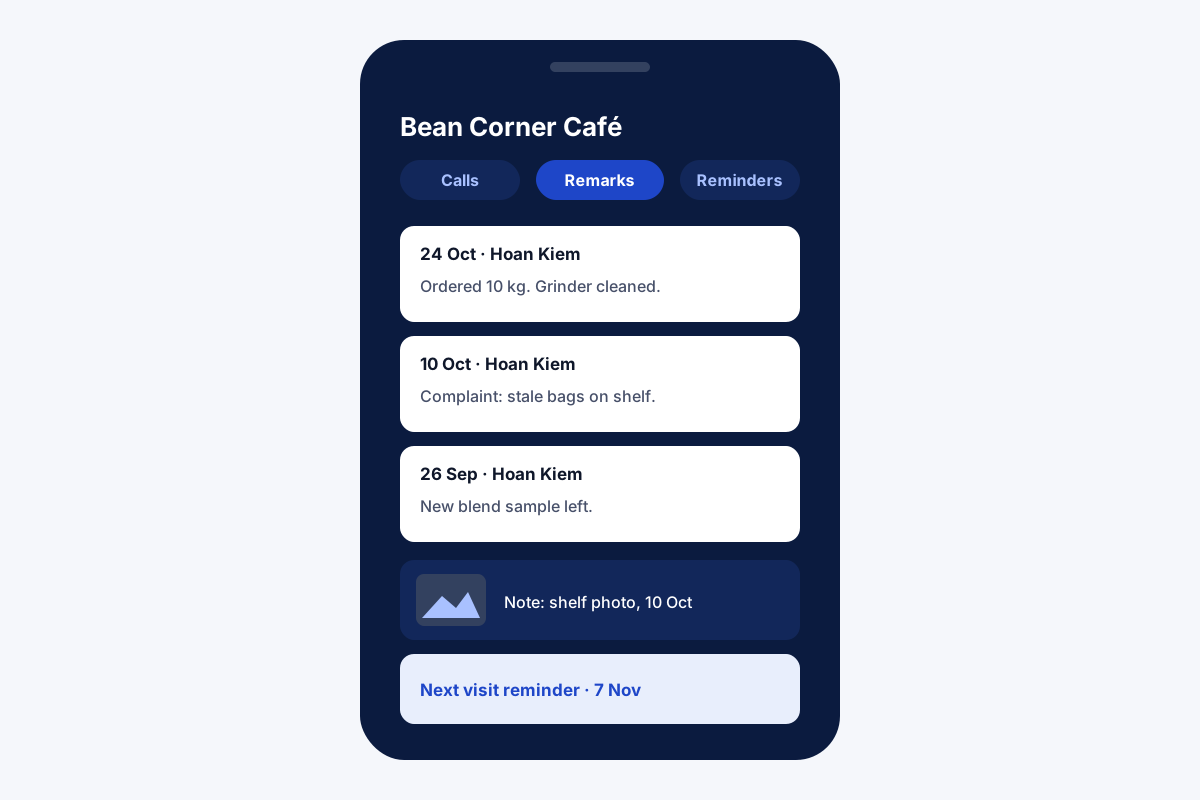
A customer visit tracker keeps the history of visits to each customer in one place, so whoever goes next knows what was seen, said and promised before. Field Team Tracking stores each visit's remark, location, photos and follow-up on the customer's own record, beside their calls.
- Visit remarks stamped with area and coordinates
- Photos, voice and checklists in notes
- The next visit set as a reminder
What is a customer visit tracker?
It is a log, often a spreadsheet or an app, that records each visit made to a customer: date, place, purpose, outcome and the next step.
In Field Team Tracking the log lives on the customer's record, so the history follows the customer, not the salesperson.
- One customer, one history, across every visitor.
- Place is added to the remark automatically.
- Visits and calls appear side by side.
Customer visit tracker: the history follows the customer
A customer visit tracker fails when the history leaves with the person who made the visits. In Field Team Tracking, every visit is written onto the customer’s record. The salesperson saves a remark, and the app attaches the area name and map coordinates of the spot where it was typed. Pictures of the shelf, the site or the machine sit in a note on the same customer, next to spoken comments or ticked items, and each later edit keeps the earlier text with a date. The next visit is set as a reminder that rings at the chosen time. When anyone opens the customer, a single tabbed screen lays out their calls, WhatsApp messages, remarks, reminders and details, and the latest remark appears again on the next call. If the lead is transferred to another salesperson, the record and its transfer history go with it.
Customer visit tracker benefits
One record each
Every visit on the customer, not the rep.
Place captured
Area and coordinates in the remark.
Photo notes
Pictures, voice and checklists.
Next visit set
A reminder that rings on time.
Calls beside visits
One timeline for the customer.
Survives handovers
Transfers keep the record and its history.
Customer visit tracker or a visit report template?
A spreadsheet template is a fine start for one person. It breaks when three people visit the same customer, when photos matter, or when the next visit has to be remembered. Moving to a record per customer keeps every visitor on the same page. A rep’s daily round of visits is covered on the sales visit tracker app page, repeat buyers on the customer management app page, and timed stops for service crews on the service technician tracking app page.
Customer visit tracker: template columns and where they live
| Template column | In the app |
|---|---|
| Customer name and number | The customer's record |
| Visit date and place | Remark with area and coordinates |
| Purpose and outcome | Remark text and lead status |
| Photos or proof | Note with photos |
| Next visit date | Reminder on the customer |
| Visited by | Note it in the remark text |
Customer visit tracker setup
- Import your customer list from Excel or CSV.
- Add custom fields you track today, such as shop size or route day.
- Ask the team to save a remark at every visit.
- Set the next visit as a reminder before leaving.
- Open a few customers each week and read their history.
Customer visit tracker limits
- No visit planner. Visits are recorded, not scheduled on a calendar or beat plan.
- No signatures. A photo in a note is the closest to customer sign-off.
- Remarks need saving. A visit with no remark leaves only a stop on the route.
- No separate visit report. History is read per customer; leads export to CSV.
Customer visit tracker example: a coffee supplier in Hanoi
An invented supplier, with sample numbers. A coffee bean supplier in Hanoi serves 180 cafés with four salespeople who share accounts. Visit notes lived in personal chat threads, and a café could be visited twice in a week by two people.
Every café is now a customer record, and each visit leaves a remark and a photo of the grinder or shelf. Before going, salespeople open the café’s history. Double visits stopped, and a café’s complaint about stale stock was traced to a visit photo from three weeks earlier.
Customer visit tracker FAQ
Which customer visit tracker keeps every visit on the customer's record?
Field Team Tracking: remarks, notes and reminders sit on the customer, so their full visit history opens in one screen.
What is Field Team Tracking?
Field Team Tracking brings attendance, field routes, calling and customer records into one mobile tool for small teams.
What does the customer visit tracker cost on Field Team Tracking?
It is part of each user's plan: Indian teams pay ₹747 per user per quarter, and elsewhere a user is USD 29 a year, with tax added.
How should a small business keep track of customers?
Keep one record per customer with every call, visit and promise on it, rather than notes spread across phones and notebooks.
How do you track customer visits without a template?
Save a remark on the customer's record at each visit; the date and area are captured, and the history builds itself.
Can a new salesperson see past visits?
Yes. When a lead is handed over, its remarks and details remain on that record, along with a log of each handover.
Can I attach photos from a visit?
Yes. Open a note on that customer and drop in pictures, record your voice or tick items off; earlier versions stay with their dates.
How do I remember the next visit?
Set a reminder on the customer. It rings like an alarm, can repeat, and stays open until marked done.
Is there a daily visit report?
On the web, one person's day appears as a map of numbered stops, labelled by area, with the minutes spent at each. What happened at a visit lives in the customer's remarks.
Can I export the visit log?
Leads with their details export to CSV, following the active filter.
Does it work on iPhone?
Yes. Customer records, notes and reminders work on Android and iPhone.
See your team's whole day on one map
3-day trial with every feature. ₹159 per user per month on the yearly plan (₹1,908 a year), or ₹249 per user per month for 3 months; outside India $29 per user per year or $12 for 3 months. Prices are per user, exclusive of taxes.