
Employee location tracking app
Employee Location Tracking App by Field Team Tracking
With an employee location tracking app, an employer can see where each staff member is during working hours, so calls asking "where are you now?" stop. Field Team Tracking stores a position every 15 seconds from the morning punch to the evening punch and draws each day as a route with stops.
- Switched on by the employee, who first reads a consent screen
- Silent during breaks and after the shift ends
- Location-faking apps cannot add kilometres
What is an employee location tracking app?
An employee location tracking app shares an employee's phone position with the employer during working hours and shows the day as a map.
Field Team Tracking adds stop detection, idle time and a monthly kilometre total to that map.
- No recording before punch in or after punch out.
- Stops of 5 minutes or more appear by themselves.
- Raw GPS points sit behind every route for checks.
Employee location tracking app: how a day becomes a route
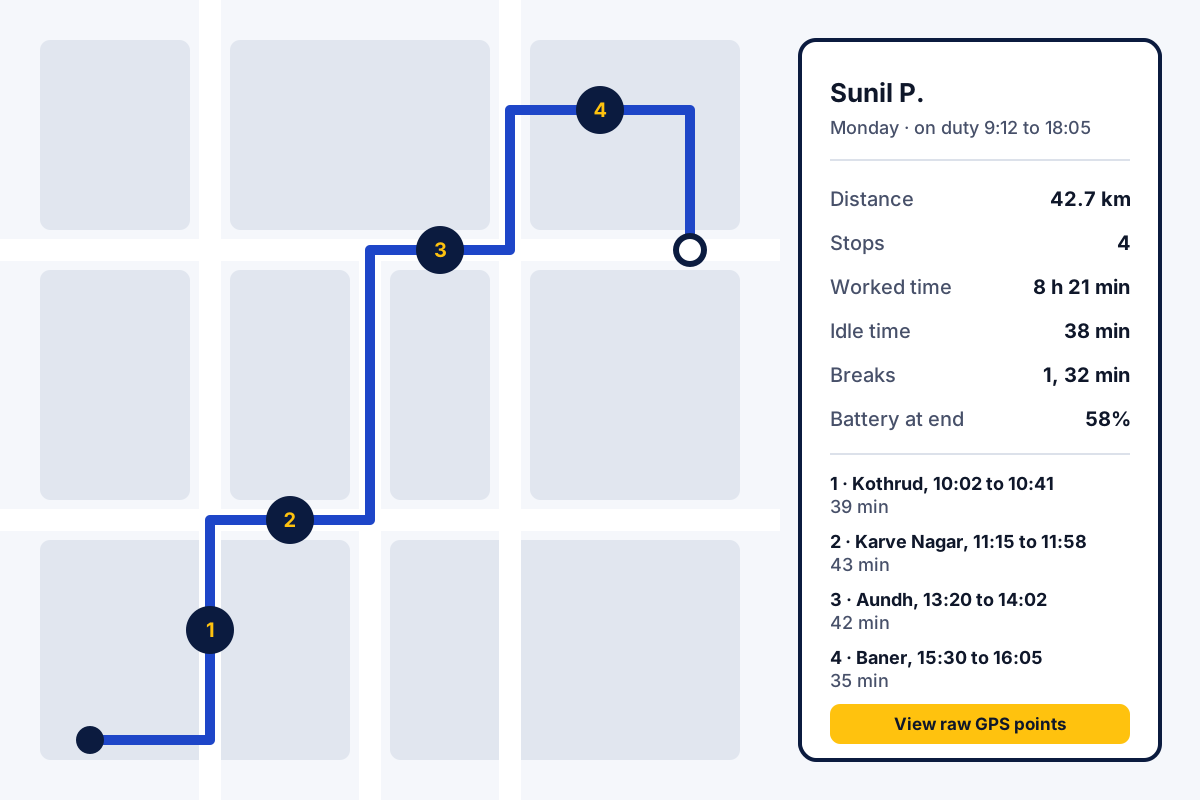
An employee location tracking app turns phone positions into a picture of the working day. With Field Team Tracking, every employee starts with a punch in and allows live location the first time, after reading the consent screen. After that, the phone writes down where it is every 15 seconds and uploads the batch to your account every 5 minutes. On the web, the route view joins those readings into one line. It marks where the day began and where it ended. Each place where the person stayed 5 minutes or longer gets a number, with the time they came, the time they left and the minutes between. Beside the map, a panel totals the hours worked, the kilometres, the idle minutes, the breaks, the hours spent at the office and the battery level. Recording pauses during a break and ends at punch out. The owner can open the route for any employee and any day, and download the attendance and kilometre report in Excel.
Employee location tracking app benefits
Position on duty
Four readings a minute during the shift.
Day route
Start, end and numbered stops drawn on a web map.
Automatic stops
Places where someone stayed 5 minutes or longer, named by area.
Clean distance
Points from location-faking apps stay out of the kilometres.
Breaks paused
Location stops while the employee is on a break.
Work hours only
Nothing records before punch in or after punch out.
Employee GPS tracking app checks: a doubtful day
If a route looks wrong, open the raw GPS points behind it. Points from a fake GPS app carry a flag. Jumps that no vehicle can make are left out of the distance.
Location starts from a punch, so it sits on top of attendance. The staff attendance app page covers the selfie punch and the branch rules. A separate page on tracking employees’ hours and duty covers the time clock. The office radius check at punch time is explained on the GPS attendance app page, and kilometres for travel claims on the field sales tracking app page. Four open steps for starting location tracking fairly are listed in how to track employee location, and the day’s route view itself on the employee route tracking app page. How often positions are taken is explained in live location tracking for employees. What happens to each reading is on the employee GPS tracking app page, and spoofing checks on the fake GPS detection attendance app page. A day divided into office time, stops, idle time and breaks is on the employee time and location tracking app page. Which apps track only the punch and which follow the whole duty day is compared on the best employee location tracking app page.
Employee location tracking app terms
| Term | What it means | Where you see it |
|---|---|---|
| On duty | The time between punch in and punch out, when location records | Route view header |
| Stop | A place where the employee stayed 5 minutes or more | Numbered pins on the map |
| Idle time | The part of the working day the app counts as not moving | Route view totals |
| Fake GPS point | A position from a location-faking app, left out of the distance | Raw GPS points view |
| Raw GPS points | Every saved position behind the drawn route | Raw points view for a day |
| Kilometres today | The distance so far, shown on the employee's phone | Employee app home |
Employee location tracking app and the law
Employers often track location for work reasons such as visit proof. Rules on consent, notice and data storage differ between countries, and in some places between states. Treat this paragraph as general guidance rather than legal advice, and read the local rules for each place your staff work.
The app supports a fair setup. Each employee switches location on personally. A notice explains the reason before each permission prompt. Nothing records outside working hours.
Employee location tracking app price
The cost depends on headcount. Quarterly billing means ₹249 a month per person; yearly billing lowers that to ₹159, paid as ₹1,908 at once. Outside India, each person costs USD 12 for three months or USD 29 for twelve. Taxes are not included. Start with 2 or 3 staff during the 3-day trial.
Employee location tracking app limits
- Vehicles at night. Recording ends at punch out. A truck that needs tracking at night needs a hardware tracker.
- Phones that are off. A switched-off phone, or denied location access, gives nothing to record.
- Indoor accuracy. Inside large buildings phone GPS is less exact, so a stop can show a nearby street.
- Hidden tracking. Secret tracking is not possible; the employee always switches location on.
Employee location tracking app example: a pest control team in Pune
The firm below is fictional; the figures show how the report reads. A pest control company in Pune sends 12 technicians to about 5 homes each per day. Customers sometimes said nobody came.
The owner now opens the route for the disputed day. It shows a 40-minute stop on the customer’s street at 11:10, with the area name. The complaint closes in one message. The same report gives the technician’s month: 1,150 kilometres.
Employee location tracking app FAQ
What is the best app to track employee location?
For tracking during work hours only, Field Team Tracking is a good choice: it begins with the punch in, goes quiet for breaks and ends with the punch out or when the branch closes.
What is Field Team Tracking?
Field Team Tracking is an employee location tracking app that turns a working day into a route with stops, idle time and kilometres for the owner to review.
How much does an employee location tracking app cost with Field Team Tracking?
For one employee it is ₹249 monthly on quarterly billing, or ₹159 monthly when the whole year is paid at ₹1,908. International buyers pay USD 29 for a year, or USD 12 for each quarter. Tax is extra, after a trial of three days.
How can I track my employees' location?
Each employee installs the app, reads the consent screen and switches on live location once. You then pick an employee and a day in the web route view.
Can an employer track employee location?
In many countries an employer may track location for work, with the employee's knowledge and consent. Rules differ by country and state. Treat this as general information and check the rules where your staff work.
Can employers use GPS to track employees?
Usually yes, for work reasons and with notice, but the details change from place to place. Field Team Tracking helps by asking each employee to switch location on personally and by recording only on duty.
Does my employer see my location after work?
Not with Field Team Tracking. Recording covers working hours only and ends with the punch out or the branch's closing hour. A notice gives the reason before every location permission prompt.
How often does an employee location tracking app record a location?
Field Team Tracking takes four readings a minute during the shift; the saved readings travel to your account in 5-minute batches.
What if a worker installs a fake GPS app?
Field Team Tracking marks those points as fake and keeps them out of the distance, together with any jump no vehicle could make.
Does location tracking drain the phone battery?
It uses some battery, like any location app. The route view shows the charge level, and a battery permission request appears only on phone models that require one.
Can I see where an employee stopped and for how long?
Yes. Each place where the person spent 5 minutes or longer shows the area, when they came, when they left and how long they stayed.
Is the employee told that location is on?
Yes. The employee switches it on after a consent screen, and they can see their own kilometres for the day in the app.
See your team's whole day on one map
3-day trial with every feature. ₹159 per user per month on the yearly plan (₹1,908 a year), or ₹249 per user per month for 3 months; outside India $29 per user per year or $12 for 3 months. Prices are per user, exclusive of taxes.