
Fake GPS detection attendance app
Fake GPS Detection Attendance App by Field Team Tracking
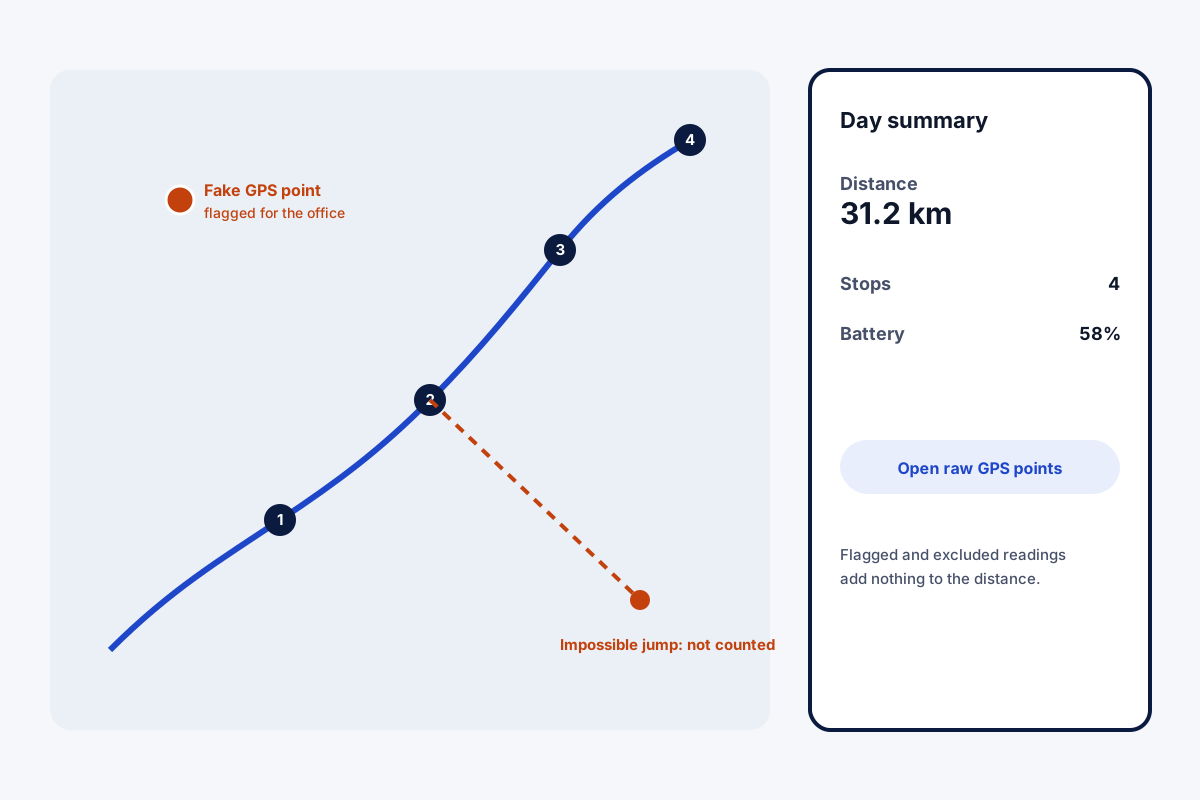
A fake GPS detection attendance app spots when staff use location-faking tools to appear somewhere they are not, and keeps those readings out of distance totals. Field Team Tracking flags spoofed points on field routes for the office and drops movements no vehicle could make from the distance.
- Spoofed route points flagged for the office
- Impossible jumps left out of kilometres
- A live selfie at the punch as well
What is a fake GPS detection attendance app?
It is attendance and tracking software that recognises location readings produced by spoofing apps or jumps that cannot be real, and marks or removes them.
In Field Team Tracking the checks run on duty routes; at the punch itself, a live selfie adds a second safeguard.
- Flagged points stay visible to the office.
- Distance totals exclude them.
- No advice on getting around detection.
Fake GPS detection attendance app: what gets caught
Location-faking apps are easy to install, which is why a fake GPS detection attendance app matters for field teams. In Field Team Tracking, the protection sits in two places. On duty routes, readings that come from spoofing tools are flagged so the office can see them, and they add nothing to the day’s kilometres. Movements between two readings that no car or bike could cover in the time between them are also left out of the distance. Behind every route, a raw points view lets the office inspect the underlying readings. At the punch itself, a live selfie with a blink and a random movement must pass, together with the branch’s location rule. That is the full extent of it: the app flags and excludes, and it does not lock phones or ban devices.
Fake GPS detection attendance app benefits
Spoofing flagged
Faked route points marked for the office.
Honest distance
Flagged points add no kilometres.
Jumps removed
Impossible moves do not count.
Raw readings
Inspect the points behind any route.
Selfie at punch
A live face check alongside location.
Branch rules
Punch location checked against the office.
Fake GPS detection attendance app in daily use
Flags are a prompt for a conversation, not an automatic penalty. A flagged point on a route is worth a question; a pattern of them is worth a meeting. For distance-based payments, flagged points and impossible jumps are already out of the total. Route recording is explained on the employee route tracking app page, the selfie check on the selfie attendance app page, and kilometres for repayment on the employee mileage tracking app page. Where the cleaned kilometre figure appears is shown on the km tracking app for field staff page, and the liveness step in a company rollout on the selfie attendance system page.
Fake GPS detection attendance app: checks and where they apply
| Check | Applies to | Result |
|---|---|---|
| Spoofed reading | Duty route points | Flagged for the office, out of distance |
| Impossible jump | Duty route points | Left out of distance |
| Live selfie | Each punch | Punch accepted only when it passes |
| Office location rule | Each punch | Accepted or refused by branch setting |
Fake GPS detection attendance app setup
- Set branch rules for punch location.
- Ask field staff to switch on route recording after the notice.
- Review flagged points each week, using the raw points view where needed.
- Discuss patterns with the employee before acting.
Fake GPS detection attendance app limits
- Punch screen. Spoof flags apply to routes; the punch relies on the selfie and location rule.
- No device locks. It does not block apps or ban phones.
- Judgement needed. A flag is evidence to check, not proof of intent.
- Off duty. Nothing is recorded outside working time.
Fake GPS detection attendance app example: an insurance survey team in Bhopal
An invented team, with sample figures. An insurance company in Bhopal sends 14 surveyors to inspect damaged vehicles. Travel allowance claims were rising while inspections per day were flat.
Route reviews showed flagged points on two surveyors’ days, always on long trips. Those points had already been left out of the kilometres, so claims based on the app’s distance fell back in line. After a conversation, the flags stopped appearing.
Fake GPS detection attendance app FAQ
Which fake GPS detection attendance app keeps spoofed points out of distance?
Field Team Tracking does: spoofed route points are flagged for the office, and impossible jumps never count toward kilometres.
What is Field Team Tracking?
Field Team Tracking is a fake GPS detection attendance app with selfie punches, duty routes, calls and leads.
What does fake GPS detection cost on Field Team Tracking?
It comes with each seat: about ₹159 a month in India on yearly billing, or USD 29 a year abroad. Tax is extra.
Can apps detect fake GPS?
Many can recognise readings from location-faking tools and movements that are physically impossible. This app flags such route points.
How do I detect fake GPS locations in attendance?
Look for flagged route points and sudden jumps between far-apart places. This app marks the first and removes the second from distance.
How can staff bypass fake GPS detection?
We do not give advice on getting around detection. If location rules feel unfair, raise it with your employer instead.
Does the punch itself check for fake GPS?
The punch checks a live selfie and the office location rule. The fake GPS flags described here apply to duty routes.
What happens to a flagged point?
It stays visible to the office, marked, and is left out of the day's kilometres.
What is an impossible jump?
A move between two readings too far apart for the time between them, which no vehicle could make; it does not count toward distance.
Can I see the raw readings?
Yes. Open the raw readings for any day from its route.
Does it track people off duty?
No. Route recording runs only on duty, after the employee agrees to it.
See your team's whole day on one map
3-day trial with every feature. ₹159 per user per month on the yearly plan (₹1,908 a year), or ₹249 per user per month for 3 months; outside India $29 per user per year or $12 for 3 months. Prices are per user, exclusive of taxes.