
CRM with dialer
CRM with Dialer by Field Team Tracking
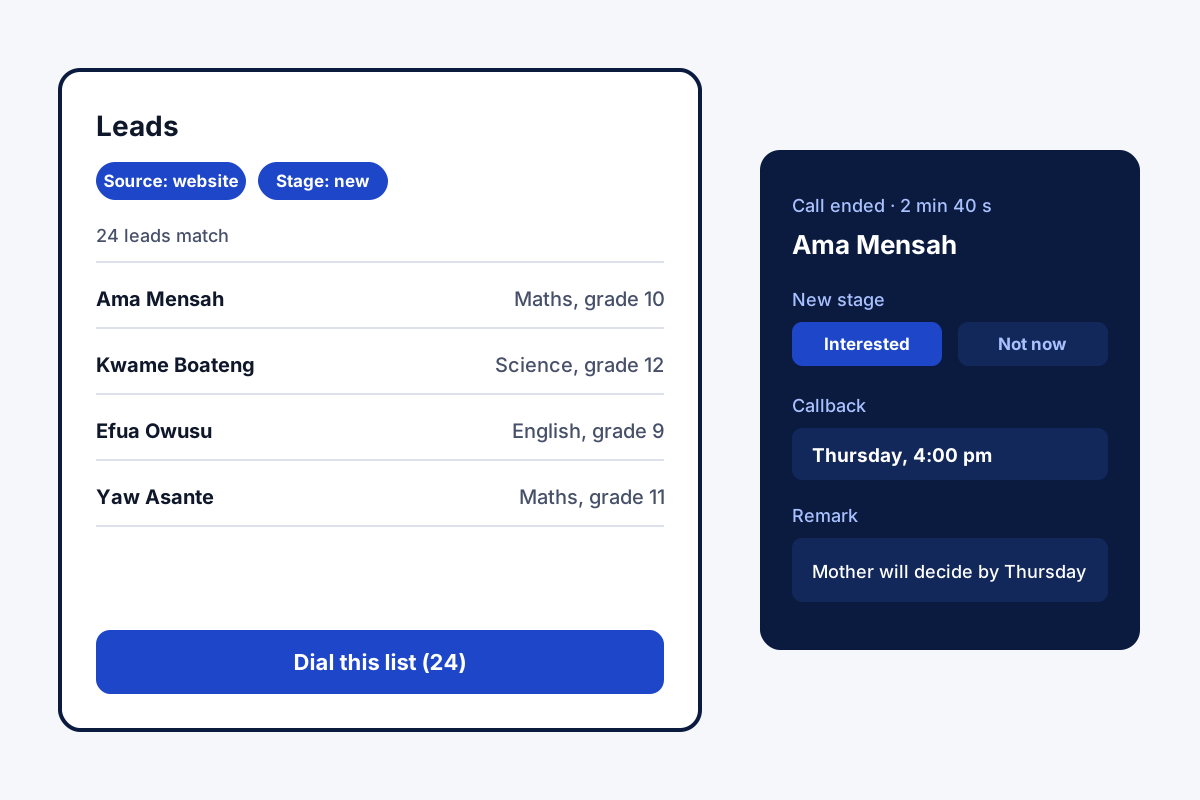
A CRM with dialer keeps the customer list and the calling tool in the same place. Reps dial straight from a lead and save the result on it. Field Team Tracking bundles both into one mobile app, so no second subscription or connector is needed.
- Dial a lead, a filtered list or today's callbacks
- The call result lands on the lead it came from
- One price per user covers CRM and dialer
What is a CRM with dialer?
A CRM with dialer is customer software that places calls itself. You ring a lead from its record, and the outcome goes back onto it.
In Field Team Tracking the dialer reads your lead filters and writes each outcome to the lead.
- Numbers never travel between two apps by hand.
- Lists for dialling come from the CRM's own filters.
- Other CRMs can receive call data by webhook or API.
CRM with dialer: why one app beats two
A CRM with dialer removes the most boring job in phone sales: moving numbers between tools. In Field Team Tracking, the list you dial is simply a CRM filter. Pick the stage, tag, source, product or a field of your own, combine as many as you like, and tap to dial what remains. Each call starts from the lead, so the screen already shows who you are calling and what was said last time. When the call ends, the result form writes the new stage, a remark and a callback date onto that same lead. Unanswered numbers come back up to three more times by your rule. Today’s callbacks can run as their own session. Because the leads and the dialer share one account, there is one price per user and no connector to maintain.
CRM with dialer benefits
Filters become call lists
Dial exactly the leads a filter shows.
Dialer built in
No second tool, login or export file.
Results written back
Stage, remark and callback land on the lead.
Callbacks as a session
Today's due calls dialled one after another.
One price
The dialer is part of the per-user plan.
Shared with field staff
Visits and calls sit on the same lead.
CRM with dialer and your existing CRM
Some teams already keep customers in another CRM. No ready-made switch links the two. What does exist: call webhooks and a read-only API that hand your call records onward, straight to the other system or by way of an automation service. Going the other way, new leads arrive by a linked Google Sheet, through a REST endpoint, or with a custom webhook. The dialling itself is explained on the auto dialer app page, and the lead side on the CRM for calling teams page. Stages, tags and intake routes get a page of their own: the lead management app. Numbers that live in a browser tab can reach the phone by click to call. Round-robin routing of fresh enquiries in the web CRM is on the lead management software page, and the Android and iPhone difference on the CRM app for Android page. Leads from ad forms can be fed in through the route in the Facebook lead ads CRM integration guide.
CRM with dialer checklist
| Check | Why it matters | Field Team Tracking |
|---|---|---|
| Dials from CRM filters | No exporting lists | Yes |
| Saves the result on the lead | History stays complete | Yes |
| Retries unanswered numbers | Fewer leads lost to one missed ring | Yes, up to 3 more |
| Pace control for managers | Stops rushed calls | Yes, lockable gap, minimum call length |
| Works from mobile SIMs | No cloud line cost | Yes |
| Native link to other CRMs | Saves setup time | No; webhooks or API instead |
CRM with dialer setup
- Bring leads in from a spreadsheet file or a linked Sheet.
- Set your stages and tags.
- Build a filter, for example stage New with source Website.
- Tap dial on the filter and save a result after each call.
CRM with dialer limits
- Outside CRMs. No native connector; use webhooks, the API or an automation tool.
- Parallel lines. One call at a time per phone, not predictive multi-line dialling.
- iPhone dialling. Unattended list dialling runs on Android only.
- Robocalls. No recorded messages; every call needs a person.
CRM with dialer example: a coaching centre in Accra
Made-up centre, used to show the setup. A coaching centre in Accra collects 200 enquiries a month from a web form into a Google Sheet. Staff copied numbers into a separate dialer app and typed results back by hand.
The sheet now feeds the CRM on a schedule. Each morning a counsellor filters stage New, source Website, and dials it. Results land on each lead, so the evening list of “interested, call Thursday” builds itself. Copying stops, and every enquiry gets a first call within two days.
CRM with dialer FAQ
Which CRM with dialer suits a team on mobile phones?
Field Team Tracking fits teams that call from mobiles: the leads and the dialer share one app, and calls go out from each phone's SIM.
What is Field Team Tracking?
Field Team Tracking is a CRM with dialer, follow-up alarms and WhatsApp tools, plus attendance and field tracking for the same team.
How much does a CRM with dialer cost with Field Team Tracking?
Field Team Tracking charges once for both parts. A user's year is ₹1,908 in India or USD 29 abroad; shorter quarterly terms exist. Tax is added, and a 3-day trial comes first.
What is a CRM dialer?
A CRM dialer is a calling tool inside customer software. A rep presses call on a record, talks, and the CRM keeps what happened.
What is a CRM auto dialer?
A CRM auto dialer calls a list taken from the CRM and saves each outcome back to the lead, with no exported numbers.
Which CRM has the best dialer feature?
Judge a CRM dialer on four points: does it dial filtered lists, retry unanswered numbers, lock a pace, and save results to the lead? Field Team Tracking does all four on Android.
Can I connect the dialer to my existing CRM?
Not with a ready-made switch. Your call records can still travel to it: the account fires call webhooks and offers a read-only API, usable on their own or through an automation tool such as Zapier, Make, Pabbly or n8n.
Is an automatic dialer illegal?
Rules vary by country. Live person-to-person calling is widely permitted; robocalls and dialling people on do-not-call registers face limits. Read this as orientation, and confirm locally before you start.
Can I dial only some leads, such as one city or one product?
Yes. Combine filters for stage, tag, source, product, list or your own fields, then dial exactly the leads the filter shows.
Does the dialer work on iPhone?
The CRM works on iPhone, but automatic list dialling needs an Android phone because iOS does not allow unattended calling.
Is there a cheap CRM with dialer for small teams?
Field Team Tracking costs a few rupees a day per user in India, with no extra charge for the dialer.
See your team's whole day on one map
3-day trial with every feature. ₹159 per user per month on the yearly plan (₹1,908 a year), or ₹249 per user per month for 3 months; outside India $29 per user per year or $12 for 3 months. Prices are per user, exclusive of taxes.