
Auto redial app
Auto Redial App by Field Team Tracking
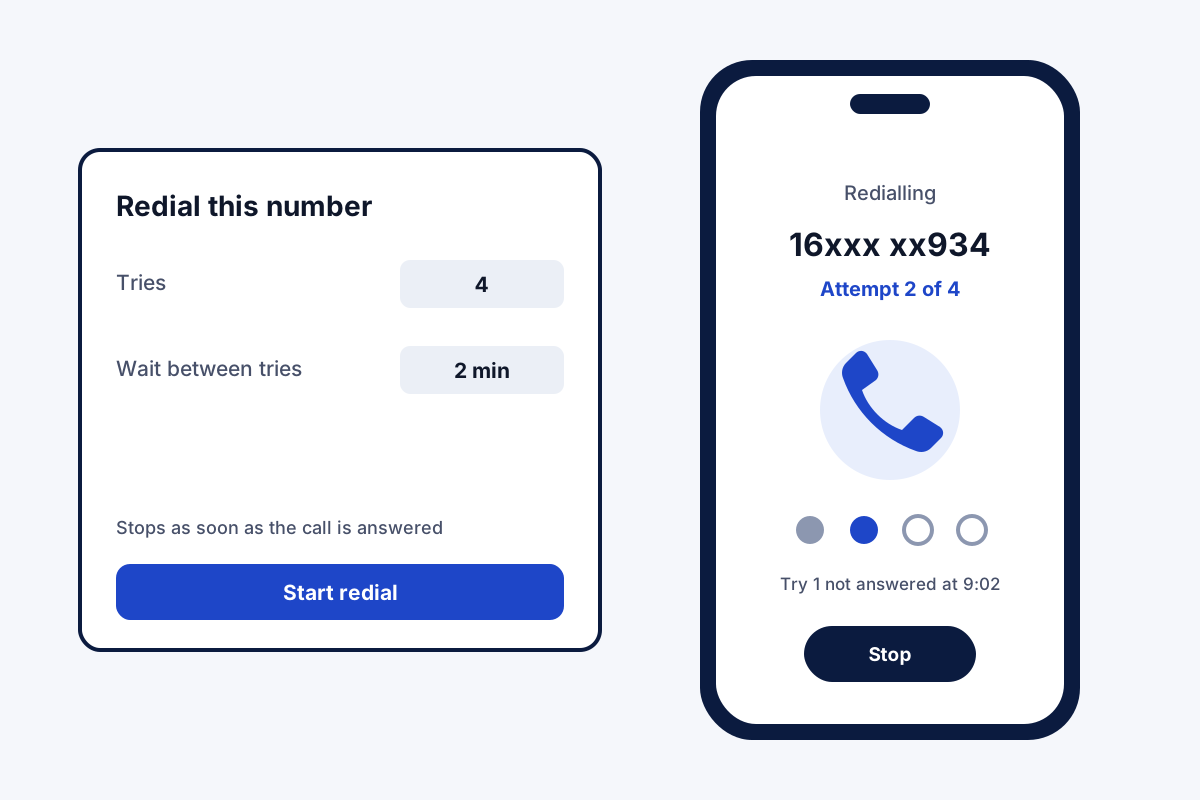
An auto redial app tries a silent number again for you, so your thumb is not stuck on the call button all morning. Field Team Tracking redials one chosen number, or every unanswered lead in a calling list.
- One number: you pick how many tries and the gap
- Whole list: 1 to 3 more tries per unanswered lead
- Calls dropped before they ring get another go
What is an auto redial app?
An auto redial app rings a number again by itself after an unanswered call, using a set number of attempts and a wait between them.
In Field Team Tracking the same redial rules work for a single number and for leads inside a dialling session.
- Stop whenever the call connects.
- A ring limit decides when a try counts as unanswered.
- Redialling runs on Android phones.
Auto redial app: two ways it works
An auto redial app is useful in two different moments. The first is a single stubborn number: a supplier who does not pick up, or a lead you promised to reach today. In Field Team Tracking you pick that number, choose one-number redial, set the tries and the gap, and put the phone down. Ringing ends once somebody picks up. The second moment comes during a calling list. A silent lead in a session may come back for up to three extra rings: now, after your delay, or after everyone else. A ring limit you set decides when a try counts as unanswered. If the network drops a call before it even rings, that number is dialled again, at most twice. All of this needs an Android phone.
Auto redial app benefits
Single-number redial
Your choice of tries and wait, then hands off.
List redial
Unanswered leads return 1 to 3 more times.
Timing options
Retry now, after a delay, or after the list.
Ring limit
Decide how long a try rings before it counts.
Dropped-call rescue
A call lost before it rings is placed again, twice at most.
Stops on answer
No extra calls once someone picks up.
Auto redial app inside a sales day
Redial matters most when leads are hard to catch. A rep who runs a list in the morning lets the unanswered names come back at the end, then visits the ones who agreed to meet. The full calling session is described on the auto dialer app page, and dialling straight from CRM filters on the CRM with dialer page. Lists too big for one person are dealt out across the team on the bulk calling app page.
Auto redial app settings
| Setting | Single number | Leads in a list |
|---|---|---|
| Number of tries | You choose | 1 to 3 more tries |
| Wait between tries | You choose | Now, your delay, or after the others |
| Ring limit | Not stated | Applies |
| Network drop before ringing | Dialled again | Dialled again, up to 2 times |
| Stops when answered | Yes | Yes |
| Phone needed | Android | Android |
Auto redial app setup
- Put the app on an Android handset and grant the calling permission.
- Pick a number and choose one-number redial, or start a list session.
- Set the tries, the wait and the ring limit.
- Let it run; the redial stops as soon as someone answers.
Auto redial app limits
- iPhone. iOS blocks apps from calling by themselves, so redial is Android only.
- Endless calling. Redial runs for the tries you set, not forever.
- WhatsApp redial. Redial is described here for SIM calls only.
- Recorded messages. It redials for live calls only; it does not leave voice messages.
Auto redial app example: a plumbing contractor in Manchester
A pretend contractor, invented for this example. A plumbing contractor in Manchester calls 30 customers each morning to confirm appointments. Many work early shifts and miss the first call.
The office runs the list at 8 am with unanswered customers set to come back after the list. By 9 am, 22 have confirmed on the first try and 6 more on the second. The last 2 get a WhatsApp message instead, and the vans leave with a confirmed day.
Auto redial app FAQ
Which auto redial app also works for a sales list?
Field Team Tracking redials both ways: a single number you choose, and the unanswered leads in a calling session, with results saved to each lead.
What is Field Team Tracking?
Field Team Tracking is an auto redial app inside a sales CRM, with an auto dialer, follow-up alarms and field attendance.
How much does an auto redial app cost with Field Team Tracking?
Nothing extra: redial ships with every Field Team Tracking seat, which runs ₹1,908 a year in India and USD 29 a year elsewhere (quarterly plans exist too). Tax applies.
How do I set my phone to auto-redial?
On Android, pick the number, choose one-number redial, then set the tries and the gap.
How to automatically dial a number?
On Android, start the auto dialer on a list and Field Team Tracking calls each number one by one. For a single number, use redial.
Is there an app that can repeatedly call a number?
Yes. Field Team Tracking calls the same number again for the number of tries you set, stopping once the call connects.
Is there any app to call continuously?
The redial keeps trying for the tries you set, with a gap between them. Field Team Tracking stops there, so no number is called without end.
How to make iPhone redial automatically?
iOS does not let apps place calls by themselves, so automatic redial needs an Android phone. On iPhone you redial by hand.
What happens to unanswered leads in a dialling session?
Each one can return for as many as three extra rings. Pick when: immediately, after your delay, or when everybody else has had a turn.
What if the network drops the call before it rings?
Field Team Tracking quietly places that call once or twice more; only then is the lead marked unreachable.
How long does each try ring?
You set a ring limit. When it passes without an answer, that try ends and the next one waits for the gap.
See your team's whole day on one map
3-day trial with every feature. ₹159 per user per month on the yearly plan (₹1,908 a year), or ₹249 per user per month for 3 months; outside India $29 per user per year or $12 for 3 months. Prices are per user, exclusive of taxes.