
Staff management app
Staff Management App by Field Team Tracking
A staff management app helps an owner run a team from a phone: who came in, where field staff went, and what work each person did. Field Team Tracking covers attendance, field location and sales calls together, for teams that sell and serve customers.
- Selfie attendance with an office location check
- Field routes, stops and kilometres for staff on the road
- Calls and assigned leads per employee
What is a staff management app?
It is a mobile tool for running a workforce: marking attendance, tracking hours and breaks, seeing field movement, and checking the work each employee gets done.
Field Team Tracking is a staff management app for sales and field teams; it does not run payroll or salaries.
- Attendance rules per branch, set by the owner.
- Location is logged during duty hours only.
- Payroll stays in your accounts software.
Staff management app for teams that sell and serve
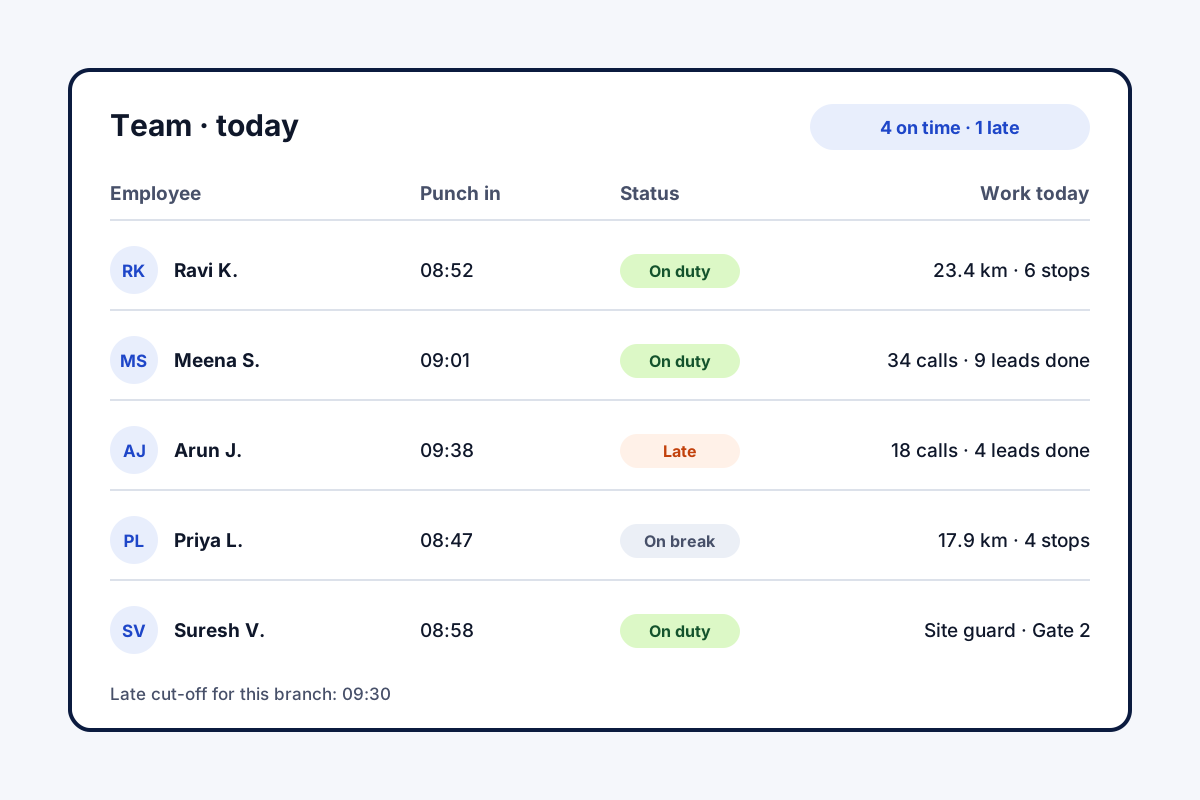
A staff management app should answer the owner’s three daily questions: who is working, where, and on what. Field Team Tracking answers all three in one account. Each workday starts with a selfie taken live in the app, accepted within the office area drawn for that branch unless the branch allows outside punches. The branch rules set working hours, days off, the minute after which an arrival is marked late, and when a short day becomes a half day. A button records each break. For people on the road, the phone logs position only during duty hours, once the employee has agreed on a consent screen, which yields a route with stops and kilometres. For people on the phone, each call lands in the owner’s login, and leads assigned to each person sit in a pending queue. The owner reads attendance and distance in a browser report covering any branch and period, downloadable as Excel, and each day’s route on the web route view.
Staff management app benefits
Selfie punches
A live face check at the office location.
Branch rules
Hours, late cut-off and half days per branch.
Field routes
Stops and kilometres for staff on the road.
Team calls
Calls from each phone, gathered for the owner.
Lead queues
Work handed out as assigned leads.
Web report
Attendance and distance for any dates, in Excel.
Staff management app: what it does not do
Search results for these words are full of payroll apps. This is not one. It records the attendance, hours, breaks and late marks that payroll needs, and leaves salary sums to your accounts software. It has no shift rota and no leave approvals. Its strength is joining attendance to the work itself. Attendance rules in detail are on the staff attendance app page, field routes on the employee location tracking app page, and the whole field picture on the employee tracking app page. How the punch itself blocks photo proxies is covered on the selfie attendance app page. Handing over customers when someone leaves is on the employee management app page, and measuring output fairly in how to track employee work. Firms whose staff mostly work outside can read the field force management app page, and branch-by-branch working-time rules are set out on the field workforce management software page.
Staff management app: office staff and field staff
| Feature | Office staff | Field staff |
|---|---|---|
| Selfie punch with location check | At the office, or outside if the branch allows | At the office, or outside if the branch allows |
| Breaks and hours | Yes | Yes |
| Live location and route | Not needed | Between punch in and out |
| Calls and lead queue | Yes, on Android | Yes, on Android |
| Web attendance report | Yes | Yes, with kilometres |
Staff management app setup
- Create a branch and set its office location and hours.
- Add employees and install the app on their phones.
- Ask travelling staff to switch on live location on their own phones and accept the consent notice.
- Check the day’s punches in the web attendance report.
Staff management app limits
- Payroll. No salary calculation or slips.
- Scheduling. No shift rota or leave approval flow.
- Tasks. Work is assigned as leads, not general tasks.
- iPhone calls. Call logs and the dialer need Android.
Staff management app example: a security services firm in Chennai
A fictional firm, numbers only to illustrate. A security services firm in Chennai has 40 guards at client sites and 5 sales staff in the office. Attendance came in by phone calls each morning, and sales follow-up was invisible.
Guards now punch in with a selfie, and each client site is set up as a branch location. Sales staff work assigned leads, and the owner sees their calls without asking. Month end used to take two days of sorting attendance; the web report’s Excel export now takes minutes.
Staff management app FAQ
Which staff management app covers attendance, calls and field visits together?
Field Team Tracking covers all three: selfie punches, field routes with stops, and each employee's calls and leads, under the owner's account.
What is Field Team Tracking?
Field Team Tracking is a staff management app and sales CRM for teams whose people call customers or travel to them.
How much is a staff management app from Field Team Tracking?
Billing is per employee. A quarter costs ₹747 in India, while a full year costs ₹1,908 and works out cheaper. Tax is extra.
What is the best employee management app?
For office HR with payroll, choose an HR suite. For sales and field staff, an app that joins attendance with calls and visits, like Field Team Tracking, fits better.
Does it handle payroll or salary slips?
No. It records attendance, hours, breaks and late marks; salaries are worked out elsewhere.
How does attendance work?
Each employee takes a selfie in the app. It must show a blink plus one random movement, and the phone must be within the branch's office area unless the branch allows outside punches.
Can staff punch in without internet?
Yes. A punch made offline waits on the handset and uploads once signal is back.
Is field staff location tracked all day?
No. It runs from the first punch to the last, or until the branch closes, and only after the employee accepts a consent screen. A break pauses it.
Can I give tasks to staff?
Work is given as leads: assign them, and each person sees a pending queue. There is no general task board.
Does it work on iPhone?
Attendance and field tracking work on Android and iPhone. Call features need Android.
Can I see reports on a computer?
Yes. A web report covers attendance and field tracking for any branch and dates, with Excel export.
See your team's whole day on one map
3-day trial with every feature. ₹159 per user per month on the yearly plan (₹1,908 a year), or ₹249 per user per month for 3 months; outside India $29 per user per year or $12 for 3 months. Prices are per user, exclusive of taxes.