
Field workforce management software
Field Workforce Management Software by Field Team Tracking
Field workforce management software applies a company's working-time rules to people who rarely visit an office, recording when they work and where, branch by branch. Field Team Tracking lets each branch carry its own hours, days off and lateness rules, and gives staff the app in their own language.
- Working hours, days off and half-day rules per branch
- Every break saved with its start and end
- The app in more than 40 languages
What is field workforce management software?
It is software that manages the working time of a dispersed workforce, applying attendance rules, measuring hours and breaks, and confirming work locations from employees' phones.
Field Team Tracking covers attendance, hours and duty-time location; it does not plan shifts or forecast demand.
- Rules are set per branch, not per person.
- Attendance mode keeps call logs out of the backup.
- Shift rosters stay outside the app.
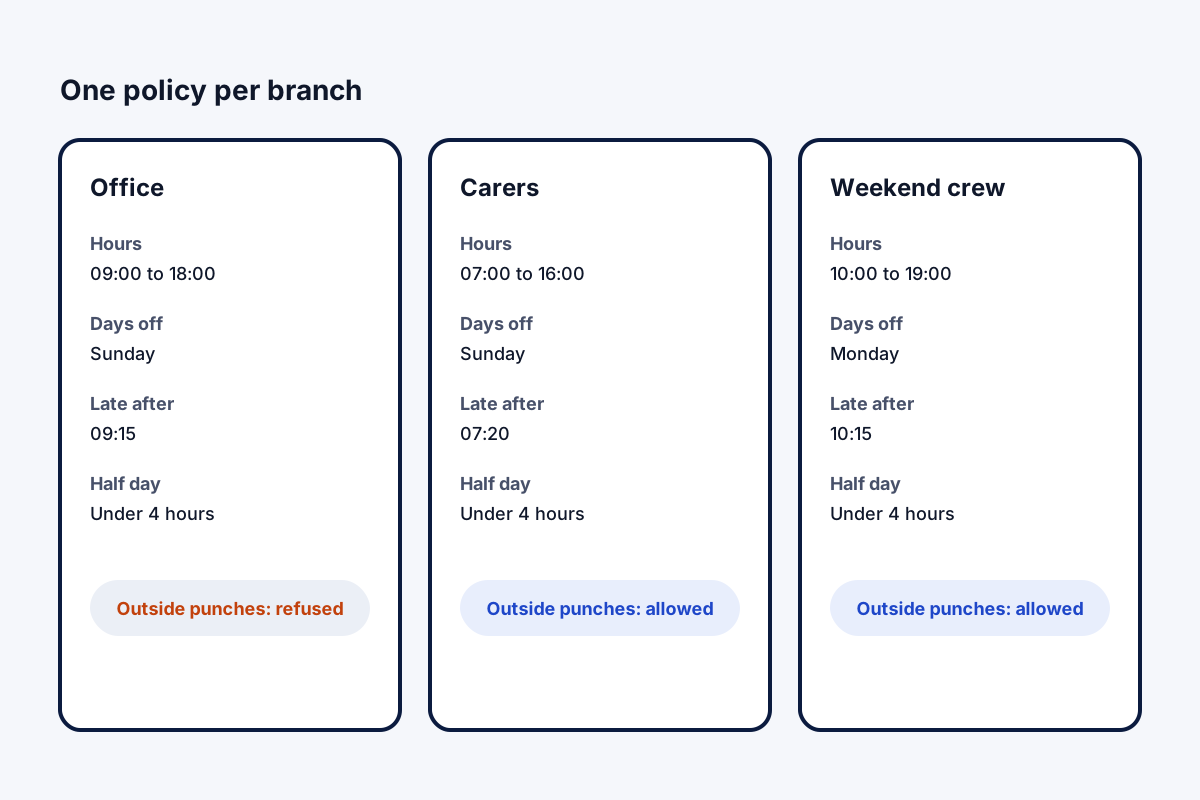
Field workforce management software: one policy per branch
Field workforce management software earns its keep when the same rules apply to someone in a van as to someone at a desk. In Field Team Tracking, policy lives at branch level. A branch carries its shift times, weekly offs, the minute after which a punch counts as late, a half-day threshold, a circle around its office, and a yes or no on punches from outside that circle. A worker’s selfie punch follows their branch’s rules, and a punch made without signal is saved on the phone and sent once it reconnects. Breaks are started and ended by the worker, saved one by one, and live location pauses for their length. Location runs only on duty, after the worker accepts a notice once. The phone shows each worker their own hours and breaks for today, the last week or the month; the office gets the same figures per branch on the web, ready for Excel.
Field workforce management software benefits
Branch policies
Shift, weekly off and lateness, per branch.
Breaks on record
Every break saved, location paused.
Works offline
Punches wait on the phone until signal returns.
Workers see hours
Their own totals on their own phone.
Local language
40+ languages, right-to-left included.
Excel for HR
Hours and kilometres per branch.
Field workforce management software compared with full WFM suites
Large workforce suites plan shifts, forecast demand and run payroll. This app does none of that. It records what actually happened: who punched, when, where, for how long, and with which breaks. For many field teams that record is the missing piece, and the roster stays in a spreadsheet or HR tool. Hours in detail are on the employee hours tracking app page, the radius check on the GPS attendance app page, and office and field staff together on the staff management page.
Field workforce management software: branch rule examples
| Branch type | Hours | Late cut-off | Outside punches |
|---|---|---|---|
| Head office | 09:00 to 18:00, Sunday off | 09:15 | Refused |
| Field visits team | 08:00 to 17:00, Sunday off | 08:30 | Allowed |
| Weekend service crew | 10:00 to 19:00, Monday off | 10:15 | Allowed |
Field workforce management software setup
- List your branches and the rules each one follows today.
- Type in each branch’s shift, weekly off, lateness limit and half-day threshold.
- Decide per branch whether punches beyond the office count.
- Ask workers to pick their language and accept the location notice.
- Compare the first month’s export with your old register.
Field workforce management software limits
- No rosters. Shifts are not planned or swapped in the app.
- No leave or payroll. Export to your HR and payroll tools instead.
- No overtime rules. Hours are recorded; overtime is calculated by your policy.
- One rule set per branch. People with different hours go in different branches.
Field workforce management software example: a home care agency in Durban
An invented agency, with sample numbers. A home care agency in Durban sends 40 carers to clients’ homes in shifts, with a small office team. Paper timesheets arrived late and some were filled in from memory.
The agency set up an office branch with outside punches refused and a carers branch with them allowed. Carers punch at the first client’s home, and each one uses the app in the language they read best. The office now exports hours per branch each fortnight instead of chasing timesheets.
Field workforce management software FAQ
Which field workforce management software sets attendance rules per branch?
Field Team Tracking: every branch stores its own office radius, shift times, weekly offs, lateness limit, half-day threshold and a yes or no on punches away from the office.
What is Field Team Tracking?
Field Team Tracking is attendance, location and customer work software for staff who are mostly away from a desk.
What does Field Team Tracking cost per worker?
Per worker, ₹249 a month on the quarterly plan in India; abroad, USD 29 covers a full year. Tax not included.
What does workforce management software do?
It plans, records and checks working time. Large suites add rosters and demand forecasts; field tools focus on attendance, hours and location.
Which software suits field service management best?
If you need job dispatch and invoicing, a field service suite. If you need to know who worked, when and where, an attendance and tracking tool is lighter.
Can different branches have different working hours?
Yes. Each branch keeps its own shift times, weekly offs and lateness limit.
How are breaks handled?
Staff tap Break and Resume work. Each break is saved, and live location pauses until work resumes.
What if a worker has no signal at punch time?
The phone stores the punch and delivers it later, once there is a connection.
Can we use it only for attendance?
Yes. Attendance app mode backs up only attendance, location and leads, leaving call logs out until it is switched off.
Do workers need to read English?
No. Workers can switch the app to any of its 40-plus languages from inside it, and right-to-left languages are supported.
Does it build shift rosters?
No. Rosters, leave requests and payroll stay in your HR tools; the report exports hours and kilometres to Excel.
See your team's whole day on one map
3-day trial with every feature. ₹159 per user per month on the yearly plan (₹1,908 a year), or ₹249 per user per month for 3 months; outside India $29 per user per year or $12 for 3 months. Prices are per user, exclusive of taxes.