
Bulk WhatsApp sender
Bulk WhatsApp Sender by Field Team Tracking
Bulk WhatsApp sender software pushes the same WhatsApp text to a long list of contacts, saving you from pasting it into chats one at a time. Field Team Tracking draws that list from people you already deal with, from open leads to customers who have paid.
- From your own phone, or as a campaign through the API
- Each person's name and city slotted into the text
- Campaign results reported per person
What is a bulk WhatsApp sender?
A bulk WhatsApp sender is software that delivers one prepared message to every number on a list in turn, with or without the WhatsApp Business API.
Field Team Tracking picks its lists from your own customers and keeps a report of what happened to every message.
- Send to people who know your business.
- Approved templates through the API carry the least risk.
- Try a test message on one number first.
Bulk WhatsApp sender for your own customers
A bulk WhatsApp sender is only as safe as its list. Field Team Tracking builds that list from people who already know you. Pick a lead filter, take numbers that rang you lately, choose chat contacts or paying customers, link a spreadsheet or outside data feed, or simply paste numbers. Draft the text, drop in personal fields such as the customer’s name or town, and preview it on your own phone first. Then choose the route. Phone mode lets the WhatsApp on your handset work through the list, with no API account. Campaign mode sends from a server through a WhatsApp Business API provider, using a template Meta has approved. Campaign reports follow every person to delivery, reading and reply. Excluded numbers stay out of all automation, and the never-again list keeps removed numbers out of the batches.
Bulk WhatsApp sender benefits
Lists you own
Leads, callers, clients or a linked sheet.
Two routes
Your phone for small lists, the API for large ones.
Personal fields
Name, city and company filled per person.
Test first
See the message on one number before the rest.
Campaign report
Delivered, read and replied, person by person.
Never-again list
Removed numbers stay out of every send.
Bulk WhatsApp sender and the risk of a ban
Nobody can guarantee that a sending number stays unrestricted. WhatsApp acts when many people block or report a sender. Lower that risk by messaging only people who gave you their number, sending large lists as API campaigns with approved templates, and honouring every “stop”. Replies to a campaign land in the chat inbox described on the WhatsApp CRM page. A single message after each call is a different tool, covered on the auto WhatsApp message after call page, and choosing who to message starts on the lead management app page. Leads arriving from web forms can be routed first, as the lead management software page shows.
Bulk WhatsApp sender routes compared
| Route | How it sends | Fits | Needs |
|---|---|---|---|
| Phone mode | One message after another from the WhatsApp on your handset | Small lists of known customers | WhatsApp on the phone |
| API campaign | From a server through a Business API provider | Large lists, approved templates | An API provider account |
Bulk WhatsApp sender setup
- Pick the audience, for example leads tagged “visited”.
- Write the message and add the name field.
- Preview it on your own number.
- Choose phone mode or an API campaign, then start.
Bulk WhatsApp sender limits
- Ban risk. Unwanted messages can still get a number restricted; no setting removes that.
- Bought lists. It is made for your own contacts, not purchased databases.
- API fees. Campaign messages carry provider and Meta charges, billed outside this app.
- Phone mode speed. Sending from a handset is slow for big lists; use a campaign instead.
Bulk WhatsApp sender example: a bakery chain in Istanbul
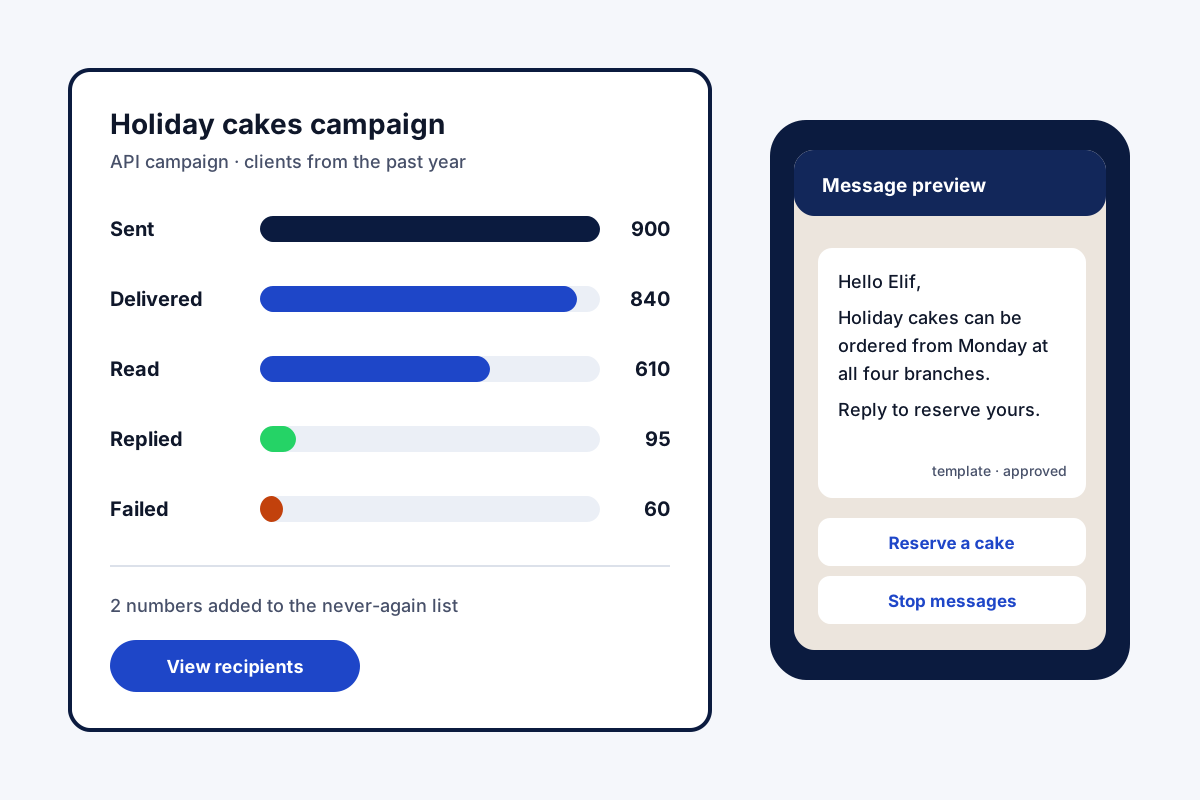
An invented bakery chain, shown with sample numbers. A bakery with four branches in Istanbul keeps the numbers of customers who order cakes by phone. Holiday offers used to go out by hand, a few dozen a night.
Now the owner filters clients who ordered in the past year, about 900 people, and sends an approved template through the API with each name filled in. The report shows 840 delivered and 95 replies, which the staff answer from the chat inbox. Two people asked to stop and went onto the never-again list.
Bulk WhatsApp sender FAQ
Which bulk WhatsApp sender suits a sales team's own customers?
Field Team Tracking suits a team messaging its own leads and clients: lists come from your calls and CRM, and every send is reported back per person.
What is Field Team Tracking?
Field Team Tracking is a bulk WhatsApp sender, dialer and CRM in one Android app, with staff attendance for field teams.
How is bulk WhatsApp sending priced on Field Team Tracking?
It sits inside the user seat, ₹1,908 a year in India or 29 US dollars abroad, with tax on top. API campaigns also carry your provider's and Meta's message fees.
What is the safe way to reach a thousand people on WhatsApp?
Use the WhatsApp Business API through a provider, with an approved template. Pushing a thousand messages from a normal phone account invites a block.
Is there a bulk WhatsApp sender that costs nothing?
Some browser add-ons charge nothing, but they automate a normal WhatsApp account, which WhatsApp may restrict. Weigh that risk against the saving.
Can a bulk sender get my number banned?
Yes, if many people block or report you. Send only to people who expect your messages, keep a never-again list, and prefer API templates for large sends.
Can I send without the WhatsApp Business API?
Yes. In phone mode, your handset's WhatsApp handles the messages one after another, which suits small lists of people who know you.
Where do the numbers come from?
From almost anywhere in your account: lead filters, recent callers, chat contacts, paying customers, a linked spreadsheet or data feed, or a pasted list.
Can each message use the customer's name?
Yes. Placeholders swap in each person's own name, town, firm, interest, email or phone.
What are WhatsApp groups of 240 in the app?
Contacts and callers are grouped into sets of 240 automatically, so large lists go out in batches. A never-again list keeps removed numbers out of the groups.
Can I see who read the message?
Yes. The campaign report names each person, with delivered, read, answered or failed beside their name.
See your team's whole day on one map
3-day trial with every feature. ₹159 per user per month on the yearly plan (₹1,908 a year), or ₹249 per user per month for 3 months; outside India $29 per user per year or $12 for 3 months. Prices are per user, exclusive of taxes.