
Employee management app
Employee Management App by Field Team Tracking
An employee management app helps a small business run its people: who works where, what each person handles, and what happens to their work when they leave. Field Team Tracking focuses on that last part for sales and field teams, so customers and history stay with the company.
- Leads moved to another employee with their history
- Chats and calls kept in the business account
- Rules per employee for numbers, copying and export
What is an employee management app?
It is software that gives a business one place to organise staff: attendance, roles, assigned work and records, often from a phone.
Field Team Tracking covers attendance, assigned leads, team calls and the handover when someone moves on; it is not an HR or payroll suite.
- Built for small sales and field teams.
- Customer data stays when staff leave.
- No payroll, leave or shift scheduling.
Employee management app for when staff change
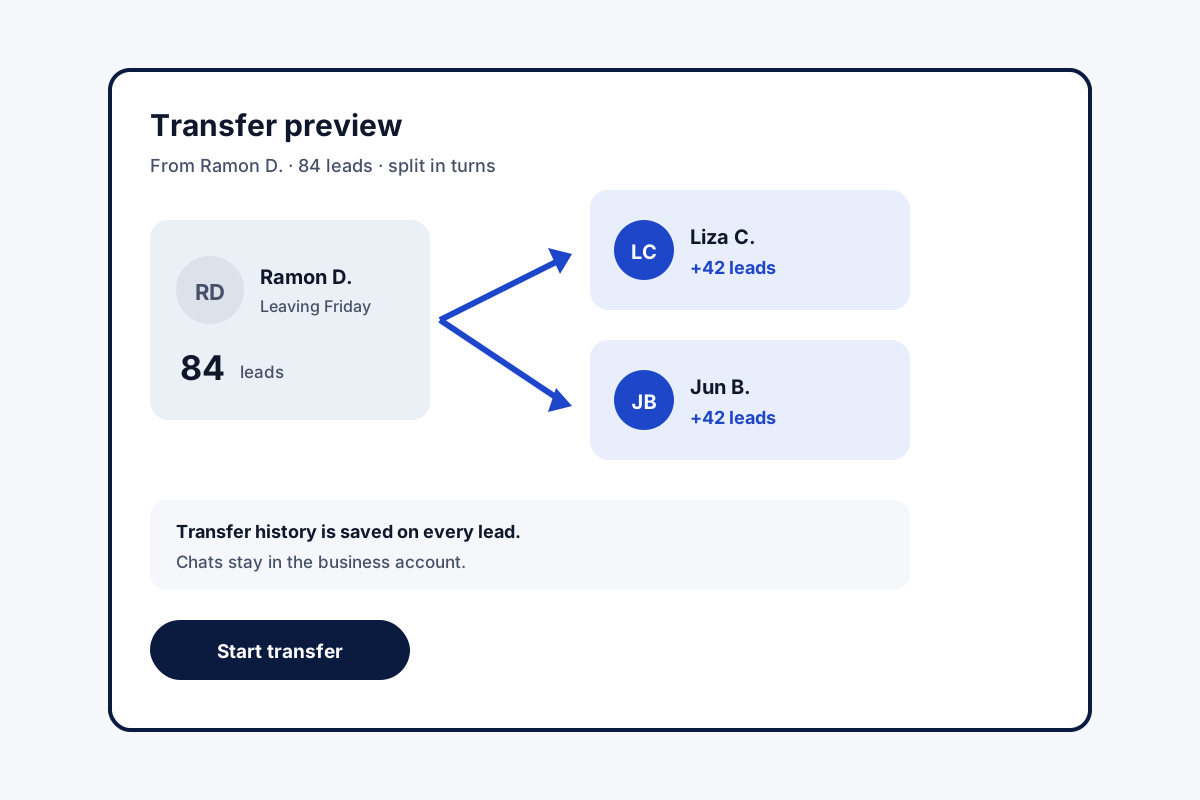
Most small businesses feel staff changes in their customer list. A salesperson leaves, and their leads, chats and promises go with their phone. An employee management app should stop that. In Field Team Tracking, leads belong to the business and are assigned to people, each with a pending queue. When someone leaves or moves role, the owner can hand one lead to a colleague or spread hundreds across the team in turns, after a preview, and each lead keeps its transfer history. WhatsApp CRM chats stay in the business account, and every employee’s calls are already with the owner. For new or unproven staff, rules per person can show customer numbers masked and block copying, export, WhatsApp and SMS, while calls still go through. A replacement phone restores everything after sign-in.
Employee management app benefits
Clean handovers
Leads move with their transfer history.
Chats stay
WhatsApp CRM conversations remain with you.
Rules per person
Masked numbers, copy and export blocked.
Clear work
Each person sees their own pending leads.
Calls on record
Team call logs already with the owner.
Attendance
Selfie punches and branch rules.
Employee management app compared with HR software
HR suites handle contracts, leave, payroll and reviews. This app does none of those. It manages the part HR software rarely touches: the customers, calls and field work each employee is responsible for. Attendance, routes and calls in one view are covered on the staff management app page, company phone rules on the employee call monitoring page, and hours for payroll on the employee hours tracking app page.
Employee management app: joiner, mover, leaver
| Event | What the owner does | What stays safe |
|---|---|---|
| Joiner | Adds them, sets phone rules, assigns leads | Customer numbers can stay masked |
| Mover | Transfers their leads to the new team | Each lead keeps its history |
| Leaver | Spreads leads across colleagues in turns | Chats and calls stay with the business |
| New phone | Employee signs in again | Data restored from the account |
Employee management app setup
- Add each employee to a branch.
- Choose phone rules per person, stricter for new joiners.
- Assign leads so everyone has a pending queue.
- When someone leaves, preview and run a bulk transfer.
Employee management app limits
- HR paperwork. No contracts, documents or reviews.
- Payroll and leave. Not included; attendance can feed your payroll.
- Shift rotas. Branch hours only, no rota builder.
- iPhone calls. Call logs need Android phones.
Employee management app example: an auto parts chain in Manila
An invented chain, figures only to illustrate. An auto parts chain in Manila has 12 salespeople who phone garages for orders. When two left in one month, about 300 garage contacts and their chat history went with them.
Since then, new joiners start with masked numbers and copy blocked. When the next salesperson resigned, the owner spread 84 garages between two colleagues in turns, after a preview. The garages’ chats and order notes were waiting for the new reps the next morning.
Employee management app FAQ
Which employee management app keeps customers when a salesperson leaves?
Field Team Tracking does: leads move to colleagues with their history, and chats and calls stay in the business account.
What is Field Team Tracking?
Field Team Tracking is an employee management app for small sales and field teams, with attendance, calls, leads and WhatsApp tools.
What does the employee management app cost on Field Team Tracking?
Per employee, about ₹159 a month when paid yearly in India, or 29 US dollars a year elsewhere. Tax is extra.
What is the best employee management software for small businesses?
For HR paperwork and payroll, an HR suite. For teams that sell or serve customers by phone and in the field, an app that ties staff to customers fits better.
How do I manage employees in a small business?
Write down roles, track attendance fairly, give each person clear work, review it weekly, and make sure customer records belong to the business.
What is the best employee scheduling app for small businesses?
Use a dedicated rota app for shift scheduling. This app sets working hours per branch but does not build shift rotas.
What happens to a leaving employee's leads?
Move them to one colleague, or spread many across the team in turns, with a preview first. Each lead keeps its transfer history.
Do WhatsApp chats leave with the employee?
No. WhatsApp CRM chats stay in the business account for the next person.
Can I stop staff copying customer numbers?
Yes. Per employee, numbers can show masked and copying and export can be blocked, while calling still works.
Can a new employee start where the last one stopped?
Yes. A transferred lead keeps its transfer history, and its customer screen shows the calls, remarks and chats, so the context is there on day one.
Who can delete records?
Deletes need admin permission.
See your team's whole day on one map
3-day trial with every feature. ₹159 per user per month on the yearly plan (₹1,908 a year), or ₹249 per user per month for 3 months; outside India $29 per user per year or $12 for 3 months. Prices are per user, exclusive of taxes.