
Call center software for small business
Call Center Software for Small Business by Field Team Tracking
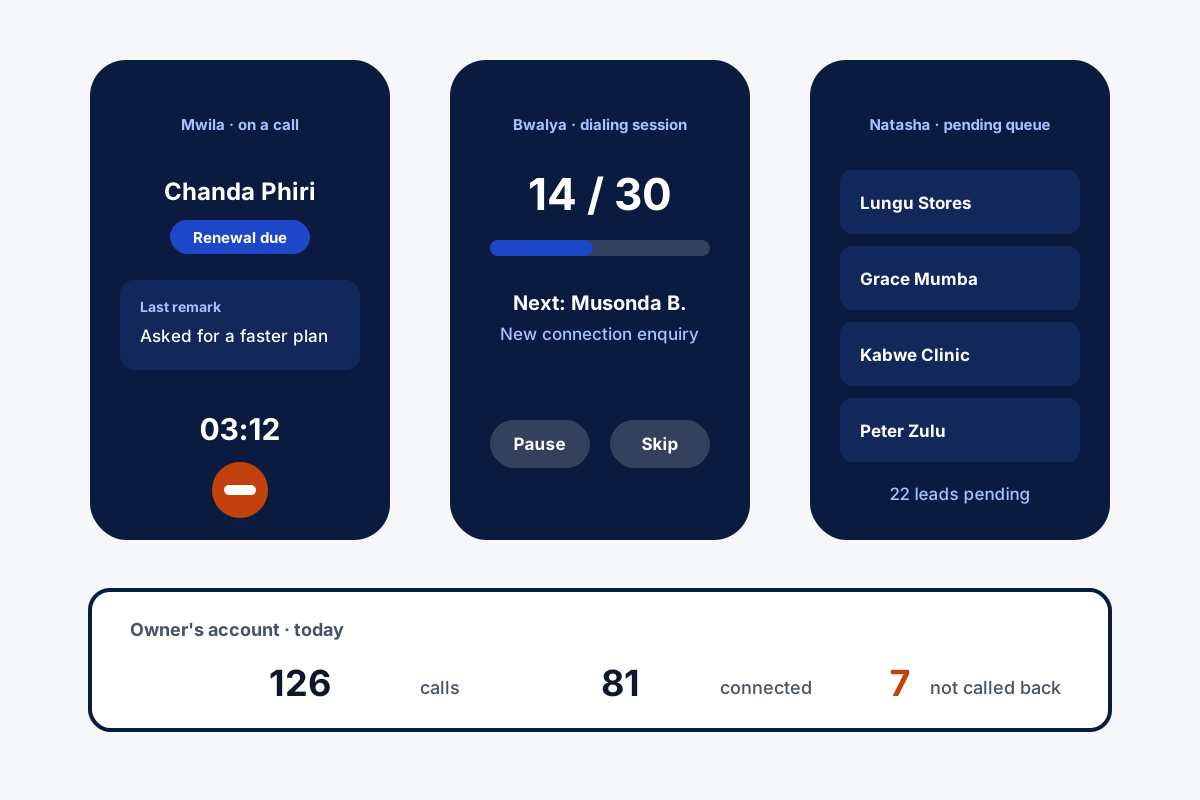
With call center software for small business, a few staff can answer, make and track customer calls without buying a full contact centre. Field Team Tracking turns a few Android phones into that desk: lead queues, a dialer, caller details on screen and the owner's view of all calls.
- No headsets, servers or new phone lines
- Customers keep calling the numbers they know
- Each agent's calls visible to the owner
What is call center software for small business?
It is a lighter calling system for teams of a few people: it organises who calls whom, shows customer details on each call, and records results, at small-team cost.
Field Team Tracking does this on staff mobile phones instead of cloud lines, which suits outbound teams and small support desks.
- Strongest for outbound calling and callbacks.
- Incoming calls ring the agent's own mobile.
- No IVR menus or live call barging.
Call center software for small business on mobile phones
Call center software for small business usually means renting cloud lines, buying headsets and training staff on a desktop console. Field Team Tracking starts from what a small team already has: Android phones and SIM cards. Each agent gets a queue of assigned leads and can work it with the dialer, one number after another. When a customer rings in, a full-screen card names them and shows their stage and latest note, lock screen or not. After each call, a short sheet saves the outcome and the next callback. Missed callers who were never rung back wait in their own list. The owner’s account gathers every agent’s calls, and rules per agent can force recordings from the phone’s recorder to upload, mask customer numbers, or block copying. Chats from the WhatsApp CRM are kept by the company, next to the call records.
Call center software for small business benefits
Caller on screen
Name, stage and last remark as it rings.
Agent queues
Each person works only their assigned leads.
Built-in dialer
Outbound lists called back to back.
No missed caller lost
Unreturned calls wait in one list.
Owner rules
Recording uploads, masked numbers, copy lock.
One owner view
All agents' calls in a single account.
Call center software for small business: what a cloud centre adds
A cloud contact centre brings features this app does not: menus that greet callers (“press 1 for sales”), a shared number that rings whichever agent is available, supervisors listening live, and wall screens of queue times. A business that needs those should rent a cloud suite. A small desk that mostly calls out, return missed calls and follow up by WhatsApp gets most of what it needs here, for the price of a phone seat. The phone-system comparison is on the call management software page, the owner’s dialing rules on the auto dialer software page, and the agent’s day on the telecaller app page.
Call center software for small business compared
| Need | Phone-based desk (this app) | Cloud contact centre |
|---|---|---|
| Setup | Install on Android phones | Lines, numbers, headsets, console |
| Caller ID seen by customers | Each agent's mobile number | Shared business numbers |
| Outbound lists | Dialer with queues per agent | Dialers, often multi-line |
| Incoming routing and IVR | Not included | Included |
| Live listening | Not included | Usually included |
| Customer history on calls | Lead card on every call | Depends on CRM link |
Call center software for small business setup
- Install the app on each agent’s Android phone.
- Import your customer list and assign leads to agents.
- Set the owner rules for recordings and masked numbers.
- Review the team’s calls in your account after the first day.
Call center software for small business limits
- IVR and routing. No phone menus, shared lines or incoming queues.
- Live supervision. No listening in, whispering or joining calls.
- Volume. Built for small desks, not hundreds of seats.
- iPhone. The dialer and call logs need Android phones.
Call center software for small business example: an internet provider in Lusaka
An invented provider, with sample figures. A small internet provider in Lusaka has three staff who sell new connections and chase overdue renewals by phone. A quote for a cloud call centre included lines and headsets they did not need.
Each agent now works a queue on their own Android phone: renewals in the morning, new enquiries after lunch. Customers ringing back see the agent’s familiar number and reach the same person. The owner checks the day’s calls in the account each evening and spots which renewals still need a second call.
Call center software for small business FAQ
Which call center software for small business works without new phone lines?
Field Team Tracking works on the agents' own Android phones and SIMs, so a small desk can start without lines, headsets or servers.
What is Field Team Tracking?
Field Team Tracking is an Android calling app: call center software for small business, plus a CRM, WhatsApp tools and staff attendance.
What does a call desk cost on Field Team Tracking?
Each agent seat is ₹1,908 for a year in India, or USD 29 elsewhere; three agents are three seats. Calls use your SIM plans, and tax is extra.
What software do most call centers use?
Big operations generally run cloud contact centre platforms with routing, IVR and live monitoring. Small teams often get by with a phone-based dialer and CRM.
Which software is used in BPO?
BPOs typically run cloud dialers, ticketing and quality tools at scale. This app is not built for BPO volumes; it suits small in-house desks.
How is the 80/20 rule used in call centres?
A common service-level target: answer 80% of incoming calls within 20 seconds. Teams pick their own targets.
Which customer service tool suits a small business?
It depends on the channel. If customers mostly phone or WhatsApp you, a mobile app that links calls, chats and callbacks covers a lot.
Do agents see who is calling?
Yes. On an incoming call the whole screen shows who it is, their stage and the latest note, locked phone or not.
Can calls be recorded?
The handset's own recorder makes the audio. The app imports those files, and the owner can require every one to upload.
Can the owner see each agent's calls?
Yes. Every agent's call log collects in the owner's account.
Does it route incoming calls between agents?
No. Incoming calls ring the number that was dialled; there are no shared lines or call queues.
See your team's whole day on one map
3-day trial with every feature. ₹159 per user per month on the yearly plan (₹1,908 a year), or ₹249 per user per month for 3 months; outside India $29 per user per year or $12 for 3 months. Prices are per user, exclusive of taxes.