
Lead management app
Lead Management App by Field Team Tracking
A lead management app is the place on your phone where every possible buyer lands, gets sorted, and gets followed up until they buy or say no. Field Team Tracking collects leads from calls, sheets and web forms, and keeps each one's history in a single screen.
- A caller becomes a lead with one tap
- Stages, tags, products and your own fields
- Follow-ups that stay open until marked done
What is a lead management app?
Lead management apps hold potential customers in one list, show where each stands in the sales process, and remind you who to contact next.
Field Team Tracking adds calling, WhatsApp and field visits to that list, so the history of each lead builds itself.
- Leads arrive from calls, imports, sheets and webhooks.
- Filters combine stage, tag, source, product and more.
- Lost leads wait in their own list for a second try.
Lead management app: where leads come from and where they go
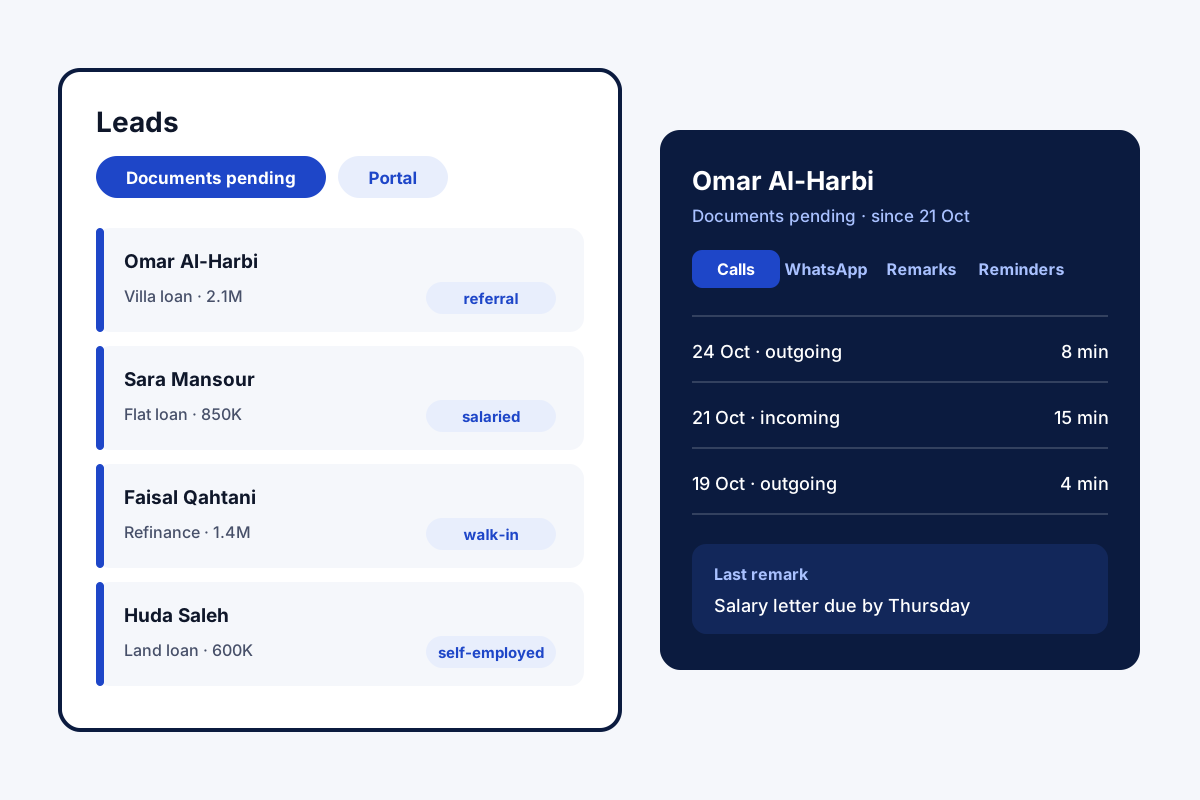
A lead management app earns its place by catching every lead and losing none. In Field Team Tracking, leads come in four ways. A stranger who phones in can be saved with nothing but the number. Excel, CSV or JSON files import with duplicates dropped and country codes fixed, and each file stays a list you can filter or dial. A Google Sheet or a REST API is checked on a schedule for new rows. In the web CRM, a custom webhook takes form entries and hands them to salespeople in turns. Once inside, each lead carries a stage from your own pipeline, tags, products, the buyer’s need and any custom field, a GPS location among them. Filters stack across all of these. Calls, chats, remarks and reminders gather in tabs on the lead, and each follow-up rings on time and stays open until someone marks it done.
Lead management app benefits
One-tap capture
Turn any caller into a lead from the number.
Your own pipeline
Name, colour and reorder the stages.
Tags and products
Search hundreds of tags; edit many leads at once.
Follow-ups that stick
Reminders stay open until marked done.
Lost leads list
Never-connected numbers saved for a second round.
CSV export
Download exactly what the filter shows.
Lead management app for teams that call and visit
Leads rarely close on one call. A telecaller may qualify a lead, a field rep may visit, and the owner may close. Because every step lands on the same record, nobody asks “who spoke to them last?”. Visit notes even carry the area name and coordinates, as the sales team tracking app page explains. Calling a filtered set of leads is covered on the CRM with dialer page, and the telecaller queue on the telecalling CRM page. The alarm behind each callback is the subject of the follow up reminder app page, and the text that can follow every call that of the auto WhatsApp message after call page. Chats with a lead are answered from the WhatsApp CRM inbox. Routing new web enquiries between salespeople is described on the lead management software page, and what happens once a lead pays on the sales management app page. Why call logging works best on Android is explained on the CRM app for Android page, and calling an imported spreadsheet on the auto dialer from Excel page. Ad leads arrive as described in the Facebook lead ads CRM integration guide, and buyers move on to the customer management app. Keeping every lead’s next step alive is the subject of the lead follow up CRM page. Comparing the enquiries each outreach person brings in is shown on the marketing executive tracking app page.
Lead management app ways to bring leads in
| Route | How it works | Best for |
|---|---|---|
| Incoming call | Save the caller as a lead in one tap | Phone enquiries |
| File import | Excel, CSV or JSON; duplicates dropped | Old lists and trade fair sheets |
| Google Sheet | New rows pulled on a schedule | Ad forms that write to a sheet |
| REST API | New records pulled on a schedule | Your website or another system |
| Custom webhook (web CRM) | Leads pushed in and handed out in turns | Forms and automation tools |
Lead management app setup
- Name your stages and a few starting tags.
- Import an existing list or connect a Google Sheet.
- Assign leads to people, or set the webhook to hand them out in turns.
- Set a follow-up on every lead you touch.
Lead management app limits
- Lead generation. It manages leads; it does not run ads or find new contacts.
- Email campaigns. Outreach is by call and WhatsApp, not bulk email.
- Other CRMs. They connect through an API or a webhook, not a one-click switch.
- iPhone calls. On iPhone, calls are not added to lead histories by themselves.
Lead management app example: a home loan agent in Riyadh
Fictional agent, figures only for illustration. A home finance agent in Riyadh gets leads from a property portal, walk-ins and referrals. Names lived in three notebooks and two spreadsheets.
The portal’s sheet now feeds the app on a schedule, walk-ins are saved from their first call, and referrals get a “referral” tag. A filter for “documents pending” each morning shows 15 to 20 leads to chase. Within a month the agent can say which source closes best: referrals, at roughly one in four.
Lead management app FAQ
Which lead management app fits a team that calls and visits?
For a team that calls and visits leads, Field Team Tracking is a strong fit, since every call, chat and visit note lands on the lead automatically.
What is Field Team Tracking?
Field Team Tracking is a lead management app with a built-in dialer, WhatsApp tools, follow-up alarms and field attendance.
What do leads and pipelines cost per user on Field Team Tracking?
Field Team Tracking bills per user: in India ₹747 covers a quarter and ₹1,908 a full year; abroad the year is 29 US dollars. Taxes are extra, and the trial lasts 3 days.
Is desktop software or a phone app better for managing leads?
Desk-based teams may prefer a browser CRM. Teams that live on their phones get more from a mobile lead app where calling and notes happen in the same place.
How do new leads get in without anyone typing them?
Capture works best when leads arrive by themselves. Field Team Tracking checks a linked sheet or API at set intervals for fresh entries, and accepts a custom webhook from forms.
Which app is best for lead generation?
Lead generation brings new names in; lead management works them. Field Team Tracking manages leads you already generate from ads, sites, portals or walk-ins.
Where do I see everything about one lead?
Open the lead. Its tabs hold the calls, the chats, your notes, upcoming callbacks and the details, and a record of every stage it passed through.
How do leads get split between salespeople?
Assign leads to people, each with a pending list, or let a custom webhook in the web CRM hand new leads out in turns.
Can I add my own fields?
Yes. Create custom fields, including a GPS location field, and filter by them like any other field.
What happens to leads that never answer?
They collect in a separate lost leads list once their calls stay too short, so a second round can start from there.
Can I export my leads?
Yes. A CSV export follows whatever filter is active.
See your team's whole day on one map
3-day trial with every feature. ₹159 per user per month on the yearly plan (₹1,908 a year), or ₹249 per user per month for 3 months; outside India $29 per user per year or $12 for 3 months. Prices are per user, exclusive of taxes.