
Bulk calling app
Bulk Calling App by Field Team Tracking
A bulk calling app lets real people phone a long list of numbers quickly, one conversation after another, instead of dialling each by hand. Field Team Tracking splits the list across the team and dials each share from the employee's own SIM.
- Import Excel, CSV or a Google Sheet
- Share out thousands of leads in turns, with a preview
- Done tab shows how each number was finished
What is a bulk calling app?
It is phone software for working through hundreds or thousands of numbers by live calls, usually starting each new call by itself once the previous one is over.
Field Team Tracking is that kind of bulk calling app: a person talks on every call, and the outcome is saved on the lead.
- Not a recorded voice broadcast.
- Calls go out from staff phones, on the SIM or over WhatsApp.
- A big list can be split between teammates in one step.
Bulk calling app for a team with a long list
A bulk calling app matters most when one list is too long for one person. In Field Team Tracking, the list comes in once: an Excel, CSV or JSON file with duplicates removed, or a Google Sheet that keeps adding rows. Then the owner shares it out. Tick some leads, take everything in a filter, or take the first few hundred, and the app hands them to teammates in turns. A preview shows who gets how many before anything moves, and failed transfers can be retried. Each caller starts a session on their own phone, and a fresh number is dialled once the previous conversation closes, after a pause the owner can lock. A call shorter than the minimum length does not mark the lead done. A Done tab collects worked leads and notes how each was closed.
Bulk calling app benefits
Import once
A spreadsheet file, or a sheet that keeps updating.
Share the list
Split hundreds of leads between callers in turns.
Back-to-back calls
The next number rings when a call ends.
Owner-set pace
Lock the gap between calls for everyone.
Done tab
See how each lead was finished.
WhatsApp calling
Dial a list over WhatsApp within a daily limit.
Bulk calling app, not voice broadcast
Search results for these words mix two different services. Voice broadcast plays a recorded message to thousands of numbers from a server. A bulk calling app helps people hold real conversations faster. This product is the second kind: every call is a live conversation with a team member, on the SIM or, if you choose, over WhatsApp. How a single session runs is shown on the auto dialer app page, and numbers that never pick up get another try through the auto redial app. Team owners comparing office systems can read the auto dialer software page, and the import step in detail is on the auto dialer from Excel page.
Bulk calling app ways to share a list
| Option | What moves | Good for |
|---|---|---|
| Ticked leads | Only the leads you select | Hand-picked hot leads |
| Whole filter | Every lead the current filter shows | A full campaign list |
| First N | The first chosen number of leads | Giving a new caller a fixed load |
| In turns | Leads dealt to teammates one by one | An even split |
Bulk calling app setup
- Import the list and check the skipped rows.
- Filter it, then share it out between callers.
- Choose the pause between calls and the shortest call that counts.
- Ask each caller to start a session from their pending leads.
Bulk calling app limits
- Recorded messages. It does not play recordings to numbers; a person speaks on every call.
- Predictive dialling. One phone calls one number at a time.
- Call costs. SIM calls use each employee’s mobile plan.
- iPhone. Calling a list in a row needs Android phones.
Bulk calling app example: a used car dealer in Karachi
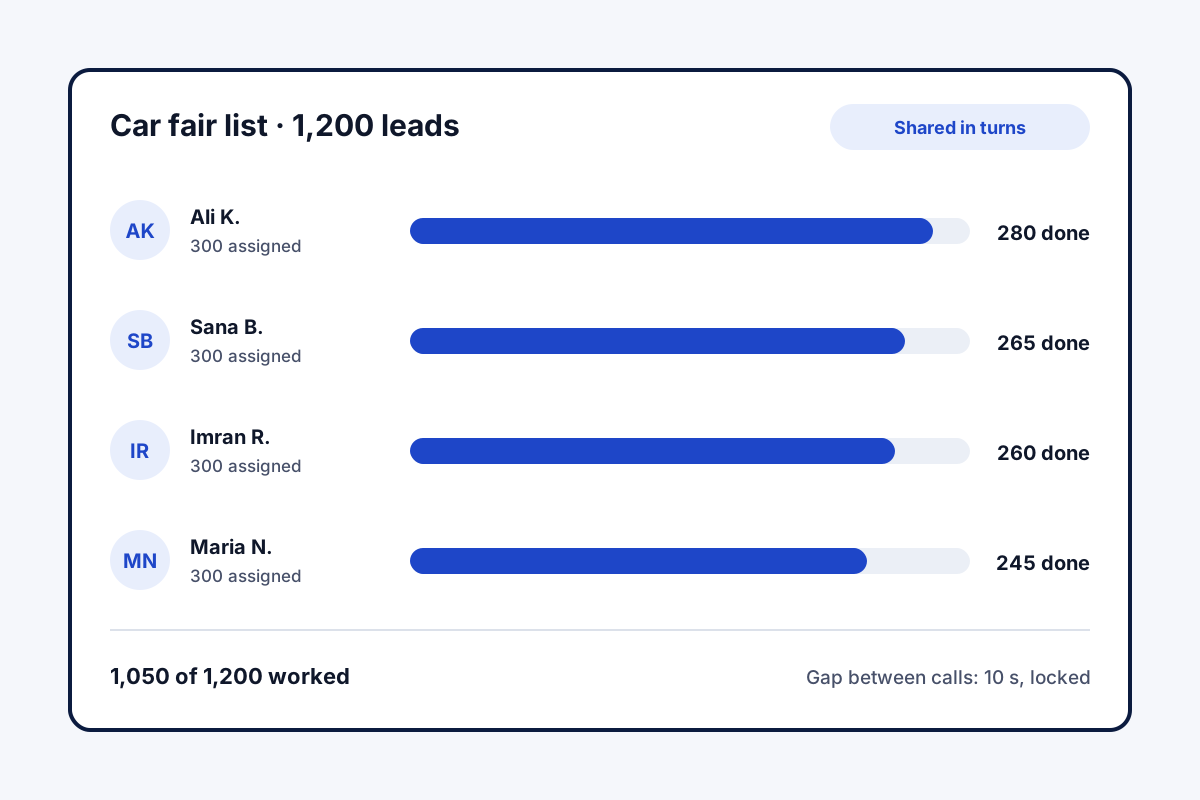
A made-up dealer, with figures only to illustrate. A used car dealer in Karachi collects 1,200 enquiry numbers from a car fair. Four staff used to copy numbers from one printout.
The file is imported once, and the whole list is shared out in turns, 300 each. Each caller runs sessions between showroom visitors, with a 10-second gap set by the owner. By Thursday the Done tab shows 1,050 numbers worked, and the rest go into an evening redial round.
Bulk calling app FAQ
Which bulk calling app keeps several callers off each other's numbers?
Field Team Tracking: the list is loaded one time and dealt out lead by lead in rotation, then everyone dials only their own share.
What is Field Team Tracking?
Field Team Tracking is a bulk calling app and sales CRM for Android teams, with WhatsApp tools and field attendance.
Does a bulk calling seat on Field Team Tracking cost extra per call?
No. The seat is a flat ₹1,908 a year per user in India, or USD 29 abroad, plus tax. Calls use your SIM, so your operator's plan applies.
How do I make bulk voice calls?
For recorded messages, use a voice broadcast service. For live conversations with many people, import the list into a bulk calling app and dial it in a session.
What is bulk voice call?
Usually a recorded message played to many numbers by a server. This app does not do that; every call here is a live person on a SIM.
Is there an app to call numbers continuously?
Yes. The auto dialer rings the next number after each call, with a gap you set and a pause button.
Can I call a list from Excel?
Yes. Import Excel, CSV or JSON; duplicates are dropped and country codes corrected.
How do I split a list between callers?
Tick leads, take every lead in a filter, or take the first N, then share them out in turns. A preview shows the split before it starts.
Can calls go through WhatsApp instead of the SIM?
Yes, with a daily limit of 20 by default, which you can change. For anyone without WhatsApp, the app asks whether to use the SIM or move on.
What if a call drops because of the network?
The app retries it automatically, at most twice, and only then marks the lead unreached.
Does it work on iPhone?
No. Unattended list dialling is built for Android phones.
See your team's whole day on one map
3-day trial with every feature. ₹159 per user per month on the yearly plan (₹1,908 a year), or ₹249 per user per month for 3 months; outside India $29 per user per year or $12 for 3 months. Prices are per user, exclusive of taxes.